
Your needs, this model
Does it fit your priorities?
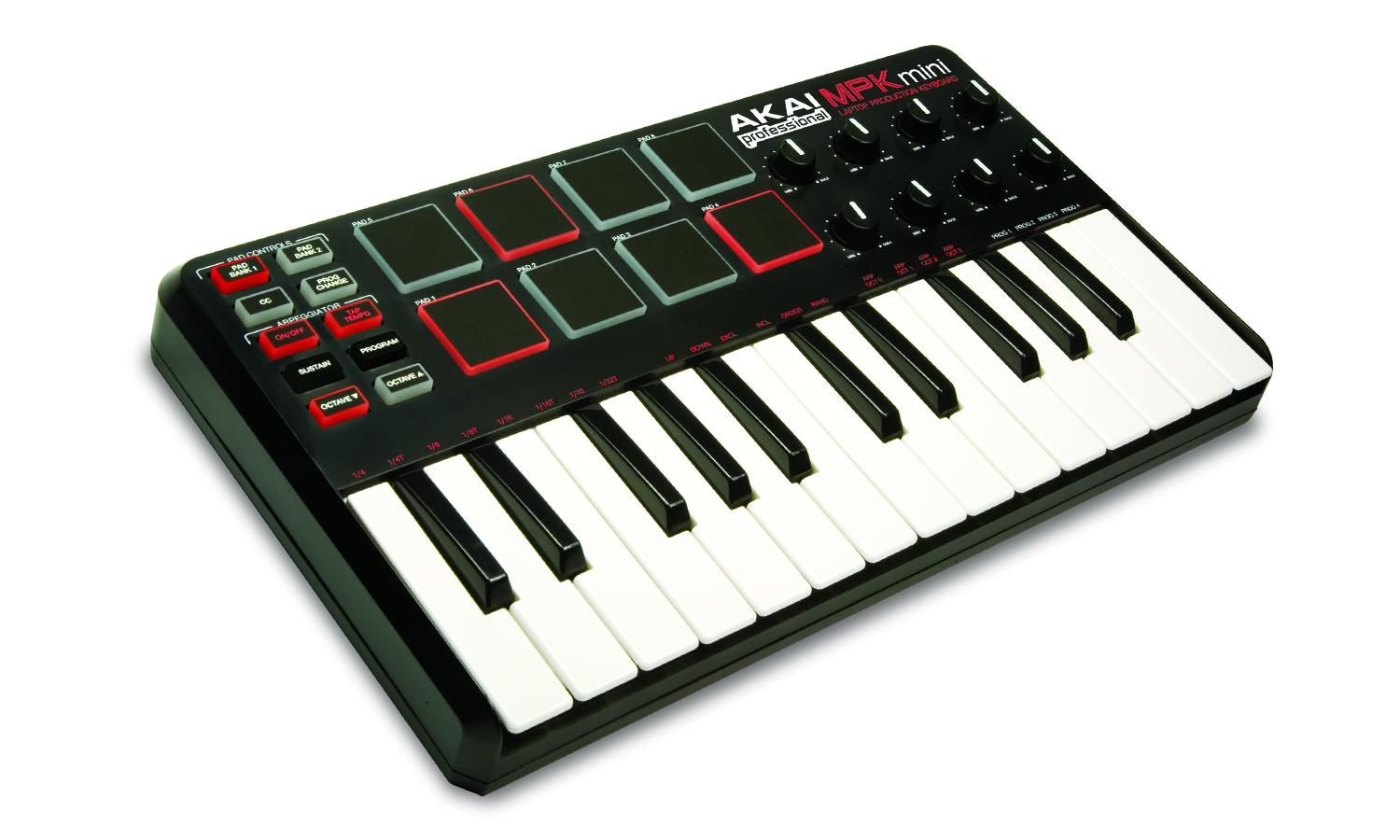
Is the first-generation MPK Mini Classic a compact 25-key controller for software note entry?
Akai’s original guide documents a 25-note velocity-sensitive keybed, octave shifts and USB-mini host power. The shifted range can help record successive parts, but does not create more than 25 physical keys at once.
Explore this need in the finder →What pad and knob control is documented on the MPK Mini Classic?
The original manual specifies eight velocity-sensitive pads in two banks and eight assignable 270-degree knobs. It does not establish pad-pressure sensitivity, so treat a pressure-required brief as unsupported rather than borrowing the later MK3 specification.
Explore this need in the finder →Does the MPK Mini Classic make sound without a host?
The official first-generation materials describe USB MIDI and computer USB power, not a sound engine or audio output. Plan for compatible software or another sound source and a separate monitoring path; a DIN-only external instrument needs an additional compatible host or interface.
Explore this need in the finder →Akai’s current legacy data calls this configuration the MPK Mini Classic, while the original official quickstart guide and media archive label it simply “MPK mini.” The matching legacy record links those materials from the exact MPK Mini page. This is the first, compact MPK Mini layout—not the separately listed MKII, MK3, Mini Play or later Mini IV. The review uses Akai’s exact legacy record and manual and does not describe personal ownership or testing.
Twenty-five mini keys favor short parts over reach
The guide documents a 25-note velocity-sensitive keyboard with octave-up and octave-down buttons. Akai describes a shiftable nine-octave range, but that does not increase the simultaneous two-octave span under the hands. A compact range can work for single-note bass or melody entry, short chord shapes and parts recorded in passes. Wide voicings or two-handed playing without repeated octave changes point toward a larger keybed. The original manual’s MIDI chart does not document keyboard aftertouch, and the sources provide no measured key width or action.
Akai’s file set does not establish the Classic’s body dimensions. The later MPK Mini MK3 FAQ’s 12.5-inch width belongs to that exact model and should not be copied here. If desk clearance is fixed, measure the exact Classic rather than treating a similar-looking successor’s chassis figure as a specification.
Eight pads and eight knobs add control, but not documented pad pressure
The quickstart guide describes eight velocity-sensitive pads arranged in two banks and eight assignable 270-degree knobs. The pads can send note, continuous-controller or program-change messages; they are useful for triggering drum sounds or mapped controls in a software instrument. The reviewed Classic manual specifies velocity sensitivity, not pressure sensitivity. That distinction matters: it is not evidence of pressure-aftertouch response on the pads, and it says nothing about aftertouch on the keyboard keys.
There is no documented display or joystick in the original guide’s control layout. Its keyboard has Arpeggiator On/Off, Tap Tempo, a Sustain button and Program selection. The arpeggiator offers several note orders and divisions, while four internal programs store control assignments. The editor can change mappings, but the source material describes old software delivered on a CD. Current compatibility, installation and account access should be verified separately; a historical software bundle is not a guarantee that a current computer will install it.
Mini-USB makes this a computer-centered MIDI controller
The original guide specifies a USB-mini cable and says the computer’s USB port powers the keyboard. It identifies USB as the MIDI route to the computer and lists no five-pin DIN output. The Mini itself does not provide a documented sound engine or audio output: plan on a computer and instrument software, or another suitable USB-MIDI host and sound source, with a separate audio-monitoring route.
The Sustain control is a button on the panel. Akai’s Classic guide does not list a separate sustain-pedal input; that connection is documented in the distinct MPK Mini MKII guide. If a footswitch is central to the setup, verify the exact model rather than assuming the family shares the MKII’s socket. Likewise, the pressure behavior, physical ports and package should be checked against the Classic record—not borrowed from current Mini models.
How it differs from other MPK Mini generations
The exact product record and first-generation quickstart guide are the basis for this Classic assessment. Akai’s separate MKII manual describes an X-Y joystick, a pedal input and a four-program limit; the Classic guide instead presents the earlier panel’s pad banks, 270-degree knobs and four programs. Akai’s MPK Mini MK3 FAQ says the later MK3 added a screen and four additional preset slots relative to the MKII. These are generation-specific control and recall differences, not proof that every later model has the same host connector or chassis dimensions.
Shortlist the Classic only when an older, USB-powered 25-key controller with velocity pads and assignable knobs fits a specific task. It is not the right documented match for USB-C, direct DIN, confirmed pressure-sensitive pads or a self-sounding instrument. Before evaluating a legacy offer, confirm it is the first-generation Classic, inspect every pad and knob, check the USB-mini port, and ask what cable and usable editor access are actually included. The official record does not establish current stock, price or seller condition.
Akai MPK Mini Classic legacy product record · Akai MPK Mini Quickstart Guide · Akai MPK Mini Classic downloads and media.
Key specifications
Key details at a glance
| Keys | 25 |
|---|---|
| Manufacturer's keybed description | Velocity sensitive mini keys |
| Pads | 8 |
| Velocity-sensitive pads | Yes |
| 5-pin MIDI Out | No |
| Computer connection | Mini-usb |
| USB bus-powered | Yes |
| Assignable pedal input | No |
| Keyboard channel aftertouch | No |
| 5-pin MIDI In | No |
Use the exact model’s instructions for operating limits, supplied equipment and version differences.
Sources for this review
Sources for this assessment
Start with your setup, not a headline feature
Use the finder to combine key-count, connection, control and desk-fit requirements. Unverified specifications are never treated as a match.