
Your needs, this model
Does it fit your priorities?
Will the MPK Mini MKII provide a longer physical range than a 25-key controller?
No: its user guide identifies 25 velocity-sensitive keys. Octave buttons move the range by up to four octaves in either direction, but those shifts do not add simultaneous key reach.
Explore this need in the finder →Can the MKII combine a pad bank and a separate footswitch input?
The exact MKII guide documents two banks of eight velocity-sensitive pads and a separate optional 1/4-inch TS sustain input. It does not establish pressure response on the pads; check the correct MKII suffix and whether a pedal is actually included.
Explore this need in the finder →Does the MPK Mini MKII provide an independent DIN sound-module route?
Akai documents USB MIDI to and from a computer and an optional sustain-pedal input, but not five-pin DIN MIDI Out or onboard sound. A direct DIN connection to a hardware instrument is not verified for this model.
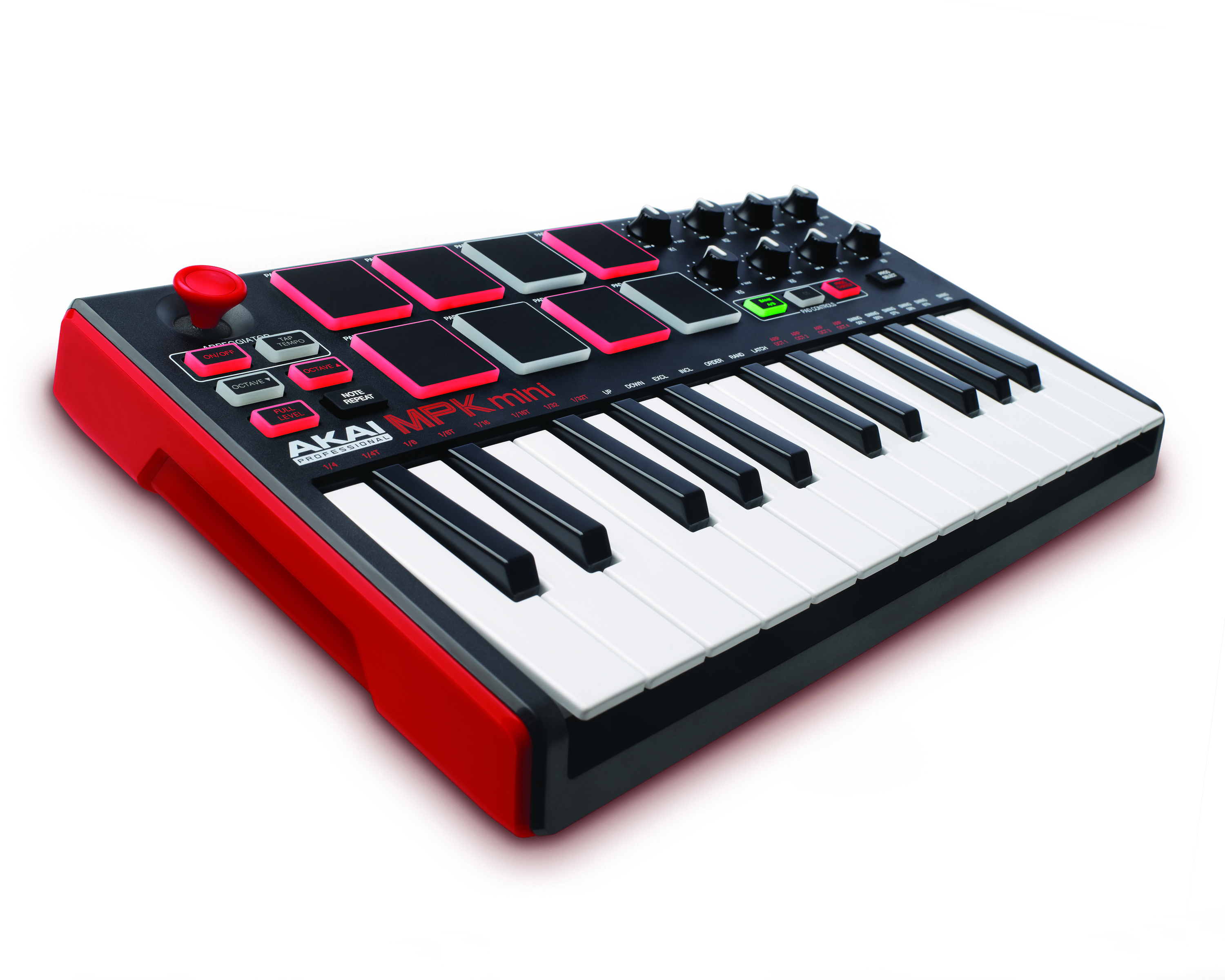
Explore this need in the finder →The Akai Professional MPK Mini MKII is the second-generation 25-key member of a family that also includes the original MPK Mini Classic, the MK3, Mini Play and Mini IV. Its manual documents an X-Y joystick, eight velocity-sensitive pads, eight assignable knobs and a separate sustain-pedal input. This assessment is based on Akai’s exact legacy model record, version 1.0 user guide and editor guide—not on hands-on testing or ownership.
Mini-key range is shiftable, not physically expanded
Akai describes 25 velocity-sensitive keys with octave buttons that shift the note range. The user guide says the switches can move up or down by as many as four octaves and describes a ten-octave command range. Those shifts are useful when entering parts beyond the printed key span, but the keyboard still provides only 25 keys at any one moment. Short melodies and note entry in a DAW are plausible jobs; wide two-handed passages without range changes are not what a 25-key bed is designed to cover. The inspected guide does not document keyboard aftertouch, a measured key width, or a tested action feel.
Akai’s MKII files do not establish a reliable body width. A 12.5-inch specification appears in the FAQ for the later MK3, not in the MKII documentation reviewed here. A buyer with a strict desk limit should measure the exact unit rather than carrying a successor’s dimension backward across generations.
Joystick, pads and knobs create a small production surface
The manual identifies eight velocity-sensitive pads across two banks and eight 270-degree assignable knobs. The pads can send notes, controller messages or program changes; Full Level can force maximum pad velocity, and Note Repeat retriggers a pad at a tempo-based division. The source describes velocity response, not pressure sensitivity, so the pad bank should not be counted as a verified pressure-sensitive surface. The four-axis X-Y thumbstick can send pitch-bend or MIDI CC messages, with its assignment adjusted in Akai’s editor.
There is no screen in the MKII’s documented control layout. Four internal programs can hold different MIDI assignments; a separate editor guide describes editing and transferring those programs. Akai’s current FAQ explicitly contrasts MKII with MK3: it identifies the newer screen and four additional preset slots as MK3 changes. That is a useful model check, not a reason to infer the MKII’s size or exact USB connector from the MK3.
USB powers the keyboard; a pedal has its own socket
The MKII guide says the computer’s USB port powers the keyboard and carries MIDI data to and from the host. It describes a standard USB cable but does not name the device-side connector standard in the text reviewed. Do not list it as USB-C without an exact connector check, and verify any host cable or adapter that comes with a used unit. The manual lists a 1/4-inch TS input for an optional sustain pedal. That jack is separate from the MIDI route; the guide lists no five-pin DIN output.
Akai presents the MKII as a controller for a DAW, not a stand-alone sound generator. Software or an external sound source must create audio, and that sound needs its own output and monitoring path. The USB connection sends and receives MIDI; it is not an audio output. If the intended target is a DIN-only synthesizer, a separate host or interface is required because direct DIN from the keyboard is not documented.
Check the generation and the package before relying on it
Akai’s current U.S. builder data lists the exact MPK Mini MKII as a legacy record, and the old model page leads to the official legacy downloads area. This establishes a support/documentation bridge, not present-day availability or stock. The MKII user guide lists an MPK Mini, USB cable, editor download, software download card, guide and safety material; a used or open-box offer may not include every original item, and the historical software offer may have different redemption or operating-system requirements now.
Compared with the MPK Mini Classic, the MKII’s manual adds the X-Y joystick and a distinct sustain-pedal input; both guides document compact 25-key beds, velocity-sensitive pads and four programs, but the exact connector and chassis specifications must remain model-specific. Compared with the MK3, the MKII lacks the screen and extra four preset slots identified in Akai’s FAQ. Confirm the suffix, cable, condition, functioning controls and the exact manual before purchase. Choose another assessed configuration if USB-C, documented pressure-sensitive pads, direct five-pin MIDI or an onboard sound source is essential.
Akai MPK Mini MKII legacy product record · Akai MPK Mini MKII User Guide, version 1.0 · Akai MPK Mini MKII Editor User Guide · Akai MPK Mini MK3 FAQ, including the MKII generation comparison.
Key specifications
Key details at a glance
| Keys | 25 |
|---|---|
| Manufacturer's keybed description | Velocity sensitive mini keys |
| Pads | 8 |
| Velocity-sensitive pads | Yes |
| 5-pin MIDI Out | No |
| USB bus-powered | Yes |
| Assignable pedal input | Yes |
| Keyboard channel aftertouch | No |
| 5-pin MIDI In | No |
Use the exact model’s instructions for operating limits, supplied equipment and version differences.
Sources for this review
Sources for this assessment
- Akai Professional current product data query: exact MPK Mini MKII legacy record
- Akai Professional MPK Mini MKII legacy product page (redirects to official legacy downloads)
- Akai Professional MPK Mini MKII User Guide, version 1.0
- Akai Professional MPK Mini MKII Editor User Guide, version 1.0
- Akai Pro MPK Mini MK3 FAQ with MKII generation comparison
- Akai Professional MPK Mini MKII official legacy media archive
Start with your setup, not a headline feature
Use the finder to combine key-count, connection, control and desk-fit requirements. Unverified specifications are never treated as a match.