
Your needs, this model
Does it fit your priorities?
Does the Q49 MKII meet a 49-key minimum for playing bass and chords without octave switching?
Alesis specifies 49 full-size velocity-sensitive synth-action keys, so the physical range meets a 49-key floor. Octave and transpose controls reach other notes but do not make additional keys playable at the same time; decide whether four octaves is enough for the passages you need.
Explore this need in the finder →Can the Q49 MKII send MIDI directly to a five-pin hardware sound module?
The exact Q49 MKII page and rear-panel guide document USB, a pedal input and a power switch, not a five-pin MIDI output. The discontinued original Q49 did list traditional MIDI sockets, so check the exact MKII label instead of assuming the older connector set carries forward.
Explore this need in the finder →Can I connect the Q49 MKII to a computer that requires USB-C at the keyboard?
The maker specifies USB-MIDI and USB power but does not identify the controller-side connector shape in the reviewed MKII materials. Do not infer USB-C from the data standard; inspect the exact unit or ask the seller which cable end is included.
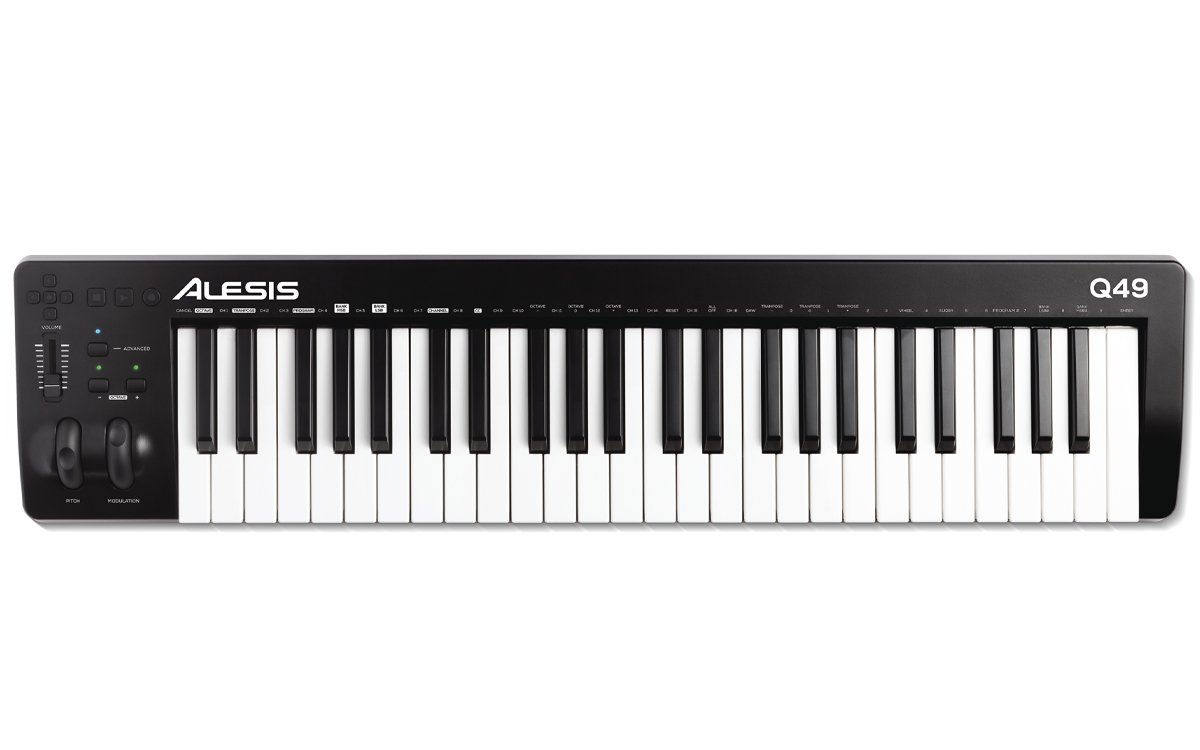
Explore this need in the finder →The Alesis Q49 MKII is a 49-key full-size USB-MIDI controller with a sparse, performance-oriented panel: pitch and modulation wheels, octave and transpose functions, four transport/directional controls, an assignable volume slider and a sustain-pedal input. That combination makes it a more direct playing surface than a broad pad-and-fader workstation, but the MKII's documented connection set differs from the discontinued original Q49 in a crucial way: the exact MKII materials do not list five-pin MIDI sockets.
A physical 49-note span, not an expandable piano
Alesis specifies 49 full-size, velocity-sensitive synth-action keys. That is a useful middle ground for software parts that need both hands or a bass line and chord voicing in one take, while remaining a smaller physical range than a 61- or 88-key instrument. The octave and transpose functions let the player move the note range when a passage goes beyond the keybed. They do not increase the number of notes available simultaneously, so repeated octave changes remain part of the compromise.
The product page calls this exact MKII bed synth-action, but the reviewed material does not quantify key width, key travel, weight or response curve, nor does it specify keyboard aftertouch. Velocity-sensitive keys can vary note-on intensity; they do not, by themselves, prove a particular feel. Players who are comparing it with semi-weighted or hammer-action boards should keep the mechanism labels separate and try the keybed in person where possible rather than infer a tactile preference from the model name.
Wheels and transport buttons over a pad bank
The panel focuses on hands-on note expression and basic DAW navigation. Alesis documents separate pitch and modulation wheels, an assignable volume slider and octave/transpose functions; the guide explains how controls can send MIDI assignments. Directional and transport buttons support MIDI, Mackie Control or HUI protocols in compatible software. This can reduce mouse trips for simple stop, play or record actions, but it is not evidence of an application-specific mixer map or of universal transport behavior in every DAW.
There is no separate drum-pad bank on the exact feature list. If finger-drumming, clip launching or pressure gestures are central to the workflow, a controller with documented pads will offer a different surface. The sustain input takes an external 1/4-inch TS pedal, sold separately. The guide notes that pedal polarity is determined on startup; a pedal held down while the keyboard powers up can reverse the expected on/off behavior. The pedal and correct startup position are small details worth checking before a live session.
USB host control: do not borrow the old model's DIN sockets
The Q49 MKII is USB bus-powered and sends MIDI to a computer over USB. The guide recommends a direct computer connection or a powered hub, and says that the keyboard itself will not make sound when keys are pressed. A software instrument must receive the MIDI and create audio, and that sound needs its own headphones, speakers or interface. Alesis also describes iOS use with the appropriate camera-adapter hardware, but that adapter is separate and host compatibility should be checked for the exact device.
One distinction deserves special attention when searching used listings. Alesis's discontinued original Q49 page lists a five-pin MIDI output and a 32-inch body; the current Q49 MKII page and its rear-panel guide do not list DIN and do not provide an exact body measurement. These are not interchangeable specifications. The Q49 MKII should be treated as a computer-centered USB controller unless a particular unit and version are independently verified. USB-C is likewise unconfirmed: a USB 2.0/data claim does not name the socket shape at the keyboard.
Package and software terms need a current check
The MKII product page lists a USB cable and software download card, alongside the documentation. It advertises a music-software bundle and trial offers, but it does not make an older or used seller's registration code transferable or unused. Confirm the exact suffix, box contents and redemption eligibility before assigning value to software. The listed system-requirement text is also older than present operating-system releases, so confirm current Alesis support guidance for the computer you intend to use.
Alesis calls the Q49 MKII lightweight, but the sources reviewed here do not provide a numeric width, depth, height or weight. Its 49-key count does not guarantee that it will fit a particular tray. Measure the exact usable surface and leave room for the cable, sustain pedal and hands. If the desk has a strict width cap, the honest answer in this assessment is that the exact chassis dimension remains undocumented, not that the board must fit.
Bottom line
The Q49 MKII is a sensible fit for a player who wants a physical 49-key full-size range, familiar wheels and compact DAW transport controls in a USB-powered setup. Its important limitation versus the older Q49 is the lack of documented five-pin MIDI Out on this MKII. It also lacks a pad bank, has no verified USB-C plug shape or numeric chassis measurements in the reviewed sources, and needs a separate sustain pedal. This review is based on the maker's exact model page and v1.0 guide, not hands-on testing; verify the suffix, current host requirements and seller package before buying.
Primary sources: Alesis Q49 MKII product page; Q49 MKII User Guide v1.0; Alesis discontinued original Q49 reference page; Alesis MIDI Controllers category.
Key specifications
Key details at a glance
| Keys | 49 |
|---|---|
| Manufacturer's keybed description | Velocity sensitive full size synth action keys |
| Pads | 0 |
| Velocity-sensitive pads | No |
| Pressure-sensitive pads | No |
| 5-pin MIDI Out | No |
| USB bus-powered | Yes |
| Assignable pedal input | Yes |
| 5-pin MIDI In | No |
| 5-pin MIDI outputs | 0 |
Use the exact model’s instructions for operating limits, supplied equipment and version differences.
Sources for this review
Sources for this assessment
Start with your setup, not a headline feature
Use the finder to combine key-count, connection, control and desk-fit requirements. Unverified specifications are never treated as a match.