
Your needs, this model
Does it fit your priorities?
Does the Q88 MKII meet an 88-key minimum without octave shifts?
Yes. Alesis identifies an 88-key full-size keyboard. Its action category is unresolved because the same product page uses both synth-action and semi-weighted wording, so the key count does not settle feel or mechanism.
Explore this need in the finder →Can the Q88 MKII connect directly to a five-pin MIDI sound module?
Yes, the exact rear-panel guide shows five-pin MIDI Out to an external module's MIDI In. For the documented standalone DIN route, the guide calls for a separate 9 V, 500 mA adapter sold separately; the module still needs its own audio path.
Explore this need in the finder →Can I assume the Q88 MKII has a USB-C computer socket?
No. The product page and model-specific manual document USB-MIDI and bus power but do not identify the controller-side plug shape. Do not call it USB-C from the USB data connection alone; check the exact rear panel, cable and host needs before ordering.
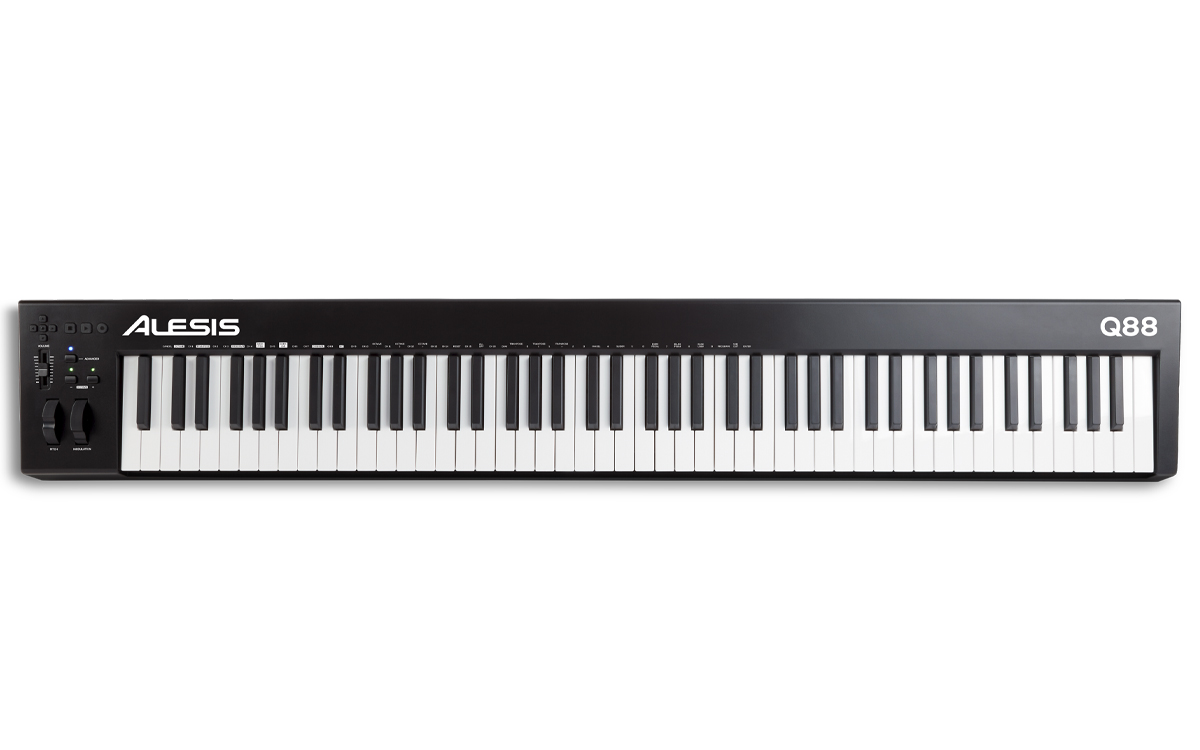
Explore this need in the finder →The Alesis Q88 MKII is the long-range member of the Q line: an 88-key USB-MIDI controller with pitch and modulation wheels, octave/transpose functions, transport controls, a reassignable volume slider, sustain and expression-pedal inputs, and five-pin MIDI Out. One specification should not be glossed over: Alesis calls the keys synth-action in the product-page overview but semi-weighted in its Features list. The matching guide does not settle the difference, so this review leaves the key action unresolved rather than choosing a preferred label.
Full range, with one important action conflict
Alesis consistently identifies 88 full-size, velocity-sensitive keys. That gives a player the physical span needed to keep low notes and upper voicings available without octave-shifting the keyboard mid-phrase. Octave and transpose controls are still useful for moving a part or adapting to a song key, but they are not what makes this controller an 88-key instrument; the physical key count does.
The exact Q88 MKII page then uses two different action terms. Its overview calls the keyboard synth-action, while the features list describes 88 semi-weighted keys. Those phrases suggest different comparisons and are not reconciled by the v1.3 guide. I therefore do not classify this as a definitively synth-action or semi-weighted board. If key feel is decisive, ask for the exact unit to be demonstrated or check a current official clarification before buying. The sources also do not quantify key width, travel, key weight or aftertouch.
A direct hardware-MIDI route with a power condition
The Q88 MKII differs from the USB-only Q49 MKII in a practical way: its rear panel has five-pin MIDI Out. The model-specific guide says to connect that socket to the MIDI In of an external sound module or synthesizer. The maker also specifies that standalone operation through MIDI uses a 9 V DC, 500 mA power adapter, sold separately. Do not treat the DIN socket as a powered audio connection; the receiving module must make the sound and needs its own headphone, speaker or mixer route.
For computer production, the guide documents USB carrying MIDI data and power to a software instrument. That is a different supported arrangement from the standalone DIN setup, and the sources do not establish that USB-C is the device-end connector. A standard USB 2.0 requirement refers to the host connection; it does not identify the plug shape. Check the exact port, cable and any supplied adapter rather than assuming that the computer setup and hardware-module setup use the same power accessories.
Controls aimed at playing and basic DAW navigation
Separate pitch and modulation wheels supply continuous hand gestures, while octave/transpose controls and the editable keyboard functions provide access to MIDI channel, program and related parameters. An assignable volume slider offers one physical parameter control. Directional and transport buttons can work through MIDI, Mackie Control or HUI in software that supports those protocols. This is helpful for basic transport and selection, but it is not a large mixer surface, pad grid or guarantee that every DAW maps the buttons identically.
The Q88 MKII lists both a sustain input and a 1/4-inch TRS expression input, with pedals sold separately. The guide notes that sustain-pedal polarity is recognized at startup. In practice, connect the pedal while it is released when powering on; pressing it during startup can invert the expected response. An expression pedal is a separate accessory and should be checked for compatible wiring/function before purchase.
Space, support and package checks
The 88-note span makes desk and stand planning especially important, but the exact product page and manual sections reviewed do not publish a case width, depth, height or weight. Do not reuse a width from the discontinued Q88 or another generation. Measure the available surface and consider rear cables, stand lip, pedal placement, hands and support load; the official photograph shows the layout but cannot answer those fit questions.
Alesis lists a USB cable, software download card and documentation in its standard contents. The page advertises a production/education bundle, but a used unit's account code may already be redeemed or may not transfer. Check the exact package and current software terms. Confirm the separate 9 V supply is present or budget for the correct adapter if you plan to use direct DIN without a computer.
Bottom line
The Q88 MKII is a clear 88-key controller with a real DIN output and useful piano-style performance controls, but it is not a sound module and its hardware-DIN plan has an extra power requirement. Its key-action wording is internally inconsistent on the official page; USB-C and body dimensions are also unconfirmed. Compare it with the Q49 MKII only after separating the different ranges and MIDI sockets, and verify the exact action description before choosing on feel. This assessment is based on Alesis's exact product page and v1.3 guide, not hands-on testing.
Primary sources: Alesis Q88 MKII product page; Q88 MKII User Guide v1.3; Alesis MIDI Controllers category.
Key specifications
Key details at a glance
| Keys | 88 |
|---|---|
| Manufacturer's keybed description | Velocity sensitive full size action description conflict |
| Pads | 0 |
| Velocity-sensitive pads | No |
| Pressure-sensitive pads | No |
| 5-pin MIDI Out | Yes |
| USB bus-powered | Yes |
| Assignable pedal input | Yes |
| 5-pin MIDI In | No |
| 5-pin MIDI outputs | 1 |
Use the exact model’s instructions for operating limits, supplied equipment and version differences.
Sources for this review
Sources for this assessment
Start with your setup, not a headline feature
Use the finder to combine key-count, connection, control and desk-fit requirements. Unverified specifications are never treated as a match.