
Your needs, this model
Does it fit your priorities?
Does the V25 MKII meet a 25-key minimum without relying on octave buttons?
Yes. The exact V25 MKII guide identifies a physical 25-note, velocity-sensitive keyboard. Octave buttons can move that span through the MIDI note range, but they do not add physical keys for simultaneous wide voicings.
Explore this need in the finder →Can the V25 MKII connect to a computer that requires USB-C at the controller?
The maker documents USB 2.0 MIDI and USB bus power, but the reviewed product-page text and guide do not identify the controller-side socket shape as USB-C. Treat that connector need as unverified and check the exact unit and cable rather than equating a USB data standard with a connector type.
Explore this need in the finder →Can the V25 MKII send directly to a five-pin MIDI sound module?
The model-specific rear-panel guide lists USB, a sustain input, power switch and security connector, with no five-pin MIDI output. The documented setup sends MIDI to a computer; a separate host/interface bridge would add equipment, and the module still needs its own audio connection.
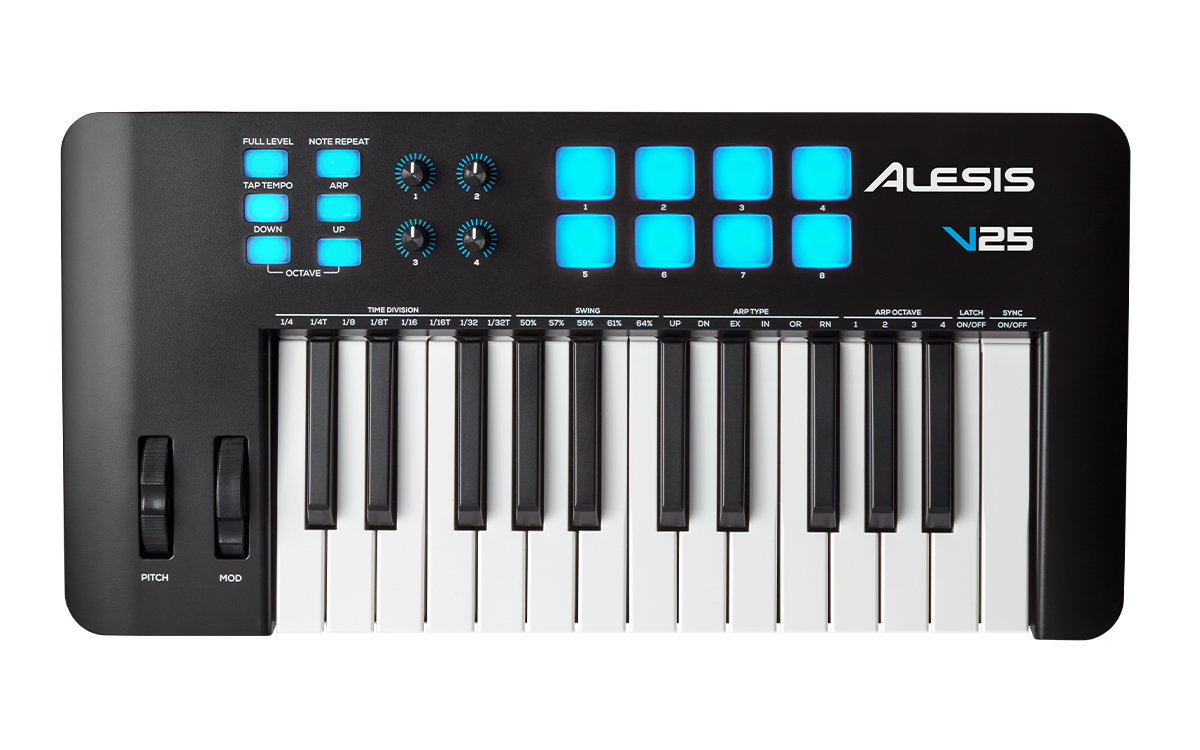
Explore this need in the finder →The Alesis V25 MKII is a small-footprint idea built around 25 full-size, velocity-sensitive synth-action keys. Its value is not a wide piano range; it is having wheels, pads, a few assignable knobs and an arpeggiator close at hand without moving to a much longer keyboard. The maker's current product page and matching user guide support that setup, but do not publish body measurements or confirm USB-C at the controller.
A short physical range with a lot of octave access
Twenty-five keys give the V25 MKII a clear use case: enter a bass line, sketch a melody, trigger a chord or work through a part that does not demand a broad span at once. The manual explains that the octave buttons let this short bed address the full MIDI note range. That is a useful control shortcut, but it is not equivalent to having more keys under both hands. A player who needs a low bass note and a high chord simultaneously still has to choose a different physical range or record in passes.
Alesis specifies full-size, velocity-sensitive synth-action keys. That gives a better sense of the intended response than calling it a miniature piano, but the sources reviewed do not give a numerical key width or a weighted-action classification. The action claim should not be stretched into a promise about piano technique or feel. The model page also does not publish chassis width, depth, height or weight, so the small key count is not proof that a specific tray or shelf will fit it.
Useful performance controls, not a complete workstation
The top surface adds eight backlit velocity-sensitive pads, four assignable rotary controls, pitch and modulation wheels, octave buttons, and a set of arpeggiator controls. The pads can trigger software drums or samples. A Full Level mode sends their top velocity value, while Note Repeat can retrigger a held pad using the shared timing settings. The manual describes the pads as velocity-sensitive; it does not establish pressure sensing or polyphonic pad aftertouch. If continuous pad pressure is essential, treat that capability as unverified rather than reading more into the backlit surface.
The arpeggiator is unusually useful on a compact controller because its timing and note-order functions are in the instrument rather than requiring a DAW menu for every sketch. Alesis documents several playback directions, latch behavior, a one-to-four-octave span, swing, tempo sync and gate adjustment. Those facilities can generate note events for the connected software, but they are not the same as a multitrack sequencer or an onboard sound library. The V25 MKII's four knobs can be assigned to software MIDI controls; the maker does not present them as a bank of pre-mapped deep controls for every DAW.
USB to a computer is the documented path
The product information calls this a USB-MIDI controller and its rear-panel guide says USB 2.0 carries MIDI data and powers the keyboard. The setup section recommends a powered computer port or a powered hub, and the included-items list names a USB cable. The written documents reviewed do not identify the device-side connector shape as USB-C. USB 2.0 describes a data standard, not the form of the socket. If the exact controller-side USB-C plug is a hard requirement, inspect the actual unit and cable before ordering.
The guide's rear-panel diagram identifies USB, a sustain input, a power switch and a Kensington-style lock connection; it shows no five-pin MIDI IN or OUT. This is a computer-oriented MIDI route rather than a direct DIN controller for older sound modules. A computer with a separate MIDI interface or a compatible USB host could bridge to external hardware, but that is extra equipment and setup. MIDI itself carries control messages, not audio; the DAW or sound module still needs an audio path to headphones, speakers or an interface.
Plan for a separate pedal and verify software terms
The 1/4-inch TS sustain input is a practical addition for playing software instruments, but Alesis says the pedal is sold separately. The product page advertises a music-production software bundle and the downloadable V Series editor can change MIDI assignments and tune key or pad response. The model guide lists a software download card; that does not prove that a code in a used or opened package remains valid. Check the exact seller's contents, redemption conditions and the current Alesis operating-system guidance rather than relying on an old minimum-requirements line.
This controller is not documented as a self-contained sound source. If you need keys that make sound without a connected computer, the V25 MKII is the wrong product type. If you do use a computer, confirm the host, DAW and any mapping workflow before treating the included software as a complete setup.
Bottom line
The V25 MKII is a reasonable current-reference match for a compact MIDI desk where 25 full-size keys are enough and pads, an arpeggiator and a few assignable controls are more valuable than direct hardware sockets. Its boundaries are important: no five-pin output is documented, USB-C is not verified, the pads are documented as velocity-sensitive rather than pressure-sensitive, and the bare chassis dimensions remain unknown. This is a source-based assessment, not a hands-on test; confirm the exact model marking, included cable and pedal/software package with the seller.
Primary sources: Alesis V25 MKII product page; V25 MKII User Guide v1.2; Alesis MIDI Controllers category.
Key specifications
Key details at a glance
| Keys | 25 |
|---|---|
| Manufacturer's keybed description | Velocity sensitive synth action full size keys |
| Pads | 8 |
| Velocity-sensitive pads | Yes |
| 5-pin MIDI Out | No |
| USB bus-powered | Yes |
| Assignable pedal input | Yes |
| 5-pin MIDI In | No |
| 5-pin MIDI outputs | 0 |
Use the exact model’s instructions for operating limits, supplied equipment and version differences.
Sources for this review
Sources for this assessment
Start with your setup, not a headline feature
Use the finder to combine key-count, connection, control and desk-fit requirements. Unverified specifications are never treated as a match.