
Your needs, this model
Does it fit your priorities?
Does the Vortex Wireless 2 have 37 physical keys or a longer physical bed after octave shifting?
Its v1.3 guide specifies 37 velocity-sensitive keys with keyboard aftertouch. Octave buttons shift that same bed through the MIDI note range; they do not add physical keys or simultaneous reach.
Explore this need in the finder →Can the Vortex Wireless 2 connect directly to a five-pin DIN sound module?
Yes. Its own guide identifies a five-pin MIDI Out, and Alesis support describes using that output for an external sound module. The module must make its own sound and connect to an audio monitoring path; MIDI DIN carries data, not audio.
Explore this need in the finder →Are the Vortex Wireless 2 pads confirmed as pressure-sensitive?
No pressure-sensing claim is established by the reviewed exact product page or v1.3 guide; those sources describe velocity-sensitive pads. The manual's keyboard-aftertouch feature is not pad pressure and should not be substituted for it.
Explore this need in the finder →The Alesis Vortex Wireless 2 is a 37-key keytar-style MIDI controller built around movement, neck-mounted performance controls and a wireless USB receiver. Its exact user guide confirms keyboard aftertouch and a five-pin MIDI Out, while the product page adds eight RGB-lit pads, eight faders and a tilt sensor. It sends performance data; it is not a self-sounding keyboard, and the wireless path is a USB receiver rather than a built-in speaker or documented Bluetooth connection.
A 37-note stage layout, not a piano-range substitute
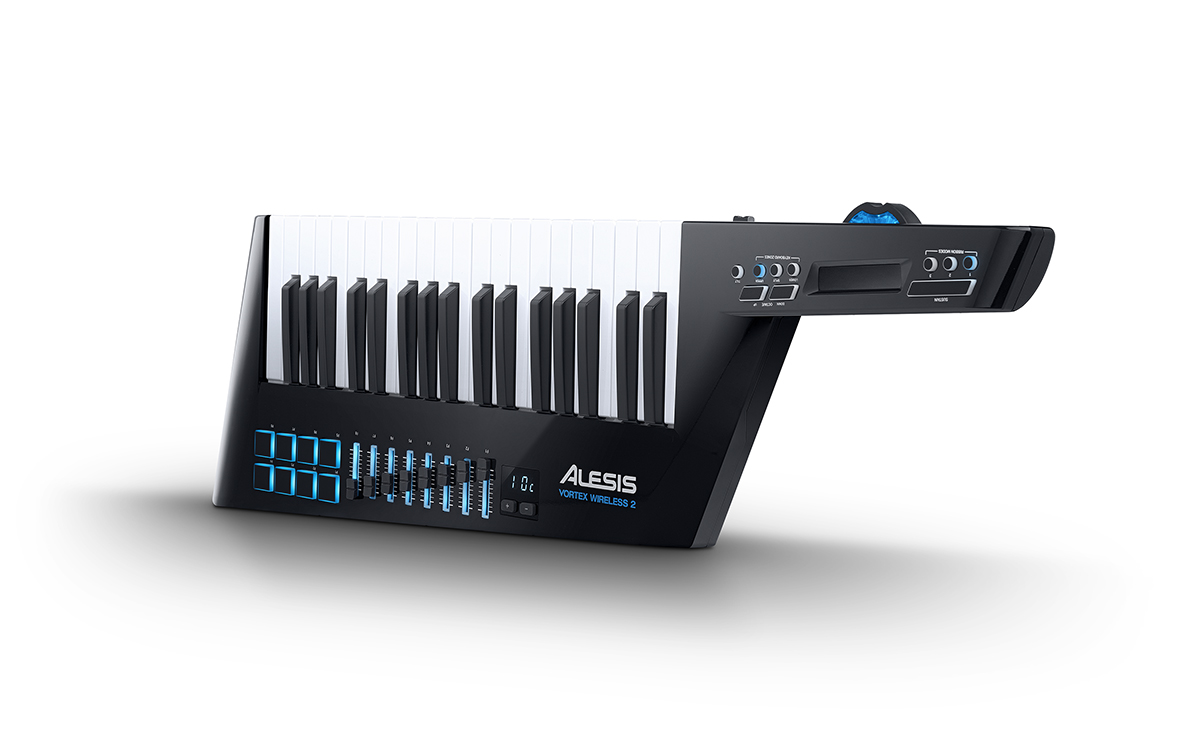
The physical keybed has 37 velocity-sensitive notes with aftertouch. Octave buttons move that same span up or down, and the manual says the controller can reach the full 127-note MIDI range by shifting octaves. That is useful for changing register in a set, but it does not put distant bass and upper notes under the hands simultaneously. The manual does not classify the key action as synth, semi-weighted or piano-weighted, and neither it nor the exact product page gives key width, key travel, aftertouch type or chassis measurements. The product photo identifies the Vortex Wireless 2; its shape is not a sizing tool.
The keyboard has Lower, Split and Upper zone buttons. In Lower or Upper mode the corresponding zone settings apply across the 37 keys; Split applies both zones around a configurable split point. That gives a performer more ways to layer or divide MIDI assignments than an octave button alone, but the actual ranges and messages require setup in the Vortex editor. If the priority is long two-handed reach or a familiar piano action, the 37-key count and undocumented action are material limitations rather than details to infer from the keytar silhouette.
Neck controls and an unusually broad set of assignments
On the body, eight velocity-sensitive pads can trigger notes or clips, while eight illuminated faders send MIDI CC messages. The exact manual describes their assignment types and settings, but does not call the pads pressure-sensitive; that pad-pressure capability is therefore not verified here. The neck adds a touch ribbon, three ribbon banks, a tilt sensor, a pitch-bend wheel, a volume slider, octave and zone controls, and a sustain button. The ribbon can be configured for a control-change or pitch-bend message, and the three banks let one preset call up different ribbon assignments. Tilt can be enabled and calibrated; it is not a touchless sound source on its own.
These controls matter when a performer wants to shape or trigger software sounds while holding the instrument. They also create a setup task: Alesis says the editor is used to assign MIDI messages and save presets, and its current support guide says software access follows registration. Do not assume a particular DAW already has the mappings you want. Check whether the software editor can be obtained and runs on the intended computer before relying on customized controls.
Wireless mobility still needs a host, power and a sound source
The included wireless USB receiver plugs into a computer or a compatible hardware host. Alesis describes the receiver as paired with the Vortex; the product can also connect by cable USB, and its five-pin DIN MIDI Out can address an external sound module. In a wireless computer arrangement, four AA batteries power the controller; batteries are not included. Wired USB operation can draw power from a connected computer. If the exact unit is being bought used, confirm the dongle, USB cable and battery-cover condition. A missing receiver is significant, although Alesis documents a replacement-pairing process through its editor.
A DIN module route is more direct than the many USB-only controllers in this library, but MIDI DIN carries control data, not audio. The module still has to make sound and connect to an amp, mixer or headphones. A computer route likewise needs a software instrument and an audio-monitoring path. Alesis says the controller itself needs a computer with software or a sound module to generate sound. No onboard voice engine or audio output is documented.
Bundle and package claims need a current check
The exact product page lists several AIR Music Tech instruments, TimewARP 2600 and Ableton Live Lite. The support FAQ says most software is accessed after registration and separately names its bundle; the setup article refers to MPC Beats. These manufacturer pages do not establish that an individual used unit still carries unused or transferable licenses. Treat the bundle as a package check, not guaranteed value: confirm the exact download card, registration eligibility, included receiver and strap, and current software/OS compatibility with the seller and Alesis. The old minimum system line on the product page is not a promise of support for a present-day computer.
Who should consider it?
The evidence points to a specific use: a performer who wants to move with a 37-key controller and use a USB receiver, wired USB or direct DIN MIDI, plus multiple assignable controls. It is a poor match if pressure-sensitive pads, USB-C, published footprint measurements or a piano-weighted action are hard requirements: these exact sources do not establish those capabilities. A compact keybed also cannot replace the reach of a longer keyboard. Compare the exact configuration and included receiver rather than assuming every used listing is complete. This is a source-based assessment of the Vortex Wireless 2, not a hands-on test or claim about current stock.
Primary sources: Alesis Vortex Wireless 2 product page; Vortex Wireless 2 User Guide v1.3; Alesis Vortex Wireless 2 FAQ; Alesis setup guide.
Key specifications
Key details at a glance
| Keys | 37 |
|---|---|
| Manufacturer's keybed description | Velocity sensitive keys with aftertouch; action class not specified |
| Pads | 8 |
| Velocity-sensitive pads | Yes |
| 5-pin MIDI Out | Yes |
| USB bus-powered | Yes |
| Assignable pedal input | No |
| Keyboard channel aftertouch | Yes |
| 5-pin MIDI In | No |
| 5-pin MIDI outputs | 1 |
Use the exact model’s instructions for operating limits, supplied equipment and version differences.
Sources for this review
Sources for this assessment
Start with your setup, not a headline feature
Use the finder to combine key-count, connection, control and desk-fit requirements. Unverified specifications are never treated as a match.