
Your needs, this model
Does it fit your priorities?
How is the non-Essential KeyLab 61 mk3 different from the Essential 61?
Both are 61-key controllers, but the standard KeyLab 61 mk3 is a different tier: Arturia lists twelve pressure-sensitive pads, a 3.5-inch full-color screen, nine 50 mm faders, and the manual confirms channel aftertouch on the keyboard itself. The Essential listing instead specifies eight pads and a 2.5-inch LCD, and its reviewed record does not verify key aftertouch. These are documented control differences, not a judgment about which action feels better. The standard 61's exact width remains unconfirmed in the sources checked here.
Explore this need in the finder →Can USB control a DAW while MIDI Out controls external equipment?
Arturia's KeyLab mk3 manual says the USB-C port carries power, MIDI and control information, and that the unit can output MIDI over USB and its DIN ports simultaneously. That documents the signal path for a computer session that also sends notes or control to external MIDI gear. It does not supply audio: the DAW or external instrument still has to produce sound and connect to monitors or headphones separately.
Explore this need in the finder →Does it need another power adapter for a computer-free hardware setup?
The manual says KeyLab mk3 can send MIDI to external devices without a computer when powered by an optional 12V DC, 1.0A supply. Its standard box list names the keyboard, USB-C-to-USB-A cable, registration card and QuickStart, not that adapter. Before relying on standalone operation, confirm the current official supply recommendation and whether your exact seller package includes one; the connected sound source still needs its own power and audio path.
Explore this need in the finder →A 61-key KeyLab, not the Essential
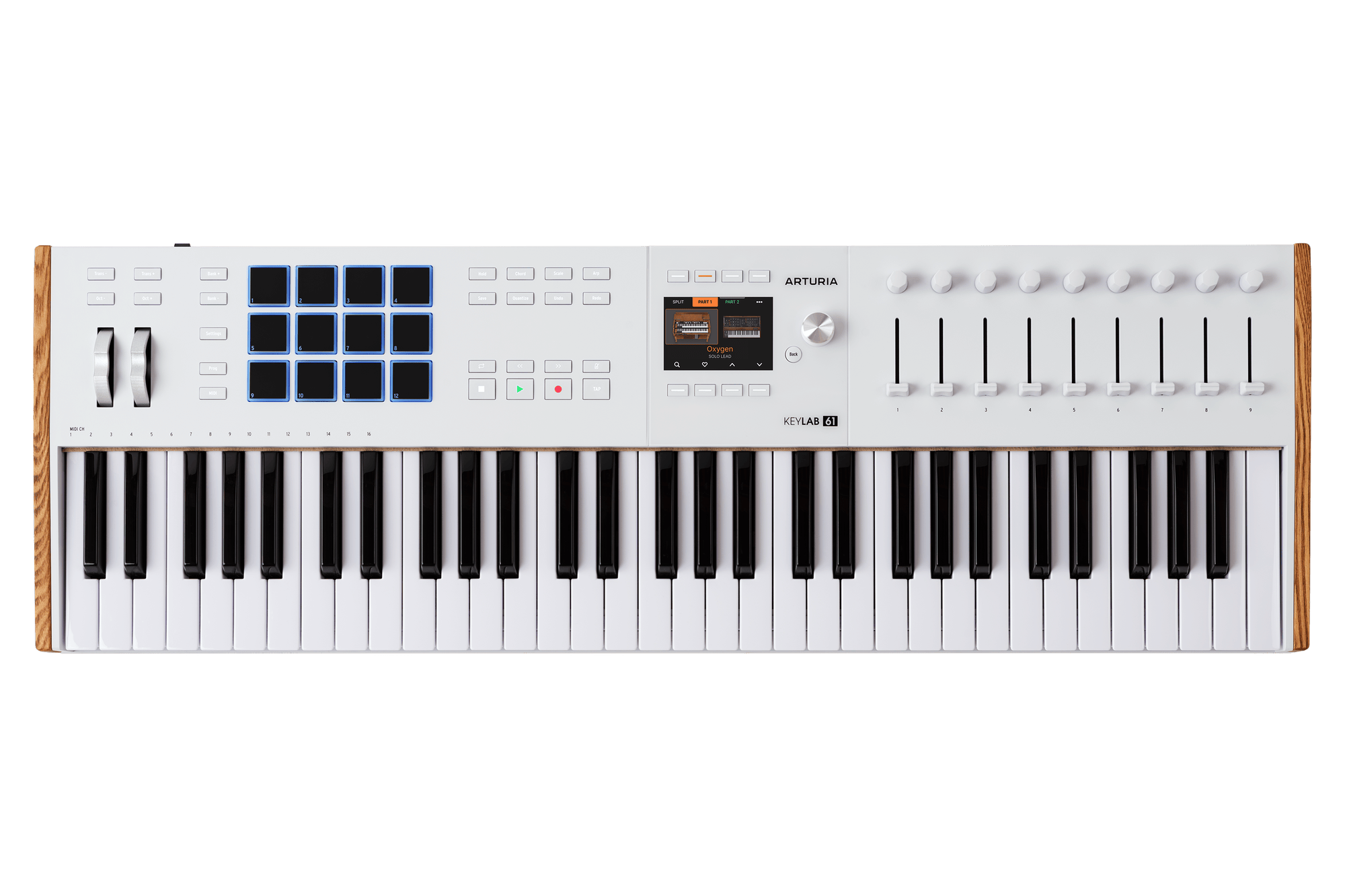
The White KeyLab 61 mk3 is Arturia's standard-tier, 61-note MIDI controller. Its official store record identifies the White SKU as keylab-61-mk3,0,white. That suffix matters: this is not the KeyLab Essential 61 mk3, and it is not the 88-key KeyLab. The standard model pairs a semi-weighted keybed with channel aftertouch, a larger control surface, and both USB-C and five-pin MIDI connections. Those documented combinations make it a plausible fit for a workstation that needs more than four octaves and expects the keyboard to address a DAW and external gear.
Range and expressive control
Sixty-one keys give more room than the 49-key KeyLab for two-handed parts, wider voicings, or keeping a bass note and a higher line within reach. That is a range advantage, not proof that every arrangement fits or that the keyboard will feel right to a particular player. Arturia describes the 49- and 61-note keybeds as velocity-sensitive and semi-weighted with a synth-action feel. The shared English manual adds release-velocity and channel-aftertouch sensitivity on the keys themselves. It does not provide a measured force curve or key width, so a player choosing by touch should seek a chance to try the exact action rather than infer its feel from the feature list.
The pads add a separate pressure-responsive surface: Arturia lists twelve touch- and pressure-sensitive pads, alongside nine rotary encoders, nine 50 mm faders, eight transport switches, four command switches, pitch and modulation wheels, and a 3.5-inch color display with contextual buttons. Keyboard channel aftertouch and pad pressure are distinct inputs. Neither item count nor the presence of a screen establishes that every control is mapped to a preferred function in every DAW; check the current script and control protocol for the software version in use.
One controller, two MIDI paths
For a computer setup, the manual says USB-C carries power, MIDI and control information, while Arturia's overview lists a separate five-pin MIDI output. The manual also says the unit can send MIDI over USB and its DIN connection at the same time. That is useful when a DAW is the host but a hardware synthesizer or other MIDI device also needs notes or control changes. The DIN connection transports MIDI data, not audio, so the receiving instrument still needs its own power and an audio connection to monitors or headphones.
A computer-free hardware arrangement is possible, but it is not just a matter of removing the USB cable. Arturia's manual calls for an optional 12V DC, 1.0A supply when using the KeyLab to control external devices without a computer. The listed standard box contents name the keyboard, a USB-C-to-USB-A cable, a registration card and QuickStart; they do not list that adapter. Confirm the current supply recommendation and the contents of the exact offer before planning a standalone rig. The page and manual establish controller behavior, not a built-in sound engine or audio output.
Do not guess its desk footprint
The 61-note version is physically a different layout from the 49-key one. In the manual, Arturia says some buttons and the two wheels are moved to the left on the smaller model rather than remaining on the larger model's main panel. But the official material I checked did not give an exact body width, depth, height or weight for this White 61 configuration. The family overview's 30.98-inch measurement appears with the 49-key model; it is not a measurement for the 61. If desk width or stand support is a hard constraint, do not use that number or extrapolate one from the key count. Ask for an exact 61-key dimension or measure the unit, then reserve additional room for plugs, hands and pedals.
Where it differs from the Essential tier
Both 61-key versions can satisfy a 61-note minimum, but their published control details are not interchangeable. Arturia lists eight pads, a 2.5-inch LCD and 30 mm faders for the Essential 61, compared with twelve pads, a 3.5-inch full-color screen and 50 mm faders on the standard model. The standard KeyLab manual confirms keyboard channel aftertouch and the standard product documentation lists MIDI In as well as Out. The Essential sources reviewed here do not verify those two capabilities; that absence should not be read as proof that they are impossible. The point is to compare exact feature evidence, not to assume the suffix is a cosmetic distinction.
What to check before choosing it
Arturia's support page has a dedicated KeyLab 61 mk3 manual, firmware entry and DAW scripts or integration guides for several hosts. That is a starting point, not a guarantee that a particular operating system, DAW release or seller bundle will behave identically. Verify the present software entitlement, registration steps, host requirements and control mode. Also confirm that a listing says White KeyLab 61 mk3 rather than Essential 61 or an 88-key version.
On paper, the KeyLab 61 mk3 makes the most sense when 61 keys, keybed aftertouch, pressure-aware pads, a visual control surface and simultaneous computer/DIN MIDI are all useful. Its unresolved exact dimensions are a substantial limitation for space-constrained buyers, and it is a controller rather than a complete audio instrument. If the smaller 49-note range is enough, compare the separate KeyLab 49 mk3; if the Essential's focused control set is sufficient, compare the Essential 61 instead. No hands-on use or performance test is claimed here: the assessment is based on Arturia's listed specifications, product manual and exact White configuration record.
Key specifications
Key details at a glance
| Keys | 61 |
|---|---|
| Manufacturer's keybed description | Semi-weighted synth action |
| Pads | 12 |
| Velocity-sensitive pads | Yes |
| Pressure-sensitive pads | Yes |
| 5-pin MIDI Out | Yes |
| Computer connection | USB-C |
| USB bus-powered | Yes |
| Assignable pedal input | Yes |
| Keyboard channel aftertouch | Yes |
| 5-pin MIDI In | Yes |
| Display size | 3.5 in |
| Fader length | 50 mm |
Use the exact model’s instructions for operating limits, supplied equipment and version differences.
Sources for this review
Sources for this assessment
Start with your setup, not a headline feature
Use the finder to combine key-count, connection, control and desk-fit requirements. Unverified specifications are never treated as a match.