
Your needs, this model
Does it fit your priorities?
Can the M32 work as a compact keyboard for a software-instrument desk?
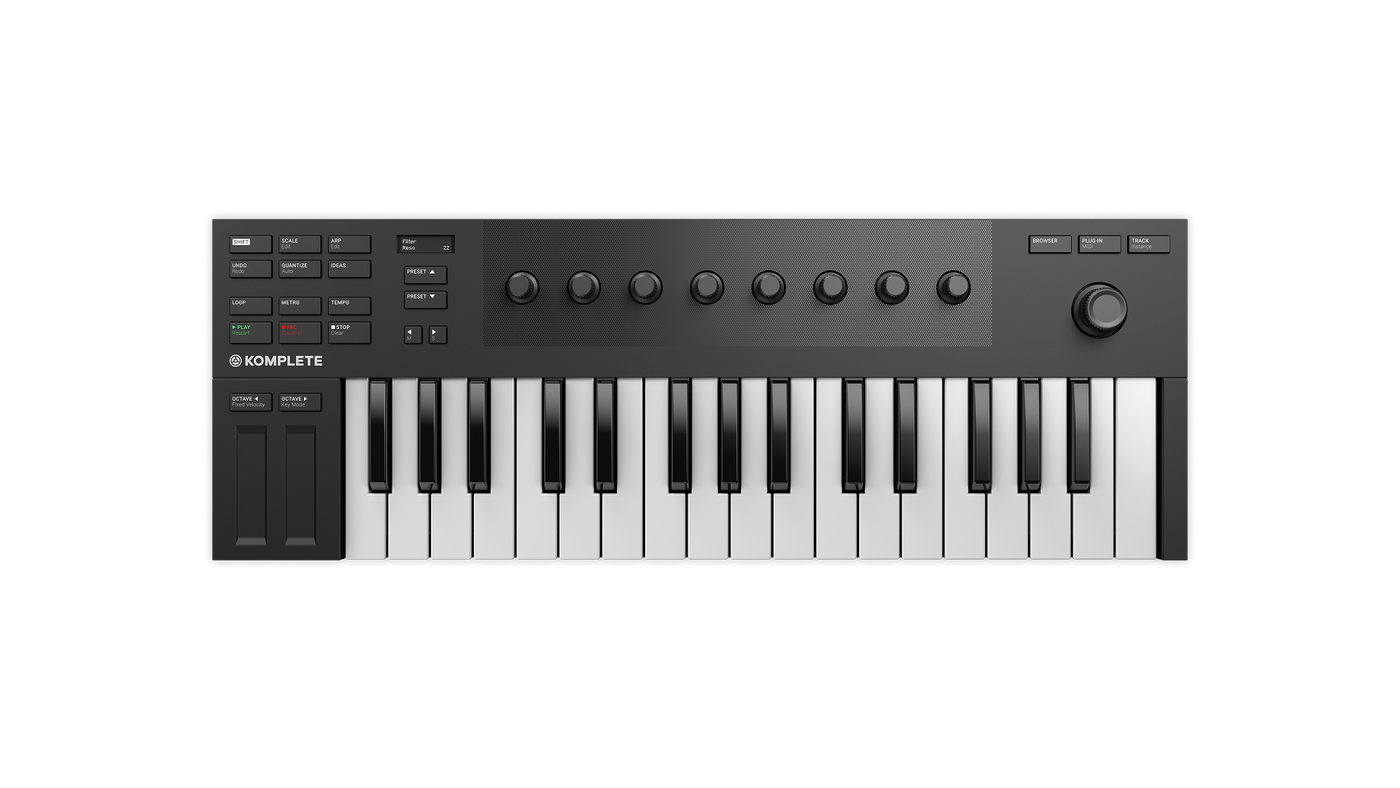
The official page describes 32 keys, USB MIDI, bus power, eight touch-sensitive knobs, two touch strips, an OLED display and a pedal input. That is a software-centered control layout, not a promise of a full piano range: the keys cover a 32-note span, and sounds come from a connected computer/software instrument rather than a documented internal sound engine. The sources do not state the body's width, so do not assume it clears a particular desk cap.
Explore this need in the finder →Does the M32 send five-pin MIDI to a hardware synthesizer?
The reviewed product page says the M32 can act as a USB MIDI controller, and the manual's rear-view diagram documents a USB connector and pedal socket. It does not document five-pin MIDI Out. For a hardware synthesizer requiring DIN, choose a controller with a documented DIN route or plan a separate computer/MIDI-interface path; USB power and MIDI data do not provide audio to the synthesizer.
Explore this need in the finder →Can the M32 be treated as a USB-C keyboard because the product page says USB 2.0?
No. USB 2.0 describes a data standard, not the shape of the keyboard's socket. NI's product page and manual specify USB 2.0-or-later host connection and bus power but do not identify the device-side connector as USB-C. If USB-C at the keyboard is essential, keep the M32 out of that shortlist until an exact current manual or seller photo verifies the connection.
Explore this need in the finder →The KOMPLETE KONTROL M32 is a 32-key USB MIDI controller built around Native Instruments' software workflow. Its appeal is not piano-range coverage or hardware-synth routing; it is compact note entry plus a small control surface for browsing and shaping software instruments.
What the M32 is designed to do
Native Instruments currently lists the M32 in its MIDI-keyboard collection as a micro-sized controller, and the product page confirms 32 keys, USB MIDI, bus power, an OLED display and a pedal input. That makes the model a credible fit for a desk where a short keyboard is one part of a larger computer setup: use its keys for a line or chord, the screen and encoder to navigate, and the eight knobs for the selected instrument's mapped parameters. The page also describes Smart Play scales, chords and arpeggiator features, with deeper browsing and control tied to KOMPLETE KONTROL and NKS software.
This is not a self-contained synthesizer in the documentation reviewed here. The M32 sends MIDI to a computer; the software instrument and the computer's audio output supply the sound. If the goal is a keyboard that can play a hardware module over a five-pin cable without a computer, the M32 is the wrong connection plan.
A short range with a deliberate control layout
Thirty-two keys leave less physical range than a 37-, 49- or 61-key board, so octave changes may become part of the workflow. That can be workable for melodies, bass lines, short chord parts, stepwise recording or a small home desk where the keyboard is not the only instrument. It is a poor fit if you need a broad two-handed part to remain under your hands at once. NI calls the M32 micro-sized, but the reviewed product page and manual do not publish chassis width, key width or a body-depth figure; don't buy it against a tight desk cap by guessing from the product image.
The panel puts eight touch-sensitive knobs above the keybed, plus a four-direction push encoder, two touch strips and a two-line OLED. The manual describes dedicated navigation, transport, perform and edit controls, so there is more here than a bare note keyboard. In compatible KOMPLETE KONTROL sessions those controls can expose browser, plug-in, track, scale and arpeggiator functions. The touch strips stand in for the familiar pitch/modulation gestures, but the source documents do not establish the feel or exact tactile response of the keybed.
There is an important source caveat: NI's current product page calls the custom keybed synth-action, while the 2021 M32 manual describes a semi-weighted bed. I leave that terminology conflict unresolved rather than treating either phrase as a measured feel description. The manual does say the keys are velocity-sensitive by default. It does not establish keyboard aftertouch, and the M32 has no documented drum-pad bank.
USB MIDI, not USB-C by implication
NI describes USB 2.0 bus power and USB MIDI; the manual says to connect the included cable to a USB 2.0-or-later computer port. The same manual's rear view identifies a USB connection and one pedal socket. Neither reviewed source identifies the connector shape at the M32 itself, so a USB 2.0 claim must not be translated into a USB-C feature. If your host offers only USB-C, check the cable or adapter that actually fits the keyboard and the host, rather than assuming the right cable is included.
The manual documents one pedal input assignable to sustain, but it does not list a pedal among the box contents. More importantly, the rear-panel diagram and page specifications do not document five-pin MIDI In or Out. This is a USB-to-computer controller, not a direct DIN bridge to an external synth. It also has no documented onboard audio output. A hardware-only setup would need another route for MIDI, power and sound; the M32 itself does not solve those parts.
Software is part of the buying decision
The M32's strongest case is when its software navigation has value. NI describes KOMPLETE KONTROL, NKS integration, mapped plug-in parameters and a bundle that includes a KOMPLETE SELECT voucher and Ableton Live Lite as downloads after hardware registration. Those details are useful, but not permanent entitlements: confirm current software versions, account eligibility, included codes and transfer rules for the exact offer, especially when considering a secondhand unit. The manufacturer's storefront record identifies the M32 variant as SKU 26154; use it only as a model-identity cross-check, not as proof of a seller package or availability. The manual also lists specific host-integration workflows, while basic USB MIDI and advanced integration are different things. Check your DAW version and operating system against current NI support before counting on automatic transport or parameter mapping.
Where it sits among compact alternatives
Compared with M-Audio's 32-key Keystation Mini 32 MK3, the M32 puts much more of its surface into software browsing, a display, touch strips and mapped instrument controls; the M-Audio model is a simpler compact USB keyboard and has a different connector specification. Akai's MPK Mini Plus II trades the M32's software-focused panel for a 37-note span, pressure-sensitive pads, a documented USB-C connection, direct DIN Out and CV/Gate outputs. Those are not minor variations: each supports a different host and hardware workflow. If compactness is the deciding factor, compare exact dimensions only where the maker actually publishes them; the M32's body width remains unknown in the reviewed material.
Bottom line
The M32 makes sense as a small NI-oriented computer controller when 32 keys are enough and hands-on software navigation matters more than physical range, pads or five-pin hardware MIDI. Its display, eight knobs, encoder, touch strips and host controls can make a compact software session less mouse-dependent. The trade-offs are clear: keybed descriptions conflict across NI's page and manual; the connector shape, body dimensions and key width are not established in those sources; a sustain pedal is separate unless a specific seller package says otherwise; and software redemption depends on registration and current terms. Treat this as a source-based assessment, not a hands-on test. Before ordering, verify the exact cable, DAW integration, software entitlement and physical fit for the offer in front of you.
Primary sources: Native Instruments KOMPLETE KONTROL M32 product page and specifications; KOMPLETE KONTROL M32 Manual, English; Native Instruments MIDI-keyboard collection. Product pages and software offers can change; verify current model, host and package details.
Key specifications
Key details at a glance
| Keys | 32 |
|---|---|
| Pads | 0 |
| Velocity-sensitive pads | No |
| Pressure-sensitive pads | No |
| 5-pin MIDI Out | No |
| USB bus-powered | Yes |
| Assignable pedal input | Yes |
| 5-pin MIDI In | No |
| 5-pin MIDI outputs | 0 |
| CV/Gate/Mod voice outputs | 0 |
Use the exact model’s instructions for operating limits, supplied equipment and version differences.
Sources for this review
Sources for this assessment
Start with your setup, not a headline feature
Use the finder to combine key-count, connection, control and desk-fit requirements. Unverified specifications are never treated as a match.