
Your needs, this model
Does it fit your priorities?
Does APC Key 25 MK2 suit a narrow Ableton Live keyboard-and-clip setup?
Akai lists 25 velocity-sensitive keys and a 12.4-inch body width, which falls within a 16-inch screen. It adds an 8-by-5 grid of RGB clip buttons, five scene-launch buttons and eight knobs. The body is deeper than a bare mini keyboard, and its chassis measurement does not include USB cable clearance or room for hands.
Explore this need in the finder →Are the APC Key 25 MK2 clip buttons velocity-sensitive pads?
Akai says the keys are velocity-sensitive but the clip-launch pads are not. The source material does not document pressure sensitivity, so those buttons should be treated as clip controls rather than expressive drum pads. If velocity-responsive percussion or pressure control is essential, verify that capability separately before choosing it.
Explore this need in the finder →Can APC Key 25 MK2 connect directly to five-pin MIDI gear?
The reviewed specifications and guide document a USB port for sending and receiving MIDI to a computer, but no five-pin DIN socket. To control a DIN-only synthesizer, plan for a compatible host or USB-MIDI interface that provides the required output; confirm routing and power with that equipment rather than assuming the keyboard itself has DIN MIDI.
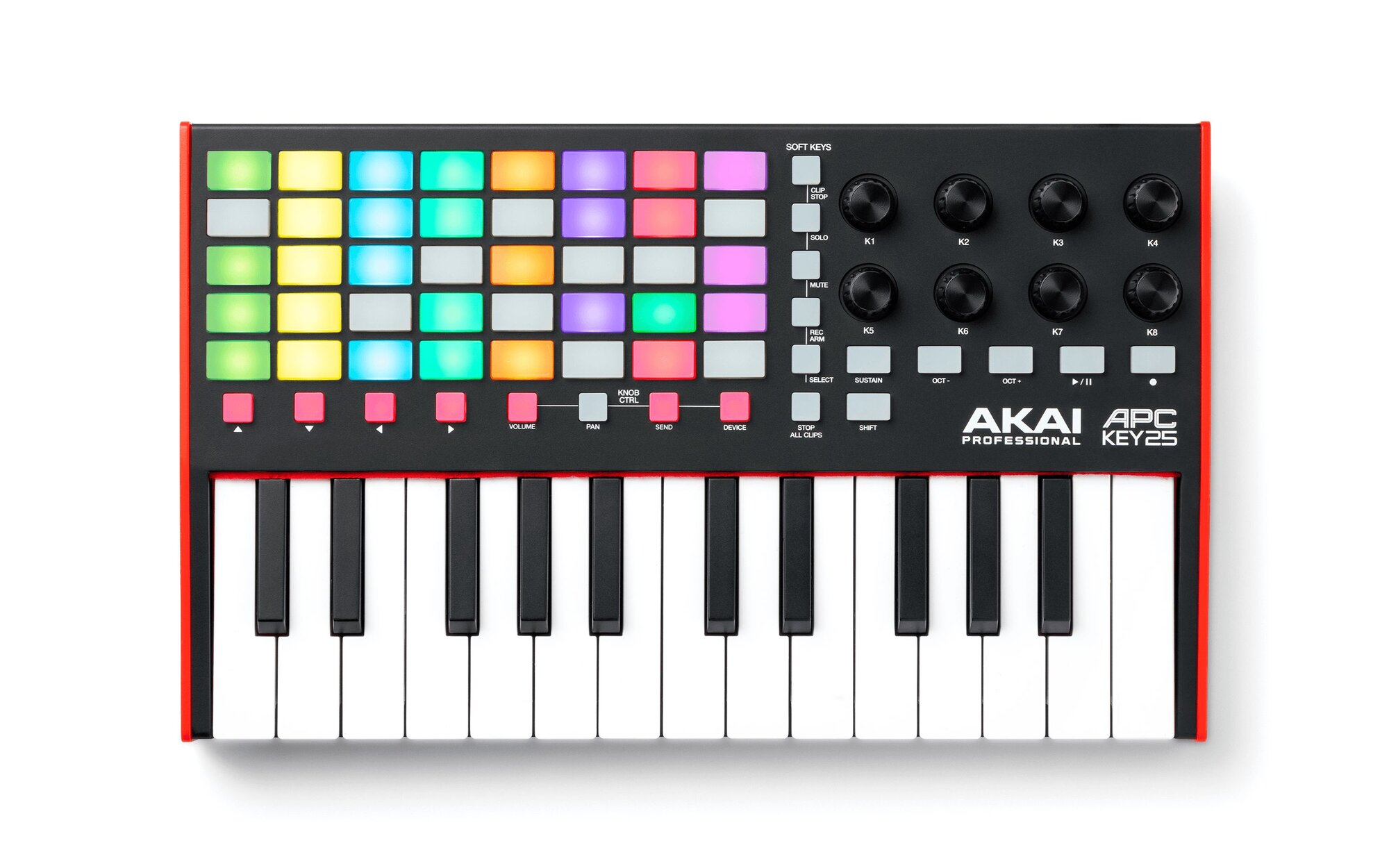
Explore this need in the finder →The APC Key 25 MK2 combines a 25-note velocity-sensitive keyboard with a 40-button, color-lit Ableton clip grid, eight assignable knobs and transport controls. It is a compact way to launch scenes while playing notes, not a pressure-responsive drum-pad surface or a direct DIN keyboard controller. This is a research-based assessment of Akai’s product page, model FAQ and version 1.2 user guide—not a hands-on test.
Keyboard range and clip control share one panel
Akai lists 25 velocity-sensitive keys with octave-up and octave-down buttons. The octave controls provide access across a ten-octave MIDI range, but the physical bed still holds only 25 notes at a time. Short bass lines, melody ideas or chord parts can fit that footprint; wide two-handed passages or a performance that needs simultaneous low and high notes may call for more keys. The inspected material calls the action “Gen 2 Dynamic” but does not report measured key width, keyboard aftertouch or a test of the feel.
The product’s other main surface is a 5-by-8 array of forty RGB clip buttons, with five scene-launch buttons, clip-stop controls and eight endless knobs. In Ableton Live, the grid represents eight tracks by five scenes and the buttons launch clips or scenes; shift-layered controls can stop, solo, mute, record-arm or select tracks. The knobs switch among volume, pan, send and device modes, where they control track or device parameters. This is a workflow-specific advantage over a bare 25-key controller, but it is not forty velocity pads for expressive finger drumming: Akai explicitly says the clip buttons are not velocity-sensitive. Pressure response is not documented, so it should not be assumed either.
Strongest fit is an Ableton Live session
The included control script is the reason this model is more than a general MIDI keyboard with extra buttons. Akai says correct control-surface operation requires Ableton Live 11.2.7 or later; its setup guide walks through selecting APC Key 25 mk2 for the control surface and relevant MIDI ports. The FAQ describes class-compliant operation without an extra driver and says the device can run from the included USB cable. Those details can simplify a compatible computer session, but they do not promise the same automatic mapping in every DAW. Akai notes that the knobs can be MIDI-mapped manually, yet the clip-grid workflow is specifically tied to Live’s session model.
The guide lists Ableton Live Lite as a download and includes software-download cards in the box list. The FAQ says the control software is redeemed through an inMusic account, and the product support page gives the minimum Live version for the script. Check the current Live version, operating system, license eligibility and registration requirements before valuing a software bundle. Offers are software access, not an instrument or audio output built into the keyboard.
USB bus power, with no documented DIN output
The guide says its USB port sends and receives MIDI data to and from the computer and draws power from that same host connection. Akai’s FAQ says no separate supply is required. The reviewed input/output specification lists one USB port; it does not list a five-pin MIDI socket or a sustain-pedal input. The labeled Sustain button is momentary: pressing it sustains held notes, but it is not evidence of a pedal jack.
If you want to play a DIN-only synthesizer, plan for a compatible computer or other host and an interface that supplies the required DIN output; the APC itself does not document that port. The page and manual describe MIDI control of software rather than an onboard sound engine or audio outputs. Keep the signal chain clear: the controller sends notes and control messages, a software or external instrument generates sound, and separate audio hardware or the computer’s audio path feeds speakers or headphones.
Desk footprint and practical limits
Akai lists a 12.4-inch width, 7.6-inch depth, 1.9-inch height and 2.1-pound weight. The width falls comfortably within a 16-inch body-width screen, but the clip grid and knobs make the unit deeper than a strip of keys. Add room for the USB lead, hands and nearby surfaces before treating that number as a fit guarantee. The manual’s included USB cable is a useful package detail for a new boxed unit; used sellers may not include it.
Compared with Akai’s LPK25 MK2, both offer 25 velocity-sensitive keys and USB bus power, but their panels solve different problems. The APC Key 25 MK2 is 12.4 inches wide and 7.6 inches deep, with forty clip controls and eight knobs; the LPK is 13.7 inches wide and 4 inches deep, with a hardware arpeggiator and clock but no clip grid. Neither product’s reviewed specification confirms USB-C or direct five-pin DIN. The APC’s reason to take desk space is its Live session control, not a larger keyboard range or a hardware MIDI port.
Who should shortlist it
Shortlist APC Key 25 MK2 if you work in a compatible Ableton Live version, want to launch and navigate clips while entering notes, and value the eight-knob volume, pan, send and device modes. Look elsewhere if expressive, velocity-sensitive pads are important, if you require confirmed pad pressure, direct DIN MIDI, a pedal socket, or a longer keyboard. Confirm the exact MK2 model, cable and software-license eligibility with the seller, and check current Live and operating-system requirements. A documented match reflects features and arrangement, not current stock, sound quality or personal keybed fit.
Akai Professional APC Key 25 MK2 product page · Akai APC Key 25 mk2 FAQ · Akai APC Key 25 mk2 User Guide, version 1.2.
Key specifications
Key details at a glance
| Keys | 25 |
|---|---|
| Width | 12.4 in |
| Pads | 40 |
| Velocity-sensitive pads | No |
| 5-pin MIDI Out | No |
| USB bus-powered | Yes |
| Assignable pedal input | No |
| 5-pin MIDI In | No |
| Depth | 7.6 in |
Use the exact model’s instructions for operating limits, supplied equipment and version differences.
Sources for this review
Sources for this assessment
Start with your setup, not a headline feature
Use the finder to combine key-count, connection, control and desk-fit requirements. Unverified specifications are never treated as a match.