
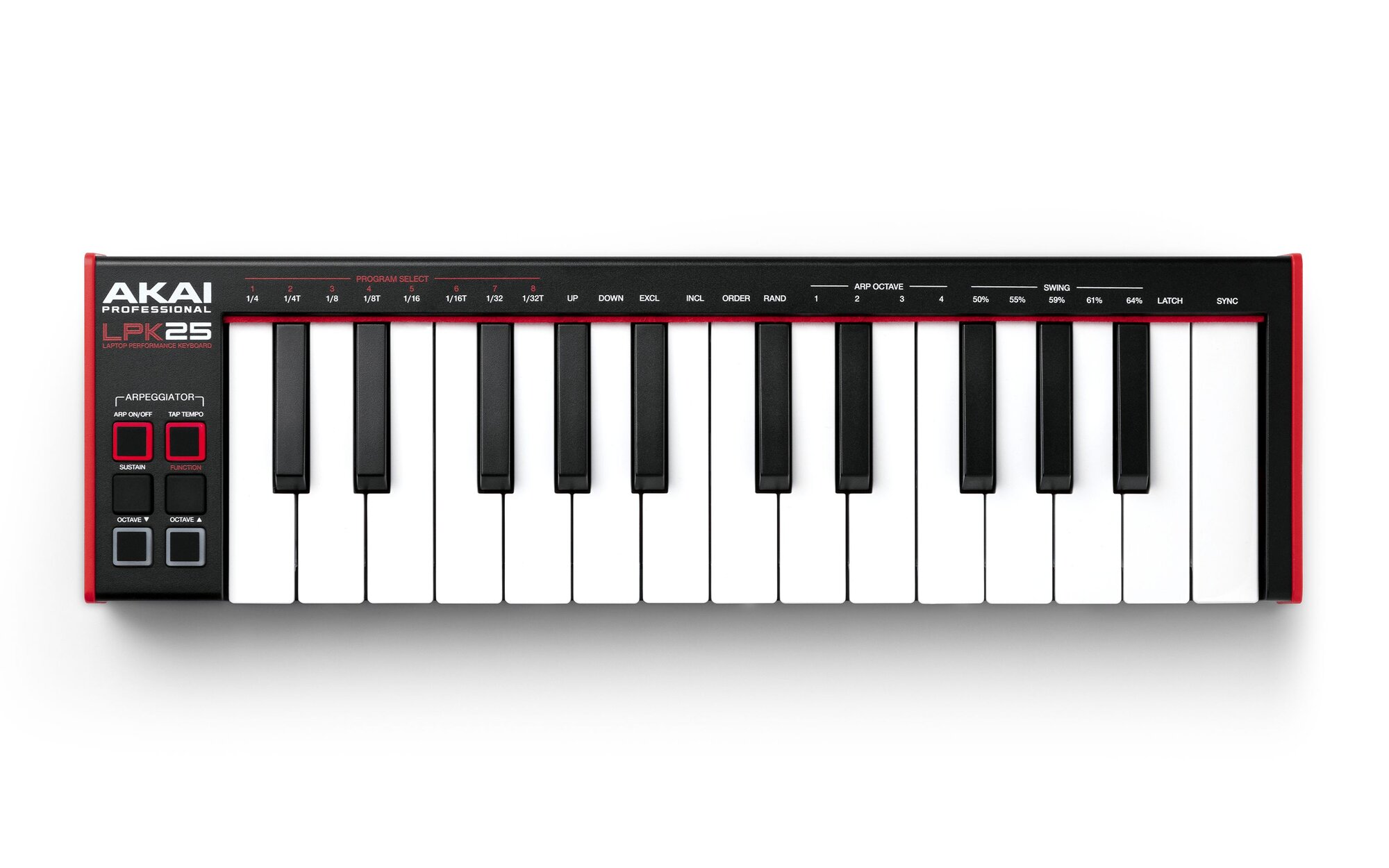
Your needs, this model
Does it fit your priorities?
Will the LPK25 MK2 fit a compact 25-key desk setup?
Akai lists 25 velocity-sensitive mini keys and a 13.7-inch body width, so its chassis clears a 16-inch width screen. The full desk still needs room for the USB lead, hands and neighboring equipment. Octave buttons shift the playable range but do not expand the notes available under both hands at once.
Explore this need in the finder →Does the LPK25 MK2 use USB-C?
Akai's FAQ distinguishes the MK2's full-sized USB connector from Mini-USB on the original LPK25, while the user guide calls for a standard USB cable. The reviewed sources do not identify that connector as USB-C, so do not treat this model as meeting a USB-C-only requirement; confirm the cable and host adapter for your setup.
Explore this need in the finder →Can the LPK25 MK2 make sound without a computer or software instrument?
No onboard sound engine or audio output is documented, and Akai says the controller itself does not generate sound. It sends MIDI through USB and needs compatible computer or iOS audio/MIDI software, or another supported host and sound source. The reviewed connection list documents no five-pin DIN output for direct connection to a DIN-only instrument.
Explore this need in the finder →Akai Professional’s LPK25 MK2 is a deliberately spare 25-key USB-MIDI controller: a velocity-sensitive mini-key bed, octave buttons, an internal clock and arpeggiator, and eight stored programs. Its modest dimensions suit a cramped setup, but this is not the pad-equipped MPK Mini, it does not document a direct five-pin MIDI output, and its USB connector is not identified as USB-C. This is a source-based assessment of Akai’s product data, FAQ and version 1.2 guide—not a hands-on playing test.
A very short physical range, with octave shifting
The MK2 has 25 velocity-sensitive mini keys. Akai says octave buttons let the player access the full 127-note MIDI range, but that is a shiftable range, not more notes under the hands at once. It can be convenient for entering a bass figure, a short melody or a chord shape, especially if parts are recorded in passes. Frequent two-handed passages, wide voicings or simultaneous bass-and-melody work are a different task: octave shifting cannot replace the reach of a 37- or 49-key bed.
Akai describes the MK2 keybed as second-generation dynamic and contrasts its spring-and-joint action with the original LPK25’s plastic friction hinge. The reviewed sources do not give a numeric key width, measured action or keyboard aftertouch specification. Treat the product description as a design claim rather than a substitute for trying the keys if touch or spacing is decisive. This model also omits the pad bank and rotary-control array found on Akai’s MPK Mini line; its surface is centered on the keybed and performance buttons.
Arpeggiator and clock are the distinctive controls
Instead of a row of knobs, the top edge labels eight program slots, note divisions, arpeggio directions, octave span, swing values and sync. The internal arpeggiator affects notes played on the keyboard, can run in several orders, and spans one to four octaves. The guide describes an internal MIDI clock as well as synchronization to a DAW’s external tempo. Tap Tempo changes the internal rate, but Akai notes that Tap Tempo does not work while externally synced.
Eight programs can store configurable arpeggiator settings in internal memory. Selecting or editing them is not a screen-driven workflow: the manual describes using the Function and Arp buttons with labeled keys, and Akai points to a downloadable editor for program management. That layout keeps the unit small, but it means configuration depends on key combinations and a computer-based editor rather than immediate access to dedicated parameter knobs. The momentary Sustain button doubles as a temporary arpeggiator latch; it is not a socket for a sustain pedal.
USB MIDI, not direct DIN hardware control
The single USB connection carries MIDI to and from a computer and also supplies power from its USB port. Akai’s FAQ calls the MK2 connector full-sized, distinguishing it from Mini-USB on the earlier LPK25. The product page and guide do not identify the connector standard more precisely, so a USB-C-only setup should not count on this controller without checking the exact cable and any host adapter.
Akai describes the LPK25 MK2 as a controller that does not make sound on its own. Use compatible software on a computer or iOS device, or another supported USB-MIDI host and sound source, and arrange audio monitoring separately. The reviewed connection list documents one USB port and no five-pin DIN output. If your synthesizer only accepts DIN MIDI, this is not a direct cable-to-synth choice; a compatible host or interface that converts the route would be a separate part of the setup. MIDI carries control data, not the resulting audio.
Small body, but still measure the whole workspace
Akai publishes a 13.7-by-4.0-by-1.5-inch body and a 0.99-pound weight. The chassis width is within a 16-inch screening limit, while a 4-inch depth leaves more front-to-back space than a broad control surface. Leave additional room for the USB cable bend, fingers and the equipment beside it; published body dimensions are not an ergonomic clearance test. The manufacturer’s guide lists a USB cable, download card, user guide and safety material in the box, but used or open-box offers can differ.
Against the 25-key MPK Mini IV, the LPK25 MK2 is the simpler, arpeggiator-oriented option. Their published widths are nearly identical—13.7 inches for the LPK25 MK2 and 13.68 inches for the Mini IV—but the Mini IV adds pressure-sensitive pads, USB-C and five-pin MIDI Out. Choose the LPK only when its lightweight keybed, clock/arpeggiator controls and lean panel fit the job; do not infer those other connections or pads from another Akai model.
Who should shortlist it
The LPK25 MK2 is worth considering when you need a portable 25-note MIDI input, prefer a built-in arpeggiator and clock over a grid of performance pads, and can accept USB power and a host-generated sound source. It is a poor match if USB-C is mandatory, a pressure-sensitive pad bank or direct DIN output is essential, or your music relies on a wide simultaneous keyboard range. Confirm the model suffix, cable, software-redemption terms, operating-system support and seller condition before buying; the current-reference label here is not a claim of stock, price or a guaranteed package.
Akai Professional LPK25 MK2 product page · Akai LPK25 MK2 FAQ · Akai LPK25 mk2 User Guide, version 1.2.
Key specifications
Key details at a glance
| Keys | 25 |
|---|---|
| Manufacturer's keybed description | Velocity sensitive mini keys |
| Width | 13.7 in |
| Pads | 0 |
| Velocity-sensitive pads | No |
| Pressure-sensitive pads | No |
| 5-pin MIDI Out | No |
| USB bus-powered | Yes |
| Assignable pedal input | No |
| 5-pin MIDI In | No |
| Depth | 4 in |
Use the exact model’s instructions for operating limits, supplied equipment and version differences.
Sources for this review
Sources for this assessment
Start with your setup, not a headline feature
Use the finder to combine key-count, connection, control and desk-fit requirements. Unverified specifications are never treated as a match.