
Your needs, this model
Does it fit your priorities?
Does the MPK Mini IV fit a compact 25-key USB-C and DIN setup?
Akai documents 25 velocity-sensitive mini keys, a USB-C host connection, eight pressure-sensitive pads and one five-pin MIDI output. The published 13.68-inch body width is within a 16-inch width screen, but it leaves only nominal space for cable bends, hands and nearby equipment; measure the complete setup. The direct DIN output can forward USB-host MIDI, or use its internal MIDI source with a separate 5 V, 0.5 A supply.
Explore this need in the finder →Do the Mini IV's pressure-sensitive pads mean its keys have aftertouch?
No. Akai specifies pressure sensitivity for the eight pads, but the reviewed product page and version 1.2 guide do not confirm aftertouch on the 25 keyboard keys. Treat these as separate capabilities and check the exact manual if key pressure after a note is held is essential.
Explore this need in the finder →Can I use the Mini IV's DIN output without a computer?
The guide describes an internal MIDI source for standalone DIN output and specifies a separate 5 V, 0.5 A supply for external-MIDI use. That arrangement sends notes and control data, not audio; the receiving instrument needs its own power and audio connection.
Explore this need in the finder →The Akai Professional MPK Mini IV pairs a 25-note mini-key range with USB-C, a five-pin MIDI output and eight pressure-responsive pads. That combination is more capable than a computer-only pad controller, but the short key span and the need to plan power for standalone MIDI work are important limits. This is a source-based assessment of Akai’s current product page, dedicated FAQ and version 1.2 user guide—not a hands-on playing test.
Twenty-five mini keys: compact reach, not a miniature piano promise
The Mini IV provides 25 velocity-sensitive mini keys. That is enough physical range for a bass line, melody, short chord voicings or a part recorded in layers, and octave controls let you move the playable register. They do not put more than two octaves under your hands at once. If a passage requires a wider simultaneous reach, choose a longer keybed before comparing knobs or software bundles.
Akai documents standard note, chord and scale modes, which change how the keyboard can send note data. The sources do not give a measured key width, establish keybed aftertouch, or report an action test. A product page’s key count and “mini” label cannot tell you whether the spacing or response will suit your hands. Try the keybed if touch is decisive, and keep the confirmed pad-pressure feature separate from the unconfirmed keyboard-aftertouch question.
Eight pressure-sensitive pads and a compact control surface
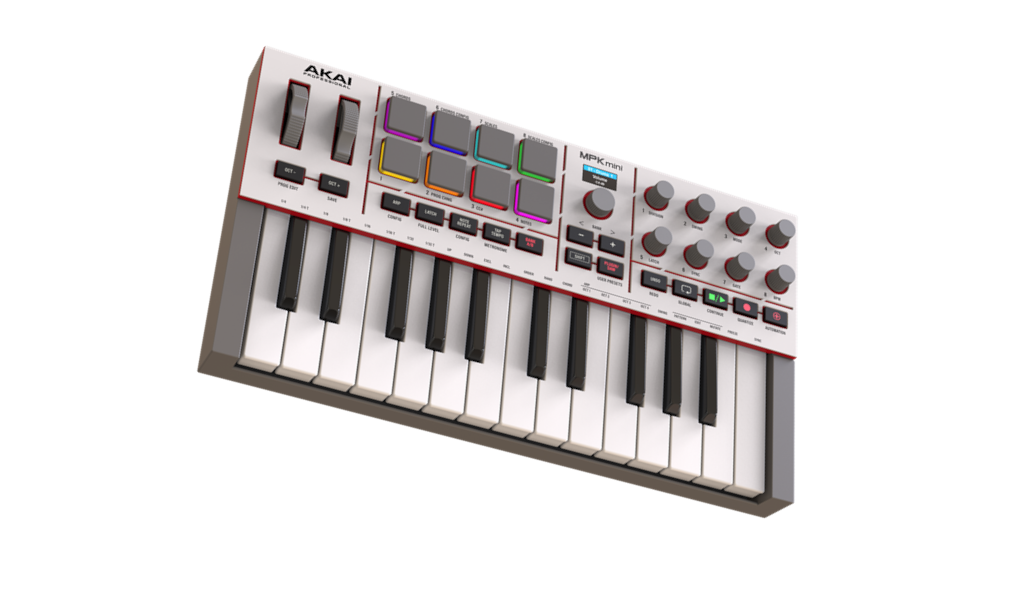
The top panel has eight RGB pads arranged in two banks. Akai specifies velocity and pressure sensitivity for the pads; a bank change expands the assignments without adding more physical pads. Pressure applied to a pad is not evidence of pressure response on a held keyboard note. The guide explains pad messages and modes, but the reviewed specification does not establish polyphonic pad aftertouch as a separate capability, so this assessment does not use that label.
Eight assignable rotary controls, a push encoder, pitch and modulation wheels, transport controls and a 0.96-inch color display offer more direct interaction than a bare keybed. They are useful when the target application maps them to parameters you need. The manual describes MIDI control and mode behaviour; it does not promise identical mappings in every DAW, so check the current setup instructions for your software and version.
USB-C computer control and a direct five-pin output
USB-C carries MIDI to and from a connected host and can power the controller. The rear-panel five-pin DIN socket is an output, not an input. In the guide’s USB-source arrangement, data received from the computer can be forwarded to external MIDI equipment. This can suit a desk where the Mini IV is connected to a DAW while also controlling a DIN-equipped synthesizer.
A second documented arrangement uses the controller’s internal MIDI data source and a separate 5 V, 0.5 A supply when no computer is connected. That is a control-data path, not a self-contained instrument: Akai’s reviewed connection and specification material documents no audio output or hardware sound engine. An external synthesizer still needs its own power and an audio connection to speakers or headphones; a software instrument needs a host and its own audio-monitoring path. MIDI does not carry the sound.
Published size and an unresolved specification conflict
Akai’s product page gives a body width of 13.68 inches and depth of 7.56 inches, while the version 1.2 guide rounds those to 13.7 by 7.6 inches. That width is below the finder’s 16-inch screening limit, but it is only the instrument body. The USB lead, DIN cable, nearby equipment, your hands and playing clearance need separate space.
The same two sources do not agree on height or weight: the product page lists 1.8 inches and 2.31 pounds, while the guide lists 1.5 inches and 2.2 pounds. These are not simple rounding differences. I leave both fields unresolved rather than combine or choose the more convenient figure. Ask the seller which exact edition is offered if height or carrying weight is a hard constraint.
Software is separate from the hardware
Akai’s FAQ describes Studio Instrument Collection and Ableton Live Lite 12 as included software offers redeemed through an inMusic account. Studio Instrument Collection is computer software; it does not turn the controller into a hardware sound source. Bundles, licensing steps and software versions can change, so verify the current offer and operating-system requirements before treating a package as included.
The MPK Mini IV is a plausible shortlist candidate when 25 mini keys are sufficient, USB-C computer connection is wanted, and pressure-responsive pads plus direct DIN output matter. It is a weaker match when you need a longer or full-size keybed, keyboard aftertouch, a five-pin MIDI input, or standalone audio. Confirm the product suffix and exact package with the seller: Akai’s page mentions two colorway options, but the inspected listing does not name the finishes or establish a retail SKU.
Akai Professional MPK Mini IV product page · Akai MPK Mini IV FAQ · Akai MPK Mini IV User Guide, version 1.2.
Key specifications
Key details at a glance
| Keys | 25 |
|---|---|
| Manufacturer's keybed description | Velocity sensitive mini keys |
| Width | 13.68 in |
| Pads | 8 |
| Velocity-sensitive pads | Yes |
| Pressure-sensitive pads | Yes |
| 5-pin MIDI Out | Yes |
| Computer connection | USB-C |
| USB bus-powered | Yes |
| Assignable pedal input | Yes |
| Depth | 7.56 in |
Use the exact model’s instructions for operating limits, supplied equipment and version differences.
Sources for this review
Sources for this assessment
Start with your setup, not a headline feature
Use the finder to combine key-count, connection, control and desk-fit requirements. Unverified specifications are never treated as a match.