
Your needs, this model
Does it fit your priorities?
Does the MPK225 fit a 25-key, DIN-output and pressure-pad brief under 19.25 inches?
Akai's page and quickstart specify 25 full-size keys, eight velocity- and pressure-sensitive pads, five-pin MIDI In/Out and a 19.25-inch-wide body. It passes a 19.25-inch bare-body cap when earlier models are included, but not 19 inches. The limit does not add room for rear plugs, hands or nearby gear.
Explore this need in the finder →Can MPK225 connect to a USB-C-only computer and send sound by itself?
The product guide documents USB computer MIDI and power but does not identify the physical device-side connector as USB-C, so a USB-C-specific requirement is not confirmed. The controller sends MIDI data rather than audio; use a computer or external sound module plus a separate audio and monitoring path.
Explore this need in the finder →What is actually in the MPK225 control surface and manual's box list?
Akai lists eight pressure-sensitive pads in four banks, eight encoders, four switches, five transport buttons, one expression input and one sustain/footswitch input. The guide's box list names a USB cable, Quickstart Guide and Safety & Warranty Manual; optional pedals and the 6V adapter are not promised in that list. Check the exact seller package and software-registration status.
Explore this need in the finder →The Akai Professional MPK225 pairs a short range of full-size keys with an unusually complete set of physical MIDI routes for its width: five-pin DIN In and Out, sustain and expression inputs, and a USB connection to a computer. It is an earlier MPK2 controller, not a self-contained keyboard instrument. The useful question is whether 25 full-size notes, a small pad bank and direct DIN justify its 19.25-inch chassis and older computer-port ambiguity.
Twenty-five full-size notes, not a 25-key miniature
Akai's model page describes 25 semi-weighted, full-size velocity-sensitive keys with aftertouch. The older quickstart guide's detailed table independently identifies a 25-key velocity-sensitive bed and a ten-octave range when octave controls or transposition are used. That is a compact physical span, not a piano-like uninterrupted range: reaching distant notes still involves octave changes, and “semi-weighted” is the maker's description rather than an independent feel test. It may fit bass, leads, one-handed parts or a desk where full-size spacing matters more than two-handed reach. A 49-key MPK249 or 61-key MPK261 is the closer comparison if you expect broader parts to remain under both hands.
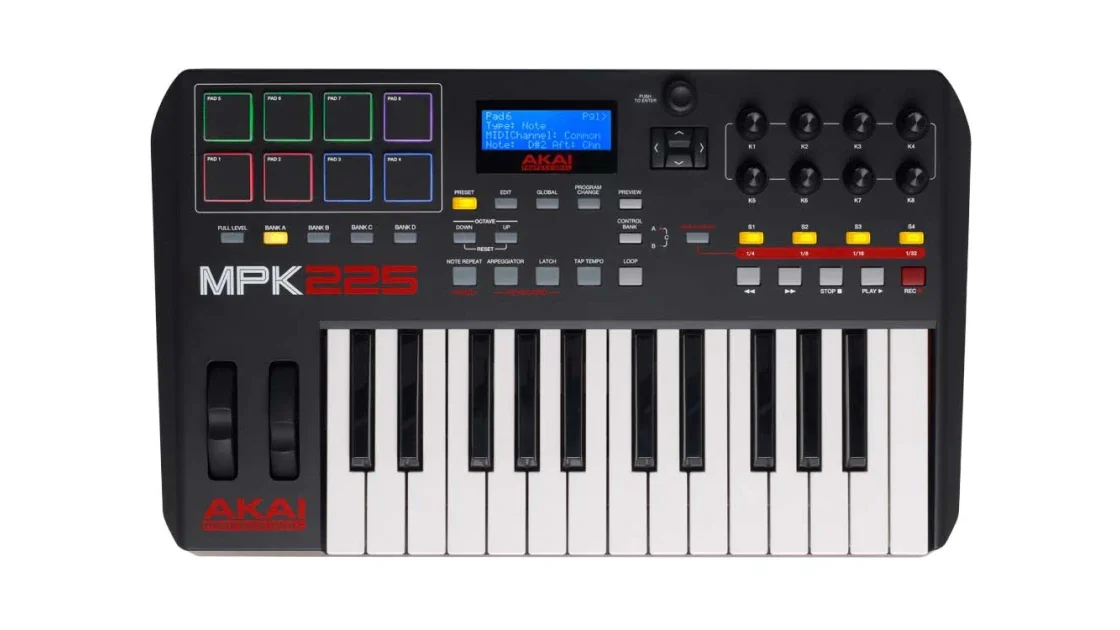
One line in the current page's technical panel calls the product an 88-key controller, but the exact page title, its main description, its detailed 25-key specification and the MPK225 quickstart agree on 25 keys. This assessment follows that product-specific evidence and does not repeat the stray 88-key line as a fact. The included image is the official product-page view of the MPK225 itself; it identifies the model, though it is an overhead rendering rather than a measurement of key spacing.
Eight pads and a modest control bank
The documented surface has eight velocity- and pressure-sensitive pads arranged across four banks, eight rotary encoders and four switches, alongside a display, pitch and modulation wheels, transport buttons and octave controls. A bank button can make a small pad surface address more than one group of notes, but the eight physical playing targets do not become 32 simultaneous pads. The MPK225 manual also exposes channel or polyphonic aftertouch choices for pads. That is separate from the keyboard's own aftertouch and from the initial velocity response; a sound or DAW must be configured to use those messages.
There are no faders in the MPK225's published control list. If your routine depends on several long-throw levels or drawbar-style adjustment at once, the MPK249 adds eight faders, eight encoders and eight switches, while the MPK261 keeps that 16-pad/fader surface and extends the key count. The MPK225's four switches and one bank of eight encoders are better understood as a compact assignment area than as a full-size DAW mixer.
DIN output is direct; USB type and audio are different questions
The guide documents five-pin MIDI In and Out. In a computer setup, the MPK225's MIDI Out can route computer MIDI to external gear, and incoming DIN MIDI can reach the computer; when the computer must relay MIDI In onward to an external device, the guide explicitly places that forwarding through the computer. The same rear panel has one sustain/footswitch input and one expression input. Those pedal sockets are optional accessories, not evidence that pedals are in the box.
Akai's manual says to connect its USB port to a computer with a standard USB cable and that the host provides operating power. The source material inspected here does not name the physical device-side connector as USB-C, so a USB-C-only requirement is not verified; do not infer port shape from the word “USB.” It also supports a computer-free route using a separately sold 6V, 1A adapter or a USB charger, but the controller still sends MIDI data rather than audio. For a stand-alone rig, budget for a powered receiving instrument and an audio/monitoring route as well as power.
Width is a body check, not a complete desk plan
Akai lists a 19.25-by-11.75-by-3.63-inch body and a 6.09-pound weight. The published width is a useful strict boundary: it passes a 19.25-inch body cap and misses 19 inches, but leaves no promised space for hands, neighbors, cables or connector bends. Check the depth behind the keyboard for USB, MIDI and pedal plugs, and account for the two wheels and upper controls when planning a stand or tray. These numbers describe the enclosure, not a tested ergonomic footprint.
Older software claims and exact-version checks
The older guide's box list names a USB cable, quickstart guide and safety/warranty sheet. It describes the power adapter and pedals as optional or sold separately. The currently displayed model page advertises software and partner offers, but that page does not establish that a used unit's registration code is unused, transferable or supported by a specific operating-system version. Akai's compatibility table names original and black MPK225 versions. A U.S. used listing also describes an MPK225 in Black, but no maker SKU links that individual unit to the support label or confirms its package or every version-specific feature. This assessment covers documented MPK225 model behavior, not a particular seller assembly. Verify the version, ports, included power equipment, software-transfer terms, condition and return window before ordering.
The MPK225 makes sense when the target is a compact, full-size 25-note controller with pressure-sensitive pads and built-in DIN sockets. It is a poor fit if the non-negotiable needs are USB-C, a wider key range, multiple faders, or sound from the keyboard without another instrument. Its controls and routes are documented, but no hands-on feel, reliability or performance testing is claimed here.
Key specifications
Key details at a glance
| Keys | 25 |
|---|---|
| Manufacturer's keybed description | Full-size piano-style semi-weighted keys |
| Width | 19.25 in |
| Pads | 8 |
| Velocity-sensitive pads | Yes |
| Pressure-sensitive pads | Yes |
| 5-pin MIDI Out | Yes |
| USB bus-powered | Yes |
| Assignable pedal input | Yes |
| Keyboard channel aftertouch | Yes |
| 5-pin MIDI In | Yes |
| Depth | 11.75 in |
| 5-pin MIDI outputs | 1 |
Use the exact model’s instructions for operating limits, supplied equipment and version differences.
Sources for this review
Sources for this assessment
- Akai Professional MPK225 exact product page and model-specific page data
- MPK225 Quickstart Guide v1.1, including product-specific connection and specification appendix
- Akai Professional macOS 26 Tahoe compatibility list
- Akai Professional MPK Series collection, previously enumerated one rendered query page
Start with your setup, not a headline feature
Use the finder to combine key-count, connection, control and desk-fit requirements. Unverified specifications are never treated as a match.