
Your needs, this model
Does it fit your priorities?
Does MPK249 meet a 49-key DIN/pad brief at a 29-inch maximum width?
Akai lists 49 full-size keys, 16 velocity- and pressure-sensitive pads, five-pin MIDI Out and a 29-inch body. With earlier models included, it clears a 29-inch bare-body cap and misses 28.75 inches. Leave additional room for cables, hands and the other pedal and MIDI connections.
Explore this need in the finder →Is MPK249 a verified USB-C controller or a standalone sound source?
Neither conclusion follows from the inspected model-specific sources. Akai documents computer MIDI and USB bus power but calls the lead a standard USB cable without naming the device-side connector; it does not document onboard sound or audio output. The optional adapter route can power MIDI control of external gear, which must generate sound and be monitored separately.
Explore this need in the finder →What should an Apple-silicon Mac owner verify before connecting MPK249?
Akai's support article identifies firmware v1.02 as addressing Apple-silicon connection issues. Its update instructions specify an Intel Mac or an M1/M2 Mac with a powered USB hub for the update process. Check the unit's installed version, the current Akai instructions and the exact host/operating system before relying on the connection.
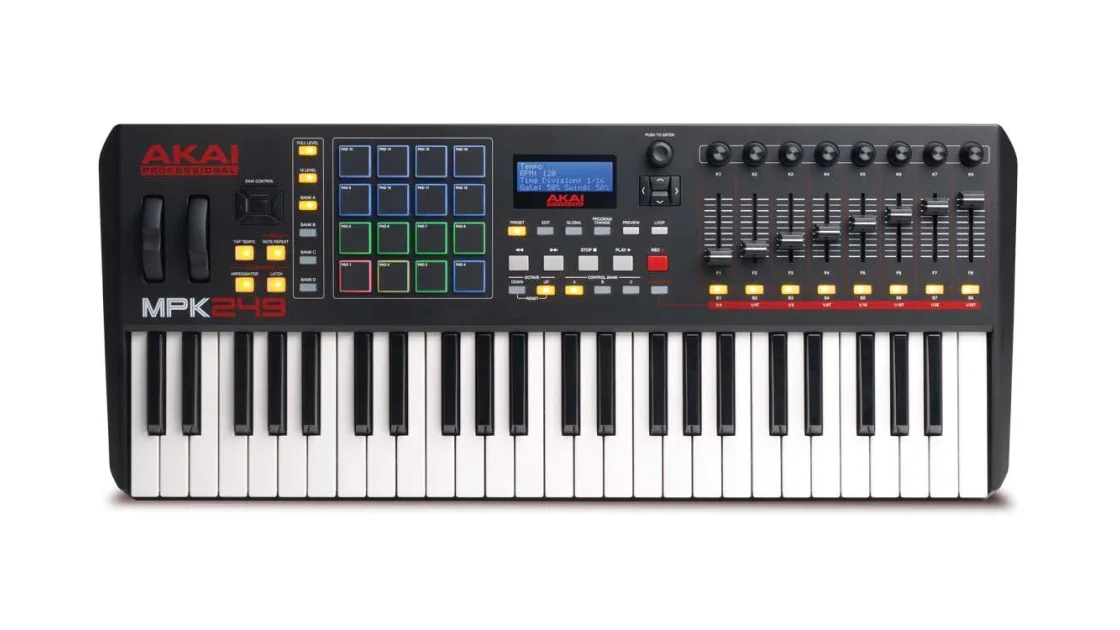
Explore this need in the finder →The MPK249 is the middle member of Akai's earlier MPK2 controller range: 49 full-size semi-weighted keys, 16 pressure-sensitive pads and a row of eight assignable faders backed by encoders and switches. Its appeal is not simply that it has more keys than the MPK225; it keeps the same direct five-pin MIDI connections, adds a more substantial control surface and remains short of the 61-key MPK261's larger playing span. The body is 29 inches wide, and its computer-side USB connector type is not established in the inspected model sources.
Forty-nine notes with aftertouch
Akai describes a semi-weighted full-size keybed, velocity-sensitive keys and aftertouch. The exact user guide identifies 49 keys, the octave/transposition range and a setting for enabling or disabling keyboard aftertouch. This is a source-backed expression feature, not a claim about key response measured in use; the documentation does not supply a force curve or a hands-on comparison. Forty-nine notes are a plausible compromise for two-hand parts and broader split layouts than a 25-key board, while still requiring octave changes for very wide passages.
The main practical alternative inside the family is MPK225: it measures 19.25 inches wide, but its keybed stops at 25 full-size notes, its pad count is eight, and its listed switches total four. MPK249 expands to 16 physical pads, eight faders, eight encoders and eight switches. If long fader moves and multi-part control are relevant, those are concrete surface differences. If the extra pads and faders would sit unused, the longer enclosure may take more space without helping the task.
Pad pressure, faders and the DAW boundary
The exact MPK249 specifications list 16 velocity- and pressure-sensitive pads across four banks, eight faders, eight 360-degree encoders and eight switches. The manual describes pad aftertouch as configurable for channel or polyphonic messages. These are MIDI controls; the target application or virtual instrument must map them, and a pad bank does not include a drum sampler or guarantee a ready-made mapping in every DAW. The manufacturer's page lists software offers and downloads, but activation, current compatibility and transfer eligibility are not fixed by the hardware spec.
The physical MIDI routes are 5-pin In and Out. The guide describes the USB connection as both a computer MIDI path and a power source; it also explains that DIN output can carry computer-sent data, and that MIDI arriving at DIN In can be passed to the computer. Forwarding that incoming MIDI back to external gear uses the computer as an intermediary. A keyboard can therefore sit in a useful computer-plus-hardware setup, but this is still MIDI routing, not USB audio. The guide's “standard USB cable” wording does not identify the controller's device-side connector as USB-C, so a USB-C-specific match remains unverified.
Power, pedals and a computer-free route
The published power options are host USB bus power, a separately sold USB charger or a 6V DC/1A center-positive adapter. The MPK249 guide explicitly describes using the external adapter when no computer is in the setup and the controller is operating an external MIDI module. The receiving module, its own power and the audio/monitoring path remain necessary; the MPK249 does not document onboard sounds or an audio output. One sustain/footswitch input and one expression input are listed. Pedals and a mains adapter should be treated as separately sourced unless the exact seller package says otherwise.
A dated support detail matters for some Mac users: Akai says MPK249 firmware v1.02 addresses Apple-silicon connection issues, and its updater instructions require an Intel Mac or an M1/M2 Mac using a powered USB hub for the update process. Its current compatibility material still flags the firmware version for Apple-silicon support. That makes firmware and the update host part of the setup plan, not a universal guarantee about every newer computer or operating system. Check the current Akai support page before relying on an old unit with your exact system.
Measure the 29-inch body, then the cables
Akai lists 29 by 12.25 by 3.38 inches and 12.6 pounds. At a 29-inch maximum-width answer it passes the bare-body limit; at 28.75 inches it does not. The remaining 0.25-inch interval is an input threshold, not a real-world tolerance. DIN, USB, sustain, expression and optional power plugs can extend beyond the case, and there is no clearance measurement for hands, a wall, a stand or neighboring equipment. A shallow desk may be limited by the 12.25-inch chassis plus rear cable routing even when the width appears acceptable.
Check the precise generation and seller package
Akai's support list distinguishes original and black MPK249 versions, and a U.S. retailer has listed an MPK249 Black-on-Black edition. A separately inspected product image shows the black-key version; its key count, pads, controls and MIDI layout match the MPK249 configuration discussed here. Akai's inspected pages do not provide a black-specific manufacturer part number or an edition-by-edition specification table, so this is a documented visual variant rather than evidence of a different operating plan. The quickstart box list names a USB cable, quickstart guide and safety/warranty material; pedals and the optional power adapter are not listed in that box list. Before buying, verify that the offer is the 49-key MPK249 rather than MPK225 or MPK261, confirm the actual finish, physical USB port and current firmware/support route, and ask whether the advertised software registration is usable.
Choose the MPK249 when 49 full-size keys, 16 pressure-sensitive pads, eight faders and a direct DIN connection all matter together. Pick MPK225 if the smaller range and smaller body are enough, or MPK261 if 61 notes and its additional footswitch input are essential. These comparisons follow published configuration differences, not a hands-on ranking; no price, availability, tested-feel or reliability claim is made.
Key specifications
Key details at a glance
| Keys | 49 |
|---|---|
| Manufacturer's keybed description | Full-size piano-style semi-weighted keys |
| Width | 29 in |
| Pads | 16 |
| Velocity-sensitive pads | Yes |
| Pressure-sensitive pads | Yes |
| 5-pin MIDI Out | Yes |
| USB bus-powered | Yes |
| Assignable pedal input | Yes |
| Keyboard channel aftertouch | Yes |
| 5-pin MIDI In | Yes |
| Depth | 12.25 in |
| 5-pin MIDI outputs | 1 |
Use the exact model’s instructions for operating limits, supplied equipment and version differences.
Sources for this review
Sources for this assessment
- Akai Professional MPK249 exact product page and model-specific page data
- MPK249 User Guide v1.0
- Akai Pro MPK249/MPK261 firmware v1.02 Apple-silicon setup instructions
- Akai Professional macOS 26 Tahoe compatibility list
- Akai Professional MPK Series collection, previously enumerated one rendered query page
- Guitar Center MPK249 Black-on-Black listing
- Music City Australia MPK249 Black Edition product page and exact image
Start with your setup, not a headline feature
Use the finder to combine key-count, connection, control and desk-fit requirements. Unverified specifications are never treated as a match.