
Your needs, this model
Does it fit your priorities?
What does the MPK25 offer if I need an earlier controller with at least 25 keys?
The operator's manual specifies 25 semi-weighted, velocity- and channel-pressure-sensitive keys. That makes it a documented 25-key option, not a wide-range keyboard: players needing 49 or more simultaneous keys should compare the MPK49 or a larger model. Its 477 mm body width is about 18.78 inches before adding cable and hand clearance.
Explore this need in the finder →Are the MPK25 pads pressure-sensitive, and how many can I play?
Akai's manual documents 12 velocity- and pressure-sensitive pads with four banks. Pads can trigger software or hardware messages, but the exact destination must understand the configured MIDI assignments; the manual does not identify the pads as polyphonic-aftertouch devices.
Explore this need in the finder →Can the MPK25 control an external synth without making its own sound?
The manual documents five-pin MIDI In and Out, a USB computer-MIDI route, and optional 6 V/1 A external power for computer-free operation. It documents no onboard sound engine or audio output, so the attached instrument must make sound and provide audio monitoring. The exact USB device connector format is not named in the source.
Explore this need in the finder →Akai's exact product-data record calls the MPK25 a legacy portable keyboard controller, while its model-specific operator's manual supplies the useful detail: a 25-key semi-weighted bed, 12 pressure-sensitive MPC pads, direct five-pin MIDI and pedal inputs. The old MPK25 should be assessed on that record, not by assuming it shares a later MPK25 successor's controls or USB format. This is a source-based review, not a report of hands-on testing.
A narrow key range, with more than a bare mini keyboard
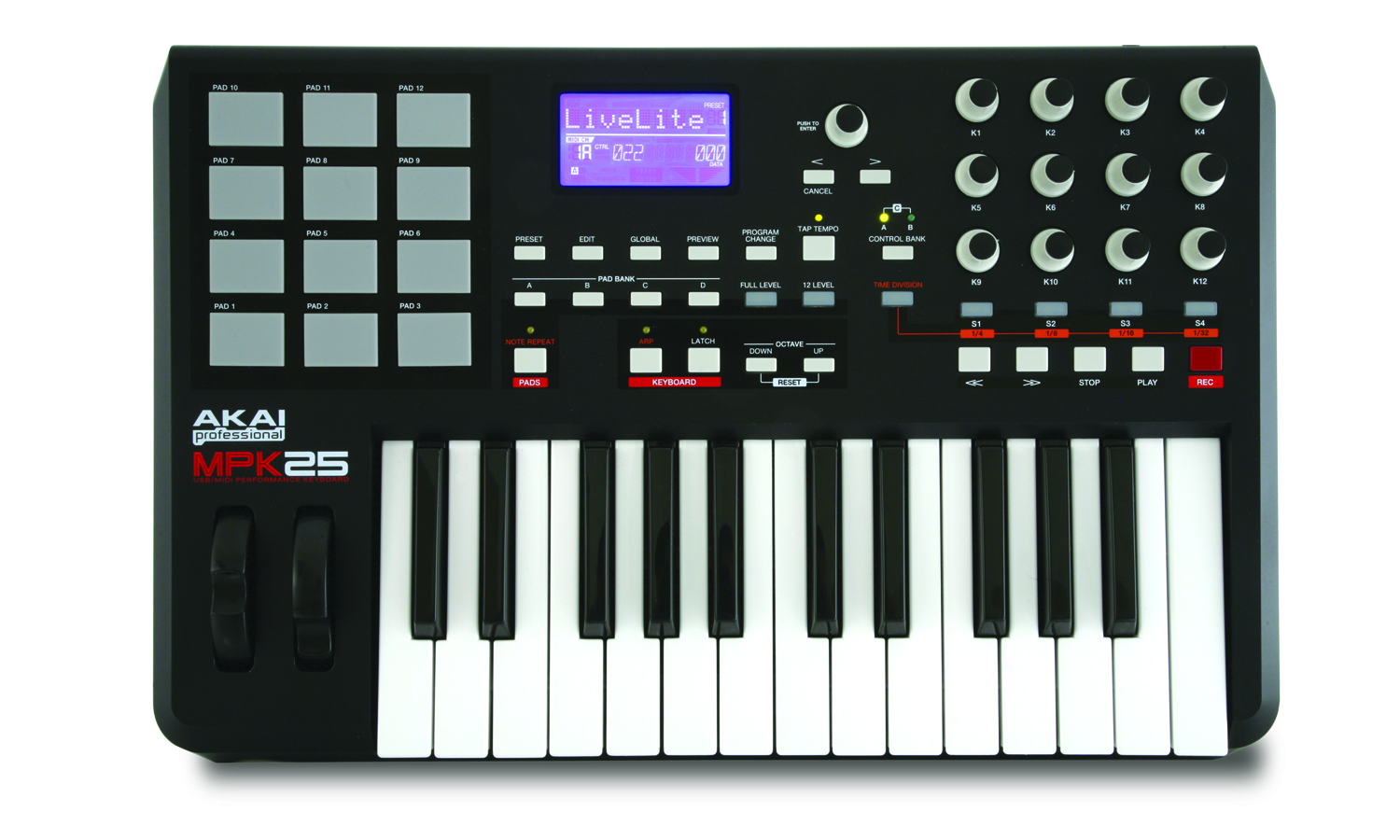
The MPK25 has 25 semi-weighted keys, and Akai specifies both velocity and channel-pressure response. This gives the unit a short span for entering a bass line, melody, compact chord or one part at a time. It does not offer the simultaneous reach of the MPK49 or MPK88; octave controls can shift the notes being sent, but they cannot put additional physical keys under the hands. The manual does not state the width of an individual key, a measured action curve or a comparative feel test, so “semi-weighted” is the grounded description rather than a promise about how it will play.
Akai's technical specifications list the body at 477 x 359 x 88 mm. The width converts to about 18.78 inches, a useful first check against a shelf or desk, but not a whole placement plan: the published chassis figure leaves no allowance for a USB lead, the two pedal plugs, hand movement or neighboring gear. A buyer with a firm 18.75-inch space would be below that body width; 19 inches clears it on paper with little extra room. Measure the exact unit and reserve clearance around its rear and pedal connections.
Pressure-sensitive pads and a dense assignment surface
The 12 MPC pads are specified as both pressure- and velocity-sensitive and are arranged in four banks. Depending on the receiving software or hardware, they can trigger drum notes, samples or configured MIDI commands. Full Level and 12 Level change how pad velocity is handled, while Note Repeat can retrigger a held pad in time divisions. The manual also describes an internal arpeggiator for keyboard notes. These are controller features: the MPK25 does not supply drum sounds, instruments or audio monitoring.
For this compact key count, the control row is unusually populated: twelve assignable 360-degree knobs in two control banks, four assignable switches, a backlit LCD, a data dial, and separate pitch-bend and modulation wheels. Twelve knobs suit a setup that benefits from many mapped continuous parameters, but there are no faders. A producer who wants physical level sliders across a larger keyboard should consider the MPK49 instead; its eight knobs sit alongside eight faders and eight buttons.
Direct MIDI output, USB hosting and optional pedals
The MPK25 manual describes computer MIDI and bus power over its USB connection, and also shows five-pin MIDI In and Out. That DIN output can send notes or pad/control messages to an external sound module without routing them through a computer. A separate DIN input accepts incoming MIDI. Akai does not label the device-side USB connector standard in the inspected manual, so this assessment does not certify USB-C. The unit has 1/4-inch TS sustain and TRS expression-pedal inputs. If the computer is absent, Akai lists an optional MP6-1 6 V, 1 A adapter; the receiver and its audio path still need their own power and connections.
The controller does not document an onboard sound engine or audio output. In a software setup, a compatible host and instrument plug-in make sound; in a hardware setup, the external synth or module does. MIDI control and audio are different paths, so confirm how the sound source will reach headphones, monitors or a mixer before relying on this as a complete music-making rig.
What the MPK25 is—and is not—compared with nearby models
The MPK25 query describes it as based closely on the MPK49, but their actual manuals show important differences. Both have semi-weighted keys with channel pressure, 12 pressure-sensitive pads, five-pin MIDI and sustain/expression connections. The 25 has twelve knobs and four switches in a 477 mm-wide body; the MPK49 has 49 keys, eight knobs, eight faders and eight switches in a 730 mm-wide body. The separate MPK88 instead has 88 fully weighted hammer-action keys and 16 pads; its manual does not supply a body width. Those differences make them different work surfaces, not interchangeable sizes of one feature set.
Legacy buying checks matter more than the old software bundle
Akai's product-data query marks this unit legacy. Its historical accessories list names a one-meter USB cable and manual, and the download record lists editor and setup files, but none of that establishes what a present used or open-box seller includes, whether a software license transfers, or whether the old editor installs on a current computer. Check the exact MPK25 name, inspect the pad surfaces, encoder behavior, wheels, display and DIN/pedal sockets, and confirm the correct optional power supply if computer-free operation is planned. Do not infer condition, current availability, seller support or a price from a legacy page.
Sources: Akai MPK25 legacy product route · MPK25 Quickstart Guide · MPK25 Operator's Manual.
Key specifications
Key details at a glance
| Keys | 25 |
|---|---|
| Manufacturer's keybed description | Semi weighted |
| Width | 18.78 in |
| Pads | 12 |
| Velocity-sensitive pads | Yes |
| Pressure-sensitive pads | Yes |
| 5-pin MIDI Out | Yes |
| USB bus-powered | Yes |
| Assignable pedal input | Yes |
| Keyboard channel aftertouch | Yes |
| 5-pin MIDI In | Yes |
| Depth | 14.13 in |
| 5-pin MIDI outputs | 1 |
Use the exact model’s instructions for operating limits, supplied equipment and version differences.
Sources for this review
Sources for this assessment
Start with your setup, not a headline feature
Use the finder to combine key-count, connection, control and desk-fit requirements. Unverified specifications are never treated as a match.