
Your needs, this model
Does it fit your priorities?
Does MPK261 fit a 61-key DIN-and-pressure-pad brief under 35.75 inches?
Akai lists 61 full-size keys, 16 velocity- and pressure-sensitive pads, direct five-pin MIDI Out and a 35.63-inch body. It fails a 35.5-inch bare-body cap and first fits the next quarter-inch setting, 35.75 inches, when earlier models are included. That 0.12-inch nominal margin is not cable or hand clearance.
Explore this need in the finder →Can MPK261 split the keybed and independently route two parts?
The MPK261 user guide documents an optional split into two zones with a split note, a separate channel for the right zone and choices about which zones respond to controls. That is MIDI routing configuration; the target sound sources or DAW still need compatible channels and the controller itself does not generate audio.
Explore this need in the finder →Does MPK261 have a verified USB-C connector and is its adapter included?
Akai's exact guide describes a standard USB cable and computer MIDI/power but does not identify the device-side connector as USB-C. It lists a 6V DC adapter and USB charger as sold separately. Check the actual port, cable, included power supply, firmware and return terms for the exact unit.
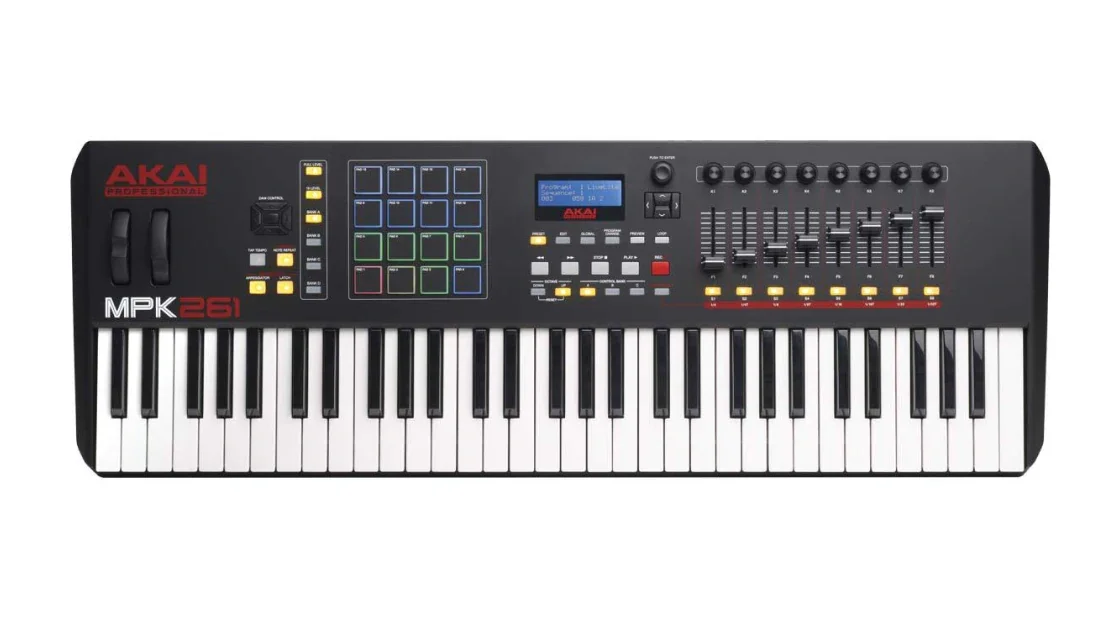
Explore this need in the finder →The Akai Professional MPK261 is the broadest keyboard in the MPK2 group reviewed here: 61 full-size semi-weighted keys, 16 pressure-sensitive pads, eight faders, eight encoders and eight switches. It adds two sustain/footswitch sockets where the MPK249 lists one, and its manual documents a split mode that can assign left and right key zones to MIDI channels. That expanded surface comes with a 35.63-inch width and a 15.1-pound listed weight, so it is a controller for a workspace that can support the whole chassis.
Five octaves, with a documented split
Akai's page describes 61 semi-weighted full-size velocity-sensitive keys with aftertouch. The user guide supports a split into two keyboard zones, with a split point and separate channel assignment for the right-hand zone; it also describes routing several controls to one zone, both or neither. This gives the MPK261 a documented way to address two MIDI destinations from one keybed. It does not mean two independent sound engines are inside the controller, and it does not establish a specific DAW or synthesizer mapping until those endpoints are configured.
Compared with the MPK249's 49 notes, the extra octave extends the playing span and the split range, but its enclosure is about 6.6 inches wider by Akai's published dimensions. The MPK225 is much narrower and keeps full-size spacing but has only 25 keys and eight pads. Choose among these models by the physical range and controls a session actually needs rather than treating the largest member as automatically better.
Sixteen pressure pads and an eight-fader surface
The MPK261's 16 pads respond to velocity and pressure and can be assigned across four banks. The manual allows channel or polyphonic pad-aftertouch messages. The eight faders, eight rotary encoders and eight switches add separate ways to send MIDI messages, and Akai's technical table lists transport, pitch/modulation and octave controls. None of those counts guarantees a useful assignment in every software setup; check whether the target DAW sees the correct port, whether its control script or MIDI learn supports the intended message, and whether the relevant instrument responds to pressure or aftertouch.
The two sustain/footswitch inputs can reduce the need to swap one pedal between tasks, while a separate expression input provides another assignable route. They are not pedals and no pedal package is promised by the hardware specification. The user guide lists a USB cable in the box contents; it describes power from computer USB or an optional external supply, and does not state that the optional adapter is included.
USB, DIN and sound are separate paths
The manual describes a USB connection to a computer for MIDI transfer and bus power, alongside one five-pin MIDI In and one five-pin MIDI Out. For external gear, computer-generated MIDI can pass through the MPK261 to the DIN output. MIDI received at DIN In is delivered to the computer, with any onward forwarding through the computer. For computer-free control, the product documentation permits a separately sold 6V DC/1A adapter or USB charger; the connected MIDI instrument must still make sound and have its own audio and monitoring path. The MPK261 is a controller, not a keyboard with built-in voices or speaker.
The inspected exact product page and manual call the host port USB but do not identify the physical device-side connector as USB-C. Treat a USB-C host requirement as unresolved until the actual unit or a model-specific port diagram confirms the plug. A cable or adapter that fits a computer is not the same as a controller with a documented USB-C connector.
Firmware is a compatibility check, not a feature upgrade
Akai's support article says firmware v1.02 for MPK261 addresses connection issues with Apple-silicon processors; it says the update does not change product features. Its update instructions specify an Intel Mac or an M1/M2 Mac with a powered USB hub for the update process and warn not to disconnect during transfer. Current compatibility information still flags v1.02 for the Apple-silicon route. These are manufacturer support conditions, not a guarantee about every later host. Check the version on the exact unit and consult Akai's current instructions before updating or connecting it to a particular operating system.
Plan for 35.63 inches before adding the cables
Akai lists a 35.63-by-12.25-by-3.38-inch body at 15.1 pounds. It fails a 35.5-inch bare-body cap and first passes the finder's next quarter-inch setting, 35.75 inches. That is a nominal 0.12-inch margin: connector clearance, hand movement, stand support and room to reach the rear sockets are not included. The body measurement is useful for rejecting an obviously too-small desk, but it does not replace measuring a complete setup with cable bends and playing posture.
Confirm which unit and package is being offered
Akai's compatibility table names original and black MPK261 versions. A U.S. used listing describes a black-finish MPK261 with the 61-key model layout, but it does not provide a maker MPN connecting that unit to the support label. Its exact package, condition and any unreported version differences remain item-specific. This assessment covers documented MPK261 model behavior, not a particular seller assembly. Check that the model is not an MPK249 or another family controller, then confirm cable, adapter or pedals, actual USB connector, firmware, software-transfer terms and return window. The official image is a manufacturer model rendering, not the used unit or a package inventory.
The MPK261 suits a setup that can use its 61-note reach, split routing, multi-control surface and direct MIDI DIN together. Its extra keys and second footswitch input are meaningful over the MPK249 only when the work uses them; otherwise its width and weight are real costs. No hands-on keybed, latency, durability or performance test is claimed.
Key specifications
Key details at a glance
| Keys | 61 |
|---|---|
| Manufacturer's keybed description | Full-size piano-style semi-weighted keys |
| Width | 35.63 in |
| Pads | 16 |
| Velocity-sensitive pads | Yes |
| Pressure-sensitive pads | Yes |
| 5-pin MIDI Out | Yes |
| USB bus-powered | Yes |
| Assignable pedal input | Yes |
| Keyboard channel aftertouch | Yes |
| 5-pin MIDI In | Yes |
| Depth | 12.25 in |
| 5-pin MIDI outputs | 1 |
Use the exact model’s instructions for operating limits, supplied equipment and version differences.
Sources for this review
Sources for this assessment
- Akai Professional MPK261 exact product page and model-specific page data
- MPK261 User Guide v1.0
- Akai Pro MPK249/MPK261 firmware v1.02 Apple-silicon setup instructions
- Akai Professional macOS 26 Tahoe compatibility list
- Akai Professional MPK Series collection, previously enumerated one rendered query page
Start with your setup, not a headline feature
Use the finder to combine key-count, connection, control and desk-fit requirements. Unverified specifications are never treated as a match.