
Your needs, this model
Does it fit your priorities?
What distinguishes the MPK49 from Akai's 25-key MPK25?
Both guides document semi-weighted keys with channel pressure, 12 pressure-sensitive pads, 5-pin MIDI In/Out and sustain/expression inputs. The MPK49 provides 49 keys and adds eight faders plus eight knobs and eight switches; the MPK25 has 25 keys and twelve knobs. The MPK49's documented body width is 730 mm, about 28.74 inches.
Explore this need in the finder →Can an MPK49 satisfy a pressure-pad and external-MIDI setup?
Yes, within the manual's documented feature scope: it identifies 12 velocity- and pressure-sensitive pads and a five-pin MIDI output, with MIDI In as well. A compatible destination still has to interpret the controller messages, and its audio and power needs remain separate.
Explore this need in the finder →How much space should I allow for the MPK49?
Akai lists the body at 730 x 300 x 100 mm. The width converts to about 28.74 inches, so a 28.5-inch body cap excludes it and the next valid quarter-inch setting of 28.75 inches admits it. That leaves almost no spare room for plugs, hands or nearby gear; the MPK88's width is not provided in the manual and cannot be compared numerically.
Explore this need in the finder →The MPK49 is a wider earlier-generation Akai controller, not just an MPK25 with extra keys. Its own version-1.2 manual documents a 49-key semi-weighted bed with channel pressure, twelve pressure-sensitive pads, eight faders, eight knobs, eight switches, MIDI DIN and two pedal inputs. Akai's current product-data query marks the model legacy. This assessment is grounded in those exact sources and makes no claim of personal use or testing.
Forty-nine semi-weighted keys add reach, not a piano claim
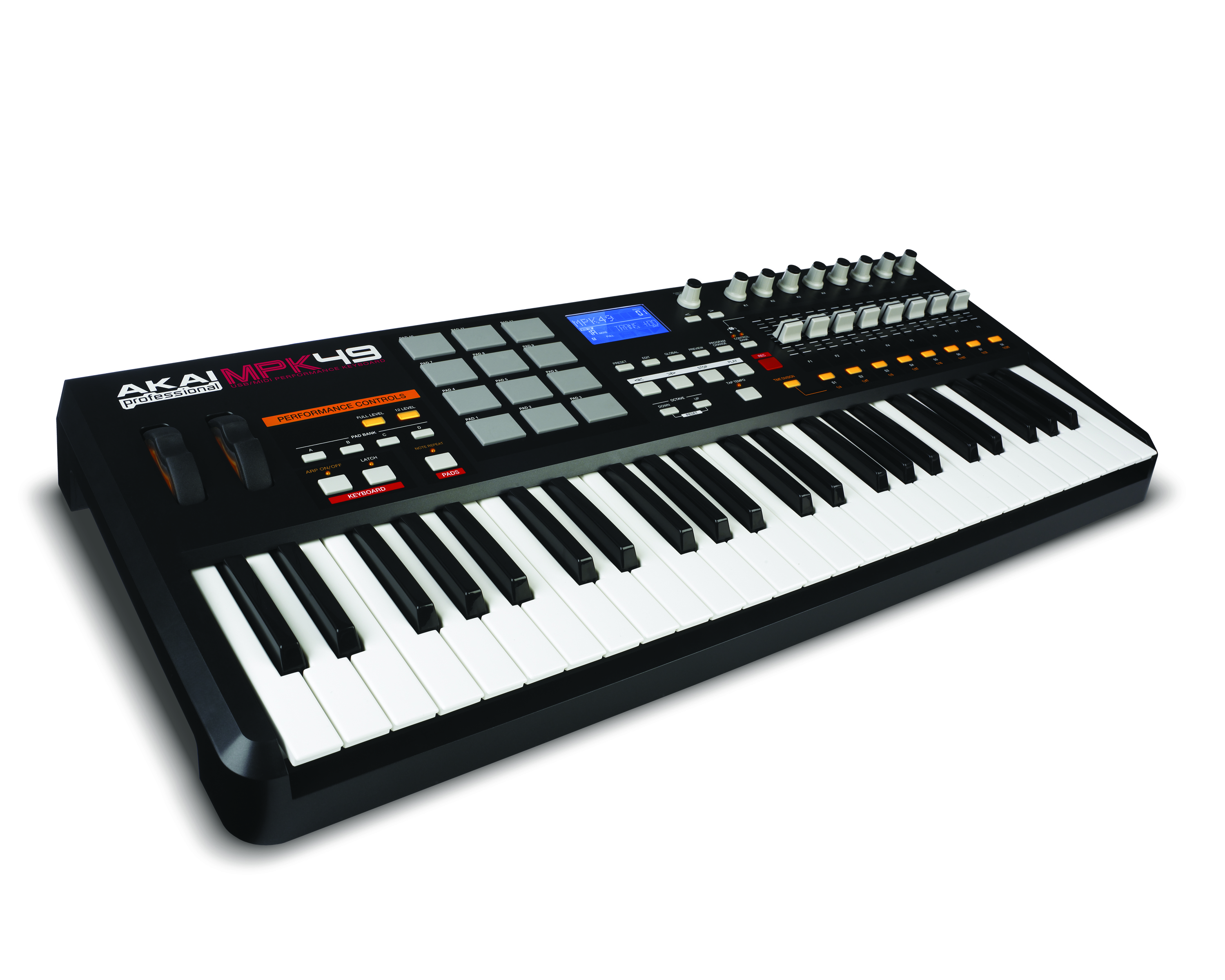
Akai specifies 49 semi-weighted keys with velocity and channel-pressure sensitivity. That expands the simultaneous playing range considerably beyond a 25-key controller: two-handed chord shapes and broader parts require fewer octave shifts, though the sources do not establish a piano-action feel or a measured force curve. The manual's “keyboard aftertouch” editing section explains channel-pressure assignment. For shoppers who want a longer physical span but a lighter controller-style action, this is the model's clearest distinction from the fully weighted hammer-action MPK88.
The manual lists a 730 x 300 x 100 mm body, about 28.74 inches wide. That is a meaningful planning boundary: a 28.5-inch shelf is too narrow for the nominal chassis, while a 28.75-inch cap only just fits the body and leaves essentially no margin for cabling, hands or adjacent equipment. The depth is about 11.81 inches before any support or rear lead clearance. The MPK25 is a more compact 477 mm wide, while the MPK88 is an 88-key design whose reviewed manual does not give a width. Do not use either sibling's dimensions for the MPK49.
A fader-and-pad workflow with flexible mappings
The twelve velocity- and pressure-sensitive MPC pads are assigned through four banks, which lets a performer move between groups of drum hits or MIDI controls. Akai also documents Note Repeat, Full Level, 12 Level and an arpeggiator. The note-repeat and arpeggiator timing can interact with external MIDI clock, so a host or device has to be configured to supply or receive the expected clock rather than assuming the features synchronize automatically.
Eight assignable 360-degree knobs, eight faders and eight buttons form a control surface that goes beyond the MPK25's twelve knobs and four switches. Three control banks allow different assignments to be selected, but changing banks can create a mismatch between a physical fader position and the value last sent; Akai includes a preview function for checking the value before transmission. The backlit LCD, pitch-bend and modulation wheels, transport controls and 30 internal presets support editing and recall. This is a surface for mapped software or MIDI gear—not an onboard synthesizer.
USB plus direct DIN; no built-in audio
The MPK49's manual documents USB for computer MIDI and bus power, along with five-pin MIDI In and Out. The DIN output can reach an external sound module directly; an incoming DIN signal can enter the controller and be routed according to the manual's MIDI behavior. The device-side USB connector type is not named in the reviewed guide, so USB-C should not be assumed. The rear panel also provides a 1/4-inch TS sustain input and 1/4-inch TRS expression input. Akai lists USB bus power or an optional 6 V, 1 A adapter. For a computer-free setup, confirm the correct supply and also plan power and audio monitoring for the external sound source.
No MPK49 sound engine, headphone socket or audio output is documented. A computer instrument, external synthesizer or sound module must make the sound, and a separate output chain must feed headphones or speakers. That separation is useful when the controller is one part of a studio or live MIDI rig, but it makes the MPK49 unsuitable as a self-contained keyboard instrument.
Where it fits among older MPK models
Akai's exact query says the MPK25 is closely based on the MPK49, and the model manuals support that family resemblance: both have semi-weighted keys with channel pressure, twelve pressure-sensitive pads, DIN MIDI and sustain/expression inputs. The MPK25 has 25 keys, twelve knobs and a smaller control row; the MPK49 has 49 keys and adds eight faders plus eight switches. The MPK88 changes both scale and action, using 88 fully weighted hammer-action keys and 16 pads. Choose among them by the actual playing range, action and footprint, not the shared MPK name.
Check software, condition and included accessories carefully
The historical MPK49 manual lists a one-meter USB cable, CD-ROM and manual as original accessories, and Akai's legacy download record offers preset-editor software and setup documents for several DAWs. A seller's package may differ; CD software, editor availability and license transfer are not guaranteed to work with a current host system. Before considering a used unit, verify the exact model, all 49 keys, display, knobs, faders, pads, bank buttons, wheels, DIN sockets and pedal inputs. Check the power supply requirements, cable type, return terms and software support independently. Akai's legacy label is not proof of current stock, and the reviewed sources establish no present price or seller condition.
Sources: Akai MPK49 legacy product route · MPK49 Quickstart Guide · MPK49 Reference Manual.
Key specifications
Key details at a glance
| Keys | 49 |
|---|---|
| Manufacturer's keybed description | Semi weighted |
| Width | 28.74 in |
| Pads | 12 |
| Velocity-sensitive pads | Yes |
| Pressure-sensitive pads | Yes |
| 5-pin MIDI Out | Yes |
| USB bus-powered | Yes |
| Assignable pedal input | Yes |
| Keyboard channel aftertouch | Yes |
| 5-pin MIDI In | Yes |
| Depth | 11.81 in |
| 5-pin MIDI outputs | 1 |
Use the exact model’s instructions for operating limits, supplied equipment and version differences.
Sources for this review
Sources for this assessment
Start with your setup, not a headline feature
Use the finder to combine key-count, connection, control and desk-fit requirements. Unverified specifications are never treated as a match.