
Your needs, this model
Does it fit your priorities?
What kind of 88-key action does the MPK88 document?
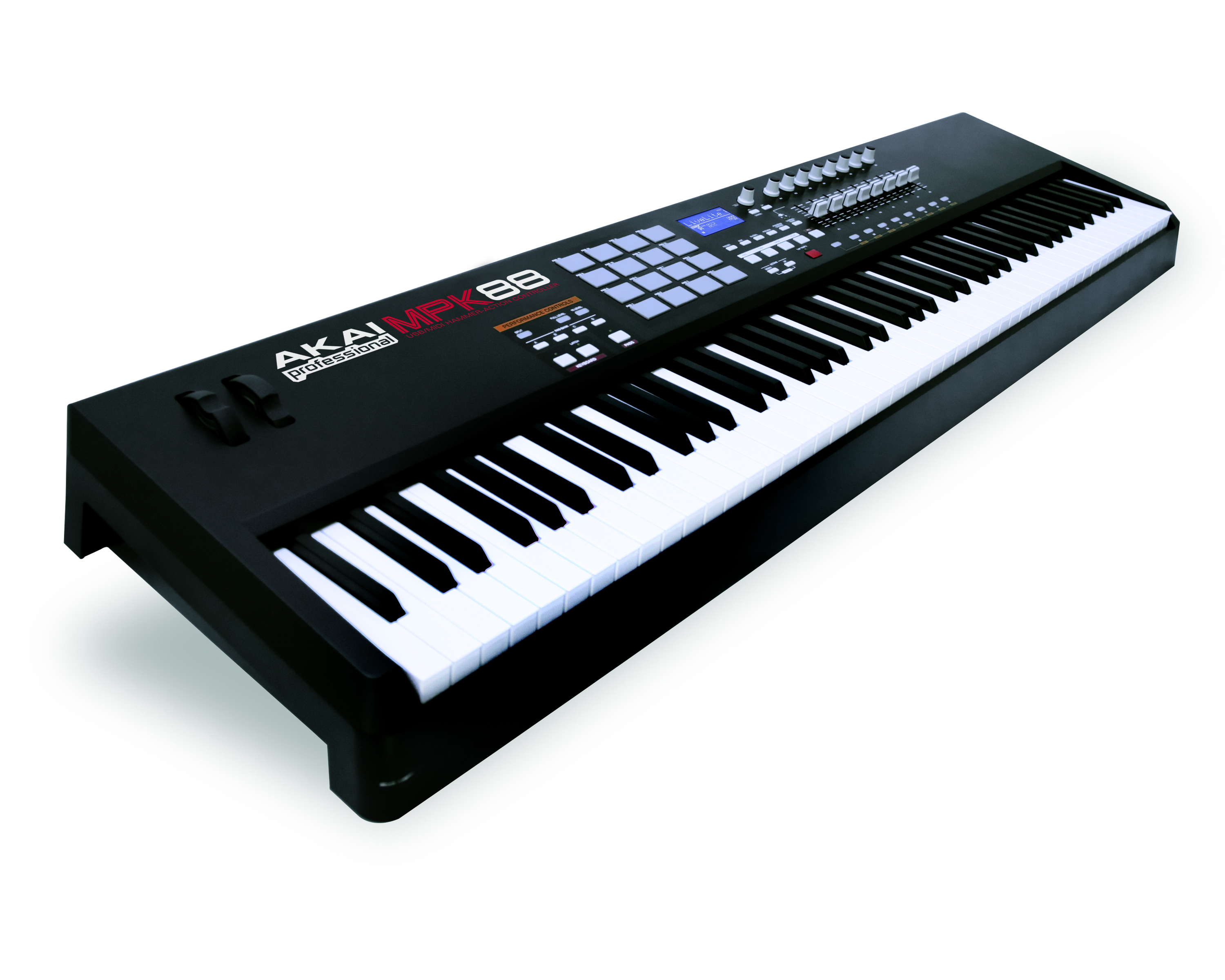
The MPK61/MPK88 technical-specification table distinguishes the MPK88 as 88 fully weighted hammer-action keys with velocity and channel-pressure sensitivity. The manufacturer's materials do not give a body width, key width, measured force curve or sound engine; do not substitute those details from another 88-key controller.
Explore this need in the finder →Does the MPK88 combine an 88-key bed with pressure-sensitive pads and MIDI output?
Akai's MPK88 manual documents 16 pressure- and velocity-sensitive pads in four banks, plus five-pin MIDI In and Out. This is useful when external MIDI control is part of the task, but the receiving gear must make sound, interpret messages and be powered independently.
Explore this need in the finder →Can I plan a numeric desk fit for MPK88 from the official manual?
No. The reviewed MPK61/MPK88 manual supplies detailed connections and controls but no MPK88 body dimensions or weight. The finder therefore does not treat it as a numeric-width pass; measure the exact unit and leave additional clearance for its plugs, hands and stand.
Explore this need in the finder →Akai's exact product-data record distinguishes MPK88 as an earlier 88-key keyboard controller. Its shared MPK61/MPK88 manual then identifies the MPK88-specific action: fully weighted hammer-action keys with velocity and channel-pressure response, joined by 16 pressure-sensitive MPC pads and five-pin MIDI. This review relies on those model-specific sources rather than a nearby 88-key controller's dimensions or setup. It is a research-based assessment, not hands-on use.
An 88-key hammer-action controller, not a standalone piano
MPK88 supplies a full 88-key span with fully weighted hammer-action keys, and its technical table specifies velocity and channel pressure. That is a materially different brief from the MPK25 or MPK49: the extra keys provide a full keyboard range under both hands, while the hammer mechanism is intended to offer a weighted playing response rather than the lighter semi-weighted controller action named for those smaller siblings. The available sources give no measured key widths, force curve, graded-weighting data or independent feel assessment. Channel pressure is documented, but no separate claim about polyphonic key aftertouch should be inferred.
There is a practical gap in the paper specifications: the manual does not list an MPK88 chassis width, depth, height or weight. An 88-key format plainly calls for space for a much longer keyboard than a compact controller, but the matcher cannot certify a numeric fit from that general observation. Do not borrow MPK61 dimensions or an unrelated piano/controller width. Measure the exact unit and stand, then leave room for hands, rear connections, a sustain switch and an expression pedal.
Sixteen pressure-sensitive pads and assignable controls
The MPK88 manual lists sixteen velocity- and pressure-sensitive MPC pads divided among four banks. Full Level, 16 Level and Note Repeat are part of the documented pad workflow; an internal arpeggiator and timing controls provide additional MIDI performance functions. Four banks can address different groups of sounds or controller messages, but the sound-producing instrument and mapping still live in a connected host or external device. The manual establishes pad pressure response; it does not call these polyphonic-aftertouch pads.
Alongside the keybed and pads are eight assignable knobs, eight faders, eight switches, pitch-bend and modulation wheels, transport controls, a backlit LCD and 30 presets. Three control banks expand the assignable controls, which can make the MPK88 useful where one keyboard needs to address several software or hardware parameters. As with the MPK49, a fader's physical position may not match the destination's saved value after switching banks; Akai documents a preview feature to inspect a control's current transmitted value.
Computer MIDI or direct hardware MIDI, with a separate audio path
Akai's MPK61/MPK88 guides document a USB connection for MIDI and bus power and five-pin DIN MIDI In and Out. They also list a footswitch input, an expression-pedal input and the option of an external 6 V, 1 A supply. The manual does not identify the USB device connector format, so this assessment does not mark it USB-C. A computer can host MIDI software; alternatively, the DIN output can control a compatible synthesizer or sound module. None of those connections makes the MPK88 itself a sound engine: the source documents no onboard audio output, so sound generation and monitoring are handled elsewhere.
Before building a computer-free rig, verify that the exact unit powers correctly from the intended adapter, that the receiving device responds to its MIDI messages, and that each component has its own required power and audio connection. The optional adapter, footswitch and expression pedal are not guaranteed to be present in any used package simply because the manual explains those connections.
How MPK88 differs from the 25- and 49-key models
Akai's three observed models share MPC-style control and a USB/MIDI foundation, but the useful distinctions are substantial. MPK25 offers 25 semi-weighted keys, 12 pressure-sensitive pads and 12 knobs in a body listed as 477 mm wide. MPK49 moves to 49 semi-weighted keys, keeps 12 pads and adds eight faders; its manual lists a 730 mm width. MPK88 instead has fully weighted 88-key hammer action and 16 pads. Its own manual omits body dimensions, so any numeric placement comparison must remain unresolved until the exact physical unit is measured.
Legacy software and package checks
Akai marks the MPK88 product-data record legacy. The manual's accessory list describes a three-meter USB cable, CD-ROM and printed documentation, while the downloads record links preset-editor software and DAW setup material. These are historical references, not a promise that a secondhand unit includes the items or that old software will install on a current computer. Inspect all 88 keys, pads, switches, controls, display and connectors; ask for a photo of the exact rear panel and confirm adapter voltage/polarity if needed. Check the stand's rated support and the actual keyboard footprint, since no manufacturer width or weight was found in the reviewed MPK88 manual. Confirm seller condition, return terms, software access and current compatibility separately; no price or live offer was established here.
Sources: Akai MPK88 legacy product route · MPK61/MPK88 Quickstart Guide · MPK61/MPK88 Reference Manual.
Key specifications
Key details at a glance
| Keys | 88 |
|---|---|
| Manufacturer's keybed description | Fully weighted hammer action (Fatar TP/110) |
| Pads | 16 |
| Velocity-sensitive pads | Yes |
| Pressure-sensitive pads | Yes |
| 5-pin MIDI Out | Yes |
| USB bus-powered | Yes |
| Assignable pedal input | Yes |
| Keyboard channel aftertouch | Yes |
| 5-pin MIDI In | Yes |
| 5-pin MIDI outputs | 1 |
Use the exact model’s instructions for operating limits, supplied equipment and version differences.
Sources for this review
Sources for this assessment
Start with your setup, not a headline feature
Use the finder to combine key-count, connection, control and desk-fit requirements. Unverified specifications are never treated as a match.