
Your needs, this model
Does it fit your priorities?
Does the SynthStation25 meet a 25-key compact-controller brief?
Akai documents 25 velocity-sensitive physical keys and octave buttons that shift across an eight-octave MIDI range. Its 310 mm body is 12.20 inches wide, so it clears a 16-inch body-only cap. Octave shifting expands selectable notes, not the number of keys available under both hands at one time.
Explore this need in the finder →Can SynthStation25 connect to computer software without the phone dock?
The quickstart says the Mini-USB port makes it a class-compliant USB-MIDI controller for Mac or PC and the computer powers it. The cable is not included, the connector is not USB-C, and the guide does not document USB audio or five-pin MIDI Out. Plan on a separate sound and monitoring path.
Explore this need in the finder →Does the SynthStation25 work with a modern phone or with its own onboard sounds?
No current phone/app compatibility or onboard sound engine is established. Akai's quickstart describes a legacy iPhone/iPod touch dock, a SynthStation Studio app that is not included, and audio from that device reaching RCA/headphone outputs. Its compatibility chart names only older iPhone and iPod touch generations; check a specific device, app license and software version before relying on this workflow.
Explore this need in the finder →A compact keyboard built around an older mobile workflow
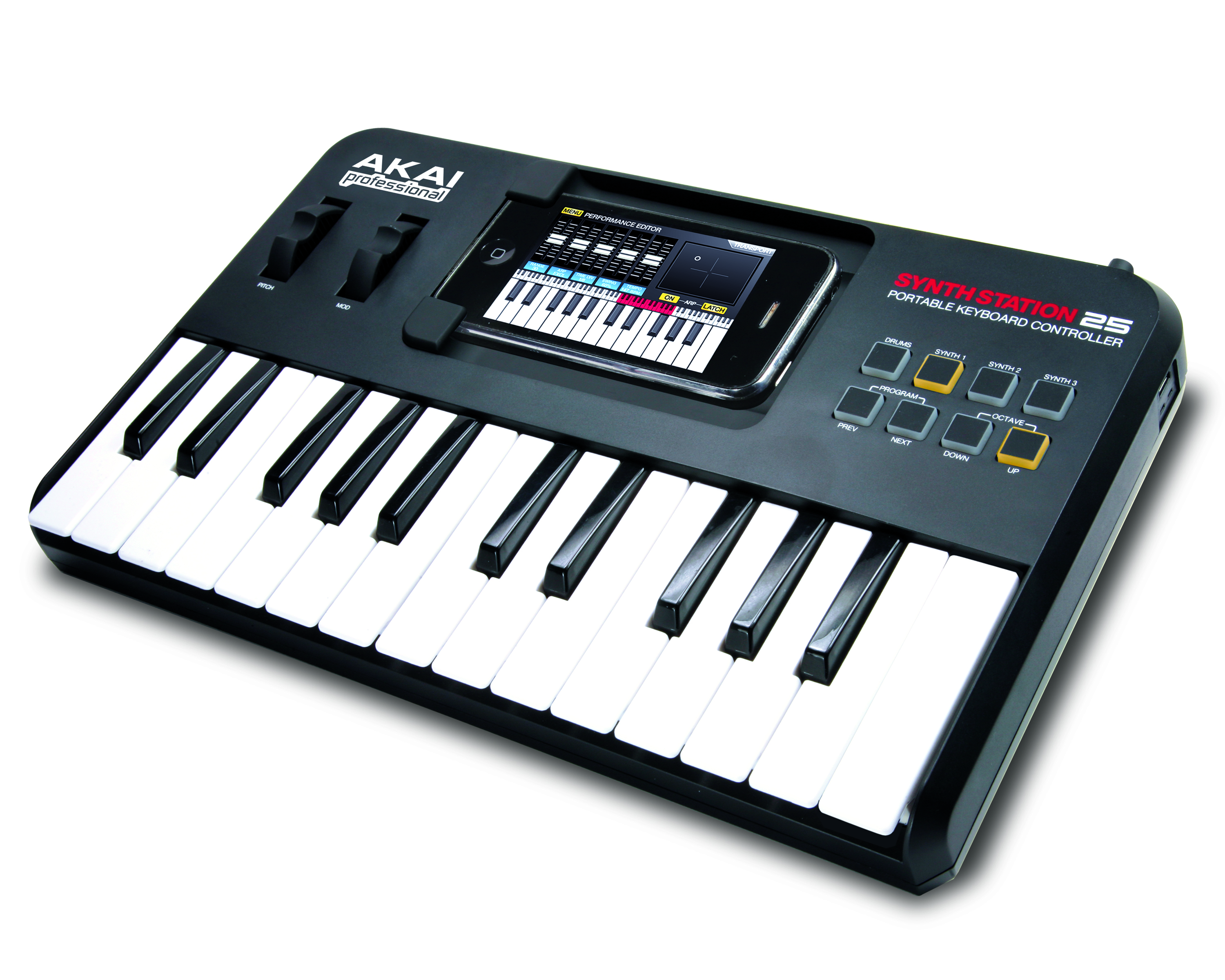
The SynthStation25 is best understood as a 25-note controller with two intended jobs, not as a self-contained synthesizer. Akai's Rev B quickstart labels it a portable keyboard controller and documents a dock for an iPhone or iPod touch. The same guide describes a separate Mini-USB connection that makes it a class-compliant USB-MIDI controller for Mac or PC. Those are materially different ways to use the unit: one relies on a mobile device and its app, while the other sends MIDI to computer software.
This distinction matters more now than the old product copy suggests. The guide says SynthStation Studio is not included and refers readers to the iTunes App Store. Akai's compatibility chart names iPhone 3G, 3GS and 4 plus first-, second- and third-generation iPod touch models; it does not establish support for current phones, adapters, operating systems, an app license or a currently obtainable app. Treat the dock as a historical supported-device list, not as a present-day compatibility promise. This assessment makes no claim to have tested the hardware or app.
Twenty-five physical keys, with octave shifting
The manual specifies 25 velocity-sensitive note keys. It calls the physical section a two-octave keyboard and says octave up/down controls shift the playable range in either direction, giving access to eight octaves overall. That extension helps reach high or low notes with a short controller, but it does not put more than 25 keys under the hands at once. A part that needs a broad simultaneous range, split zones or two-handed accompaniment can run into the physical limit even if the MIDI note range is wide.
Akai also documents a pitch-bend wheel, modulation wheel, program up/down buttons and Drum/Synth selectors for the app's three synth parts or drum part. The keyboard controls whichever app part is selected. These buttons are not a pressure-sensitive pad bank. The original manual does not give a measured action curve, key width, key aftertouch or a modern key-size classification, so comparisons based on those details should remain open rather than inferred from the photograph.
Docked-device audio and computer MIDI are not interchangeable
In the docked route, the attached mobile device runs SynthStation Studio and supplies the sounds. The guide says master volume controls one stereo RCA output and a 1/8-inch stereo headphone output, including playback from the docked iPhone or iPod touch. It also notes that the optional power adapter can charge the device while the SynthStation25 is in use. This may be useful for someone who already owns the exact older hardware and app, but the app is not built into the keyboard and is not included with it.
For a computer, the quickstart specifies a Mini-USB port and says a standard cable to a Mac or PC makes the controller a class-compliant USB-MIDI device without a separate driver. The computer powers the keyboard over USB. The manual does not describe the computer's audio returning through the RCA or headphone sockets, so a computer user should plan to monitor sound through the computer or a separate audio path. Mini-USB is not USB-C, and no five-pin MIDI In or Out appears in the maker's connector list. A DIN-only hardware synthesizer therefore needs another compatible MIDI host/interface; the SynthStation25 itself is not the direct DIN bridge.
Power, dimensions and what a listing must verify
Akai lists three power choices: four AAA batteries, computer USB power through a Mini-USB cable, or an optional 6 V DC, 1 A, center-positive adapter. The guide lists four AAA cells in the original box contents but says the USB cable and adapter are not included. For a particular earlier offer, check the power contacts, battery compartment, dock connector, keys, wheels, RCA jacks and headphone socket; seller package and condition are not established by this original manual.
The published body dimensions are 310 x 203 x 40 mm (width, depth and height), or about 12.20 x 7.99 x 1.57 inches after conversion. It fits under the finder’s smallest 16-inch body-width cap, but the phone dock, attached device, cable bends and hands need extra room. The quickstart prints weight as both 1.7 lb and 7.7 kg, a major conflict; this review does not choose one. The manual also predates current phone connectors and software stores, so compatibility should be confirmed before a buyer treats the old dock as usable.
Who should compare it—and who should pass
The SynthStation25 is a plausible reference for an owner who can verify the listed legacy iPhone/iPod touch generation, has a working app/license and wants the keyboard's particular device-audio routing. It can also be assessed as a simple 25-note USB-MIDI controller for a computer, provided a Mini-USB cable and separate sound/monitoring path are available. But it has no documented onboard sound engine, no pad bank, no five-pin DIN output and no USB-C port; its app route should not be the reason to buy without checking exact software and device support.
Its noteworthy feature is not an unqualified promise of modern mobile compatibility. It is the combination of a velocity-sensitive two-octave keyboard, octave shifting, a legacy device dock, RCA/headphone outputs and a separate USB-MIDI route. Verify which workflow you actually intend to use, then check the precise model and all required accessories. This older assessment identifies documented capabilities; it does not establish present stock, seller condition, application availability or compatibility with a particular computer or phone.
Key specifications
Key details at a glance
| Keys | 25 |
|---|---|
| Manufacturer's keybed description | Velocity sensitive keys |
| Width | 12.2 in |
| Pads | 0 |
| Velocity-sensitive pads | No |
| Pressure-sensitive pads | No |
| 5-pin MIDI Out | No |
| Computer connection | Mini-usb |
| USB bus-powered | Yes |
| Assignable pedal input | No |
| 5-pin MIDI In | No |
| Depth | 7.99 in |
Use the exact model’s instructions for operating limits, supplied equipment and version differences.
Sources for this review
Sources for this assessment
- Akai Professional current builder-data query: exact SynthStation25 legacy record and image
- Akai Professional SynthStation25 exact legacy downloads record
- Akai Professional SynthStation25 Quickstart Guide, revision B
- Akai Professional SynthStation25 iPhone/iPod compatibility chart
- Akai Professional SynthStation25 exact media-image archive

Start with your setup, not a headline feature
Use the finder to combine key-count, connection, control and desk-fit requirements. Unverified specifications are never treated as a match.