
Your needs, this model
Does it fit your priorities?
What distinguishes KeyLab 49 mk3 from KeyLab Essential 49 mk3?
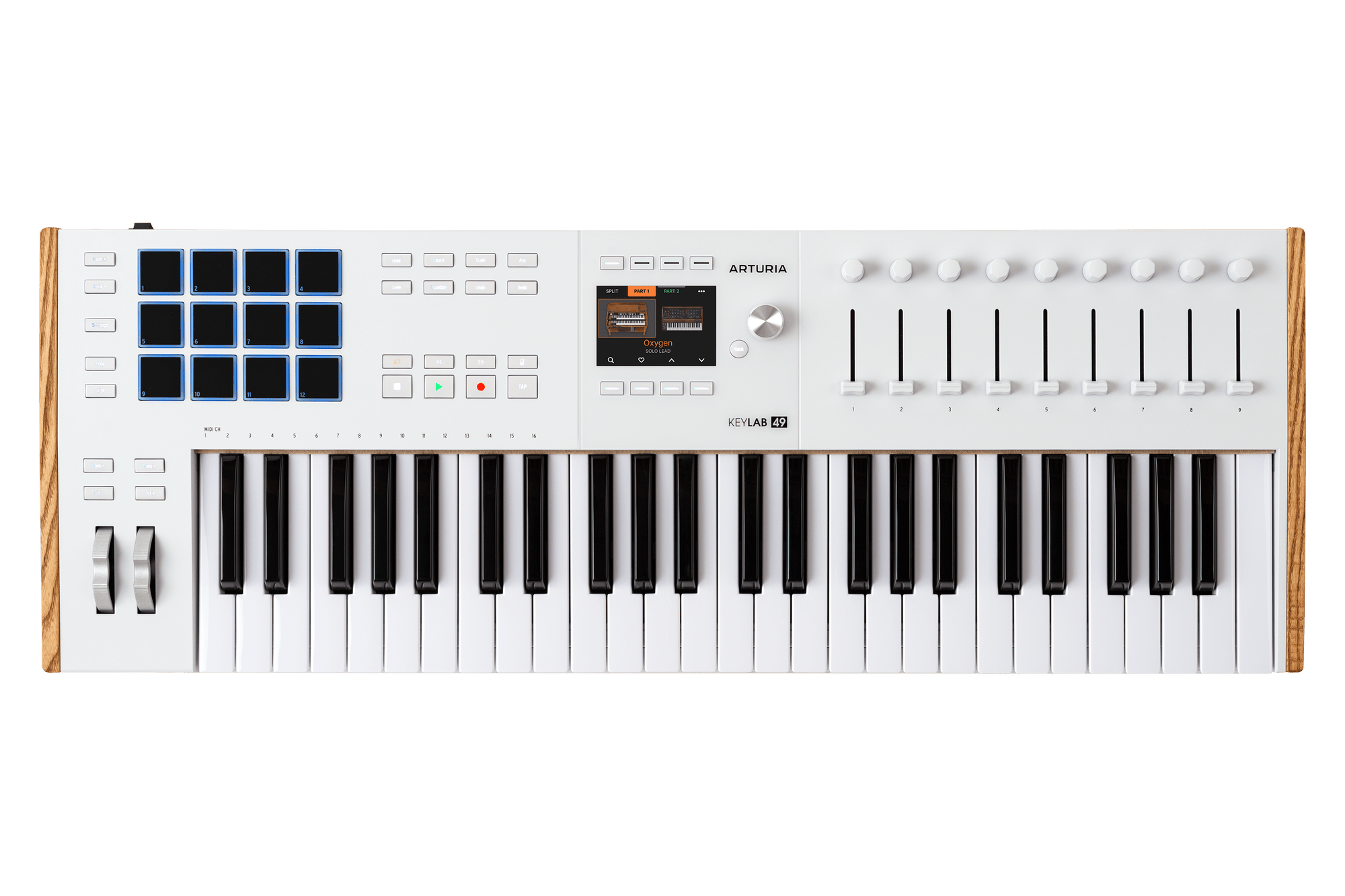
The standard KeyLab 49 mk3 is a separate tier, not a renamed Essential. Arturia specifies 12 touch- and pressure-sensitive pads rather than eight, a 3.5-inch full-color display rather than the Essential's 2.5-inch LCD, 50 mm rather than 30 mm faders, and the manual confirms channel aftertouch on the keybed. The standard model also has both DIN MIDI In and Out; the Essential listing specifies MIDI Out. These are source comparisons, not claims about which keybed or workflow feels better.
Explore this need in the finder →Does the keybed itself support aftertouch?
Yes. The English manual describes the 49/61-key keybed as semi-weighted and sensitive to velocity, release velocity and pressure through channel aftertouch. That is separate from the 12 pads, which the store page also lists as velocity- and pressure-sensitive. The cited sources do not give a measured force curve or key width.
Explore this need in the finder →Can I use it to control hardware without keeping a computer attached?
The manual says MIDI Out can send data to external devices without a computer when the controller is powered by an optional 12V DC, 1.0A supply. It has DIN MIDI In and Out, but MIDI carries control data, not audio; the receiving instrument must make sound and provide its own audio connection. The standard box contents list a USB cable and registration card, not the optional adapter.
Explore this need in the finder →Arturia’s KeyLab 49 mk3 is a 49-key MIDI controller for a setup where keyboard performance, hands-on DAW control and hardware MIDI all matter. This is a source-based assessment, not a hands-on test: the sources identify its keybed, controls, connections and dimensions, but they cannot tell you whether its action or scripts suit your particular playing style.
Start with the 49-note compromise
Forty-nine notes provide more room than a small two-octave board for chord voicings, bass lines and lead parts, while the controller remains shorter than a 61- or 88-key instrument. That can make sense where desk space and playing range both matter. It is still a real limitation for wide piano passages or parts that regularly span the keyboard: octave-shift controls can move the range, but they do not put more keys under both hands at once. If that is a regular part of your work, compare the exact KeyLab 61 mk3 or another longer-range model rather than treating the family name as one configuration.
Arturia lists the White 49 mk3 body at 30.98 inches wide, 11.02 inches deep and 2.83 inches high. The published width clears a nominal 31-inch cap by just 0.02 inches. That is a body-only comparison, not a practical installation clearance. USB, DIN and pedal plugs need space, the cable bend may extend the footprint, and you still need room for your hands and the nearby controls. Measure the actual surface and the connection side before treating the number as a fit guarantee.
Key action, aftertouch and pads are separate inputs
The English KeyLab mk3 manual describes a semi-weighted keyboard with velocity, release-velocity and channel-aftertouch sensitivity. The product page uses “semi-weighted” and “synth-action” language for the family. That is a more specific documented control set than the KeyLab Essential 49 listing, which leaves keyboard aftertouch unconfirmed in the sources reviewed. It still does not tell us key width, travel, measured response or whether you will like the action; those are reasons to try the exact model if touch is decisive.
The 12 pads have their own velocity and pressure sensitivity. They can send expressive performance data, but their pressure sensing should not be confused with keyboard aftertouch. Arturia also lists nine encoders, nine 50 mm faders, eight transport switches, four command switches, pitch and modulation wheels, and a 3.5-inch full-color display with eight contextual buttons. A large control surface is only useful if the mapping fits your DAW and project. Current manufacturer materials list integrations for several major DAWs and MCU/HUI, but actual behavior can depend on the DAW version, script and mode. Check the current support page and the specific commands you expect to use instead of assuming every control maps identically everywhere.
Why this is not the KeyLab Essential 49
Both products are 49-key Arturia controllers, but the “Essential” label marks a different configuration. The standard KeyLab 49 mk3 has 12 pads, a 3.5-inch color screen and 50 mm faders; the Essential 49 listing specifies eight pads, a 2.5-inch LCD and 30 mm faders. The standard mk3 manual also documents channel aftertouch on the keys, and its rear panel has DIN MIDI In as well as Out. The Essential 49 product listing names a DIN output, not a DIN input. These differences may matter when you want incoming hardware MIDI to reach a computer, when you need expressive key pressure, or when more visual feedback is worth a larger control panel. They do not establish that one keybed is better or that its scripts will suit your session better.
USB-C for the host, DIN for a hardware path
With a computer, the USB-C connection supplies power and carries MIDI and control information. The 5-pin DIN ports provide MIDI In and Out for external instruments or other MIDI equipment; the manual notes that USB and DIN MIDI can operate simultaneously. In a DAW arrangement, that allows the keyboard to control software while sending or receiving data through separate hardware connections. A DIN cable is not an audio lead: the synthesizer or module at the other end must generate sound and route its audio to headphones, speakers or a recording interface.
The manual also describes a computer-free MIDI setup, but it requires an optional 12V DC, 1.0A power supply. Arturia’s listed box contents include the controller, a USB-C-to-USB-A cable, a registration card and QuickStart material; they do not list that power supply or any pedals. If a hardware-only rig is important, confirm the exact compatible adapter and seller package against current Arturia instructions. For a computer rig, make sure the host or USB supply can provide the power the controller expects.
Software and the job of a controller
Arturia’s current store page lists Analog Lab Pro, Ableton Live Lite, several instruments, Loopcloud and Melodics among the software titles and services. Registration, redemption windows, account eligibility and software-system requirements can change, so treat the page as a list of manufacturer claims to confirm—not as a promise that every license will remain available in a particular seller’s box. The KeyLab itself is documented as a MIDI controller. No built-in sound engine or audio output is listed in the reviewed specification, so plan for a software instrument or external sound source and a separate audio-monitoring path.
Who should shortlist this exact White edition?
The White 49 mk3 is a candidate if 49 notes fit your repertoire, you want keybed channel aftertouch alongside pressure-sensitive pads, and a screen, faders and both DIN MIDI directions solve real tasks. It is less suitable when full piano range, a specific tested action, a body that needs no cable clearance, or a self-contained sound instrument is essential. Before ordering, check that the exact listing is White SKU keylab-49-mk3,0,white (MPN 231621), not the similarly named KeyLab Essential 49, and verify the current software, operating-system support, included accessories and return terms. Those concrete checks are more dependable than a broad “best MIDI keyboard” claim.
Key specifications
Key details at a glance
| Keys | 49 |
|---|---|
| Manufacturer's keybed description | Semi-weighted synth action |
| Width | 30.98 in |
| Pads | 12 |
| Velocity-sensitive pads | Yes |
| Pressure-sensitive pads | Yes |
| 5-pin MIDI Out | Yes |
| Computer connection | USB-C |
| USB bus-powered | Yes |
| Assignable pedal input | Yes |
| Keyboard channel aftertouch | Yes |
| 5-pin MIDI In | Yes |
| Display size | 3.5 in |
| Fader length | 50 mm |
| Depth | 11.02 in |
Use the exact model’s instructions for operating limits, supplied equipment and version differences.
Sources for this review
Sources for this assessment
- Arturia KeyLab 49 mk3 US store record
- Arturia KeyLab mk3 product overview and specifications
- Arturia KeyLab 49 mk3 downloads, manuals and current support resources
- Arturia KeyLab mk3 English user manual, version 1.0.4
- Arturia KeyLab Essential 49 mk3 store listing, used for same-brand model-tier comparison
Start with your setup, not a headline feature
Use the finder to combine key-count, connection, control and desk-fit requirements. Unverified specifications are never treated as a match.