
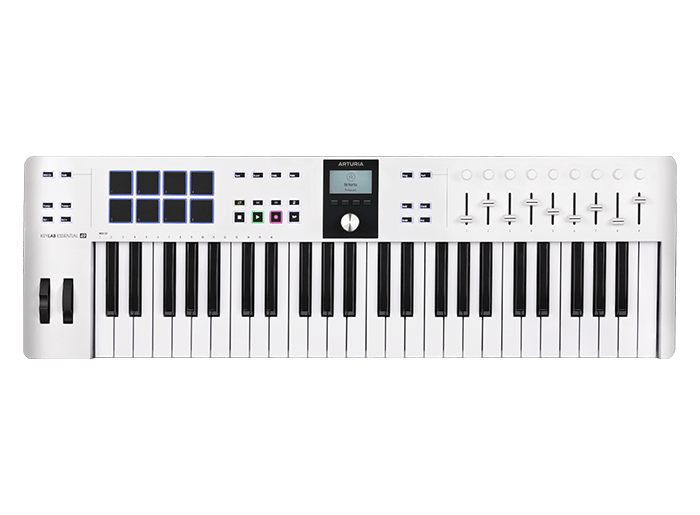
Your needs, this model
Does it fit your priorities?
Is 49 keys enough for two-handed parts?
This edition has a confirmed 49-note range. That can be a workable middle ground for layered parts and compact setups, but broad piano passages or frequent octave-spanning parts may make 61 or 88 keys more comfortable. Key count alone does not establish key width, action quality or your playing comfort.
Explore this need in the finder →Can its pads add dynamics to a drum or clip workflow?
Arturia specifies eight velocity- and pressure-sensitive pads. That documents sensing hardware, not a particular drum sound or DAW mapping: assign the pads in the chosen software and check whether its pressure behavior is useful for your workflow.
Explore this need in the finder →Can it send notes to an external hardware synthesizer?
The published connection list includes 5-pin MIDI Out. This is a MIDI-data route, not an audio output: the external instrument must make sound, the controller needs USB-C bus power, and the audio still needs its own monitoring or recording path.
Explore this need in the finder →Arturia’s KeyLab Essential 49 mk3 is a computer-oriented MIDI controller with a useful amount of physical control around a 49-note keybed. The decision is less “is this the best keyboard?” than whether its range, desk footprint and MIDI route fit the way your setup makes sound. The manufacturer’s pages support a detailed feature assessment, but not a claim about personal playing feel or tested DAW performance.
The 49-key range is the first tradeoff
This White configuration has 49 velocity-sensitive keys. That gives a controller more room than a 25-key mini board for chords, bass and lead parts in the same arrangement, while stopping well short of the reach of a 61- or 88-key instrument. If your workflow regularly needs wide piano voicings or two-handed parts with broad spacing, consider whether octave shifting would become routine; Arturia lists semitone and octave transpose controls, but those controls do not add physical keys.
KeyLab Essential 49 and the Essential 61 and 88 models are not interchangeable catalogue names. The larger versions change playing range and body size, so a buyer who needs the full reach should compare the exact larger model rather than infer it from this review. The 49-key version’s published dimensions are about 31.1 by 9.45 inches, with a listed height of 2.76 inches. Leave additional room for the USB, MIDI and pedal connections, and measure the usable surface rather than relying on a desk’s advertised width alone.
A control surface designed around a software session
The documented layout includes nine faders, nine rotary encoders, eight transport switches, four command switches, two performance wheels and a 2.5-inch LCD with contextual buttons. Eight pads are specified as velocity- and pressure-sensitive. In a DAW session, that combination can keep common mixer moves, transport commands and drum triggers under the hands instead of behind separate mouse clicks. The useful part is not the raw count: it is whether the supplied or custom mapping exposes the particular track, instrument and performance actions you use.
Arturia lists integration scripts for several major DAWs and supports common MCU/HUI control, but “compatible” does not promise identical behavior across every version or project. Check that the current script is available for your DAW and operating system, then look at its documented mappings. Pressure sensitivity here refers to the pads; the pages inspected do not establish aftertouch on the keyboard keys. Nor do the published feature counts tell us how the controls feel, how responsive a given DAW script is, or whether your preferred pressure curve is supported.
USB-C and a direct hardware MIDI route
The product specification lists USB-C for computer connection and bus power, a five-pin MIDI output and a pedal input that can be assigned to sustain, expression or footswitch use. That is a practical pairing for someone who wants a DAW controller at the desk but also needs to send MIDI to an external synthesizer or drum machine. The port descriptions establish a MIDI-data route; they do not turn the keyboard into a sound module or provide an audio output. Plan separately for the sound source, its power and the path that gets audio to headphones, speakers or a recorder.
Also account for power when planning a hardware-only patch. The controller is specified as USB bus-powered, so it needs a suitable USB host or power source even when the notes leave through the DIN output. Confirm how your particular host, USB supply and external device should be connected; a DIN cable carries MIDI, not power or audio.
What “feel” and included software do—and do not—establish
Arturia describes the keyboard as a hybrid synth-piano-feel keybed in the store specification and calls it semi-weighted on the product overview. Those are the manufacturer’s descriptions, not independent measurements of key mass, travel, velocity response or acoustic-piano resemblance. Key width and keyboard aftertouch were not confirmed in the material reviewed. If those details decide the purchase, try the exact version or obtain the manual/specification directly before choosing.
The software bundle also deserves a date-specific check. The US store listing names Analog Lab Pro, Ableton Live Lite, The Gentleman, UVI Model D, Melodics and Loopcloud; the dedicated included-software page names Komplete Select where the store page lists The Gentleman. Licenses, bundles and account entitlements can change, so do not value a particular plug-in as guaranteed until the exact offer and registration flow agree. The product page shows a USB cable and registration card among the package contents; it does not list a pedal there, so check before assuming a sustain pedal is in the box.
Compared with a smaller controller
Arturia’s MiniLab 3 is a useful same-brand contrast, not a performance ranking. Its page describes 25 slim keys, eight encoders and four faders, while the Essential 49 page lists 49 keys, nine encoders and nine faders, plus a 5-pin MIDI output. MiniLab’s smaller range favors a shorter footprint; the Essential 49 spends more space on the keybed and dedicated DAW controls. Choose between them by the parts you need to play, the controls you will actually map and the hardware ports you require—not by a generic “beginner” or “pro” label.
Who should shortlist this exact edition?
The White 49-key mk3 is a sensible candidate when a roughly 31-inch controller can fit, 49 notes are enough for the repertoire, and the combination of USB-C, pads, faders and five-pin MIDI Out solves a real setup need. It is less compelling when a full piano range, a specific keybed action, a guaranteed software license or a self-contained instrument is essential. Before ordering, check the color and 49-key suffix, current software bundle, host compatibility, USB power plan and cable clearance. Those checks matter more than treating the family name as a single universal configuration.
Key specifications
Key details at a glance
| Keys | 49 |
|---|---|
| Manufacturer's keybed description | Hybrid synth-piano feel (Arturia wording) |
| Width | 31.1 in |
| Pads | 8 |
| Velocity-sensitive pads | Yes |
| Pressure-sensitive pads | Yes |
| 5-pin MIDI Out | Yes |
| Computer connection | USB-C |
| USB bus-powered | Yes |
| Assignable pedal input | Yes |
| Display size | 2.5 in |
| Depth | 9.45 in |
Use the exact model’s instructions for operating limits, supplied equipment and version differences.
Sources for this review
Sources for this assessment
Start with your setup, not a headline feature
Use the finder to combine key-count, connection, control and desk-fit requirements. Unverified specifications are never treated as a match.