
Your needs, this model
Does it fit your priorities?
What is materially different about KeyStep Pro Chroma?
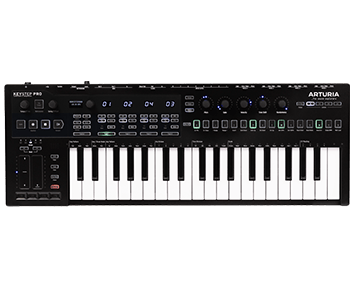
The Chroma keeps the standard KeyStep Pro's documented 37-key, four-track sequencer and MIDI/CV routing platform, but adds a dark-gray chassis, blue LEDs, different knob caps and per-track LED-color customization. Arturia's firmware 2.5 support notes say the color setting is Chroma-only; the same notes distinguish other update features available to standard KeyStep Pro users.
Explore this need in the finder →Does Chroma have pressure-sensitive drum pads?
The manufacturer lists a keyboard with aftertouch, a drum sequencer, illuminated step controls, and analog drum-gate outputs, but no physical pressure-sensitive pad bank. Keyboard aftertouch and step buttons are not the pressure-sensing drum/control pads asked about by the finder.
Explore this need in the finder →Can Chroma run hardware without a computer and produce the synth sound?
The shared manual supports computer-free use from the included 12V supply, with DIN and CV/Gate available to control external instruments. The controller does not document an onboard sound engine; the small speaker and line output are for its metronome, so a receiving synth/module and its separate audio-monitoring route are still required.
Explore this need in the finder →KeyStep Pro Chroma earns a separate assessment for one narrow but real reason: its track LEDs can be assigned different colors. The rest of the reviewed configuration is the same basic 37-key, four-track sequencing platform as the standard KeyStep Pro. Its dark gray case, blue lighting and alternate knob caps change the visual identity; the ability to customize track colors is the functional distinction that matters in a live or hardware-heavy arrangement.
Color coding is the model-specific feature
Arturia's Chroma store page identifies this as a special edition of its four-track sequencer keyboard. The overview describes a dark gray body, vivid blue illumination and customized track-color choices. More precisely, the manufacturer's firmware 2.5 help article says that per-track LED color editing is available only on KeyStep Pro Chroma. That makes the added value concrete: a player can make track indicators visually distinguishable rather than relying only on printed track numbers or memorized positions. It is a small workflow aid, not an additional sequencer, a greater note range, or a drum-pad surface.
That point is easy to blur with the rest of firmware 2.5. The support article describes several update features for KeyStep Pro users, including per-pattern program changes, a transpose latch and fixed-velocity settings. Those are not Chroma-only claims. If track color selection is the reason to pay attention to this SKU, confirm the firmware and exact edition before purchase; if it is not useful to your set, compare the standard White or Black model on its unchanged core functions.
What stays the same under the finish
The chassis still carries a 37-note Slimkey keyboard with velocity and aftertouch, four independent polyphonic sequencer tracks, a separate drum sequencer, an arpeggiator and controller mode. The documented sequence capacity reaches 64 steps and 16 notes per step. Its five encoders can transmit CCs. The rear-panel workflow includes one 5-pin MIDI input, two DIN outputs, clock connections, four CV/Gate/Mod voice outputs, eight drum gates and a sustain input. This is a compact keyboard for controlling other sound sources, not a self-sounding 37-note instrument. Its little speaker and line output are specified for metronome use.
The manual lists the USB connector as standard Type-B, not USB-C. With a compatible host, USB carries control data and can provide power; the manual also supports computer-free use from the included 12V adapter. In a hardware-only setup, the adapter powers the controller while DIN, clock or CV sends control messages to the receiving gear. The receiving instrument still creates the musical audio and needs its own power and monitoring connection. A USB-C host may need a data-capable adapter or cable; the product’s USB port itself remains Type-B.
Choose it for the visual workflow, not an assumed upgrade
Chroma makes the strongest case in a multi-track setup where an at-a-glance color scheme could help identify different parts. But a dark finish cannot guarantee visibility in every lighting condition, and the evidence does not quantify LED brightness or establish that color coding improves anyone’s performance. The review is based on manufacturer documentation rather than a hands-on lighting test. The 37-key range is also compact, and aftertouch on the keyboard does not satisfy a requirement for pressure-sensitive pads. Those limits remain the same regardless of the Chroma treatment.
For identity and included items, use the current Chroma store record and its product overview. The English KeyStep Pro manual describes the shared operating platform; the firmware 2.5 notes explain the Chroma-only color controls. The listed package includes an external power supply and USB cable, and the store names Ableton Live Lite and Analog Lab Intro V.5. Check the actual seller package, license/registration conditions and current resources rather than assuming every listing contains an identical software bundle.
Purchase checks for the exact Chroma
Verify the model is KeyStep Pro Chroma with SKU keystep-pro-chroma,0, not the standard White or Black finish. Confirm the included 12V supply, the Type-B connection and whatever host-side cable your computer needs. If your essential feature is USB-C or pressure-sensitive pads, this configuration does not meet it. If your essential task is color-coded track feedback in the documented KeyStep Pro workflow, Chroma is the model-specific choice; otherwise the standard versions retain the core 37-key sequencer and routing functions. Connect a sound source and monitoring path separately, and consult the current manual for the exact hardware, firmware and external connections.
Key specifications
Key details at a glance
| Keys | 37 |
|---|---|
| Manufacturer's keybed description | Velocity-sensitive slim keys (manufacturer description) |
| Width | 23.2 in |
| Pads | 0 |
| Velocity-sensitive pads | No |
| Pressure-sensitive pads | No |
| 5-pin MIDI Out | Yes |
| Computer connection | USB Type-B |
| USB bus-powered | Yes |
| Assignable pedal input | Yes |
| Keyboard channel aftertouch | Yes |
| 5-pin MIDI In | Yes |
| Depth | 8.2 in |
| Polyphonic sequencer tracks | 4 |
| Drum sequencer parts | 24 |
| Maximum steps per pattern | 64 |
| Maximum notes per step | 16 |
| 5-pin MIDI outputs | 2 |
| CV/Gate/Mod voice outputs | 4 |
| Per-track LED colors customizable | Yes |
Use the exact model’s instructions for operating limits, supplied equipment and version differences.
Sources for this review
Sources for this assessment
- Arturia KeyStep Pro Chroma US English store record; exact SKU, included items and dimensions
- Arturia KeyStep Pro Chroma overview; 37-key sequencer, connections and edition finish
- Arturia KeyStep Pro downloads and manuals; shared English manual version 2.5.2
- Arturia KeyStep Pro English User Manual, version 2.5.2, revised 5 February 2025
- Arturia KeyStep Pro firmware 2.5 support notes; track LED color editing is Chroma-only
- Arturia keyboard controllers category page 1; exact Chroma card and SKU
Start with your setup, not a headline feature
Use the finder to combine key-count, connection, control and desk-fit requirements. Unverified specifications are never treated as a match.