
Your needs, this model
Does it fit your priorities?
Can the White MicroLab mk3 fit a 16-inch-wide shelf?
The product overview lists a 15.98-inch body, so it is within a 16-inch numeric body cap by only 0.02 inches. The finder screens the body alone; leave room for the USB-C plug, pedal lead, hands and nearby equipment before treating the space as workable.
Explore this need in the finder →Does it send MIDI directly to a 5-pin DIN synthesizer?
Arturia's current I/O list documents USB-C and a control-pedal input, not a 5-pin DIN output. A computer or compatible host can use USB MIDI, but a DIN instrument needs a separate MIDI interface or a controller with documented DIN Out; MIDI data also does not provide audio from that instrument.
Explore this need in the finder →Are there enough physical notes for a wide two-handed part?
The manufacturer specifies 25 velocity-sensitive slim keys, approximately two octaves plus one note. Octave shifting expands the playable register but cannot put additional notes under both hands at once, so a fixed wide part may call for a 37-, 49- or 61-key configuration instead.
Explore this need in the finder →The White MicroLab mk3 is an exceptionally narrow job-specific controller: 25 velocity-sensitive slim keys, two touch strips, a hold/chord control, octave and navigation buttons, USB-C and one pedal input. Its small footprint is real, but the compactness comes with firm limits in physical range, controls and connections.
What the White model actually is
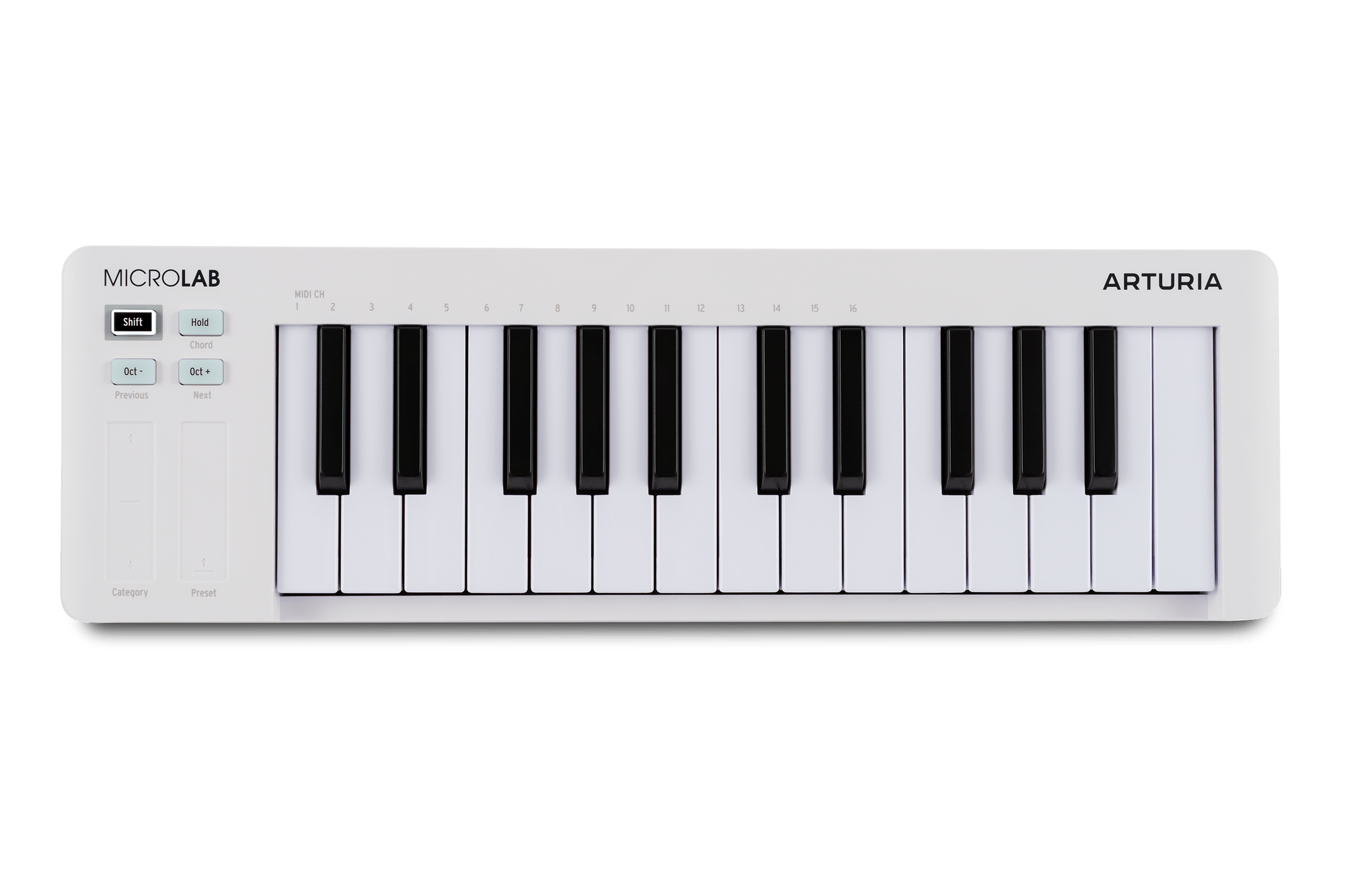
Arturia's English store identifies the White MicroLab mk3 as SKU microlab-mk3,0,white. The separate product overview describes a 25-note velocity-sensitive slim keybed, not a full-length or weighted keyboard. It is a performance controller, not a self-contained audio instrument: the bundled Analog Lab Intro can provide sounds after software setup, but the hardware itself has no documented sound engine or audio output. A DAW, virtual instrument or separately connected sound source still has to create and monitor audio.
The physical control set is spare by design. Two touch strips send pitch-bend and modulation messages, and the button cluster handles octave movement, hold, chord mode and navigation. Arturia's product comparison lists no pad bank, rotary encoder, fader or screen for this model. That is a meaningful distinction from MiniLab 3 and MiniLab 37, not just a lower count of the same controls. The MicroLab is for playing a line or triggering basic performance behavior; it is not the stronger choice when pad pressure, mixer controls or direct instrument browsing are part of the brief.
A narrow desk and a limited note span
The manufacturer lists a body of 15.98 inches wide, 4.92 inches deep and 1.54 inches high, at 1.37 pounds. The width is just below the finder’s 16-inch threshold, but that number leaves essentially no room in a 16-inch gap for USB or pedal plugs. It also says nothing about where your hands, laptop or nearby controls go. Measure the actual usable surface, including the rear connector bend, before treating this as a portable-desk solution.
Twenty-five keys make an approximately two-octave-plus-one-note physical span. Octave buttons can move the played range by up to four octaves in either direction, but they do not put additional notes under your hands at once. That can work for a melody, bass part, short take or separate overdub; it is a poor substitute for a longer keybed when a single passage needs broad two-handed reach. No reviewed source specifies full-size key width or key aftertouch, so neither should be assumed.
USB-C is the route; MIDI DIN is not documented
The overview and manual describe USB-C for MIDI communication and bus power, plus a control-pedal input. The illustrated I/O list contains no 5-pin MIDI DIN connection, and the current questionnaire therefore does not count this as a DIN-output model. USB-C can connect it to a compatible computer; Arturia also describes mobile-device use through the appropriate camera-kit or OTG adapter. That is not the same as promising compatibility with every tablet, port, cable or application.
Arturia's support material distinguishes using the controller with mobile hardware from installing its applications: the included software and the MIDI Control Center require a supported Windows or macOS computer. If your plan is to play an external DIN instrument, budget for another MIDI interface or choose a controller with a documented DIN output. The MicroLab itself has no documented battery or standalone power mode; its ordinary operating plan uses USB power from a host. A sustain or expression pedal is an option, but it is not listed among the standard box contents.
Software bundle and setup checks
The White store listing names Analog Lab Intro and Ableton Live Lite and shows a USB-C cable and registration card in the box. Software licenses, download size, current operating-system support, account requirements and included titles can change; verify the registration and package terms for the exact SKU before assigning them value. Arturia describes class-compliant MIDI and a multi-client Windows driver, but a specification does not replace checking your actual host, DAW and any adapter.
The MicroLab's simple surface should reduce setup decisions, though the low control count also means software navigation is largely assigned to key combinations and touch strips. The chord and hold functions can be useful for quick sketches, but they do not turn the device into a sequencer or add an onboard sound source. If those shortcuts or the strip sensitivity matter, consult the current manual and support notes for the exact behavior rather than inferring it from the product photograph.
Who should consider it—and who should look wider
Consider this edition when the essentials are a 25-key USB-powered control surface, a body around sixteen inches wide, and a minimal set of direct performance controls. Against Arturia's MiniLab 3, it gives up the eight pressure-sensitive pads, encoder bank and DIN-thru arrangement in exchange for a notably shallower control surface and a simpler button/strip layout. Neither model solves the need for more than 25 physical notes; MiniLab 37 and the longer KeyLabs are the more relevant starting points if range matters more than travel size.
Do not select it for an external MIDI instrument that must connect directly by 5-pin DIN, for pad-pressure gestures, for weighted or aftertouch keys, or as a standalone audible keyboard. Those capabilities are not established for this exact configuration. This assessment is based on the current manufacturer store, overview, resource and support information; it does not claim hands-on use or a personal judgment of key feel.
Primary sources: Arturia White MicroLab mk3 store record, product overview, English user manual, version 1.0.0, resources and manual listing, and MicroLab mk3 support notes.
Key specifications
Key details at a glance
| Keys | 25 |
|---|---|
| Manufacturer's keybed description | Velocity-sensitive slim keys (manufacturer description) |
| Width | 15.98 in |
| Pads | 0 |
| Velocity-sensitive pads | No |
| Pressure-sensitive pads | No |
| 5-pin MIDI Out | No |
| Computer connection | USB-C |
| USB bus-powered | Yes |
| Assignable pedal input | Yes |
| 5-pin MIDI In | No |
| Depth | 4.92 in |
Use the exact model’s instructions for operating limits, supplied equipment and version differences.
Sources for this review
Sources for this assessment
- Arturia US White MicroLab mk3 store listing and SKU
- Arturia MicroLab mk3 product overview, specifications and dimensions
- Arturia MicroLab mk3 resources and English-manual listing
- Arturia MicroLab mk3 downloads and manual page
- Arturia MicroLab mk3 English User Manual, version 1.0.0
- Arturia MicroLab mk3 General Questions: mobile connection and controls
- Arturia Keyboard Controllers category, original White MicroLab mk3 observation
Start with your setup, not a headline feature
Use the finder to combine key-count, connection, control and desk-fit requirements. Unverified specifications are never treated as a match.