
Your needs, this model
Does it fit your priorities?
Is 25 keys enough if my desk can only spare about sixteen inches?
The White MiniLab 3 is the only currently reviewed configuration that meets a 25-key floor and a 16-inch body-width cap: its official overview lists 14.02 inches. That leaves less than two inches of nominal side-to-side slack, but the cap ignores cable bends, playing clearance and neighboring equipment; measure the complete setup rather than treating it as a desk-fit guarantee.
Explore this need in the finder →Does its pad-pressure feature mean the keyboard keys have aftertouch?
No such conclusion is supported. Arturia lists the eight physical pads as velocity- and pressure-sensitive, but the reviewed MiniLab 3 feature list does not specify keyboard aftertouch. Keep pad pressure and key-aftertouch as separate capabilities, and check the exact current manual if pressure on the keybed is essential.
Explore this need in the finder →Can the MiniLab 3 use DIN MIDI without a computer?
The official support description calls the DIN port a MIDI Thru that passes outgoing MIDI from host software over USB. The reviewed evidence supports a connected-computer arrangement, not a self-contained computer-free DIN setup. The unit is USB-powered, and DIN sends control messages rather than audio; confirm a powered host and the external instrument's own power and audio requirements.
Explore this need in the finder →The White Arturia MiniLab 3 is a 25-key USB MIDI controller for a very small footprint and a control surface that includes pads, faders, encoders and a display. Arturia styles the white finish as Alpine White; the English store listing identifies this configuration as SKU minilab-3,0,white. This is a research-based review of official manufacturer information, not a hands-on test.
Twenty-five keys is a real constraint
A two-octave-plus-one-note keybed is useful for entering a bass line, a short hook, a chord idea or a part that you can record in layers. It is less forgiving when a performance spans a wide register without stopping. Arturia specifies velocity-sensitive slim keys and octave and semitone shifting; shifting expands the notes you can reach over time, not the number of notes under your hands at once.
This is the shortest range in the current reviewed Arturia set. MiniLab 37 adds twelve keys and is wider, while 49-key controllers preserve more simultaneous reach at a larger body size. Do not choose solely by a “beginner” or “portable” label. Write down the lowest and highest note you need to play in one take, then decide whether an octave change or a second recording pass is acceptable.
The reviewed product pages do not establish key width, a measured action, release velocity or aftertouch on the keybed. Arturia’s slim-key and velocity-sensitive descriptions are useful starting facts, not a substitute for trying the exact keys if dimensions or feel are central to your decision.
Eight pads, two banks and small controls
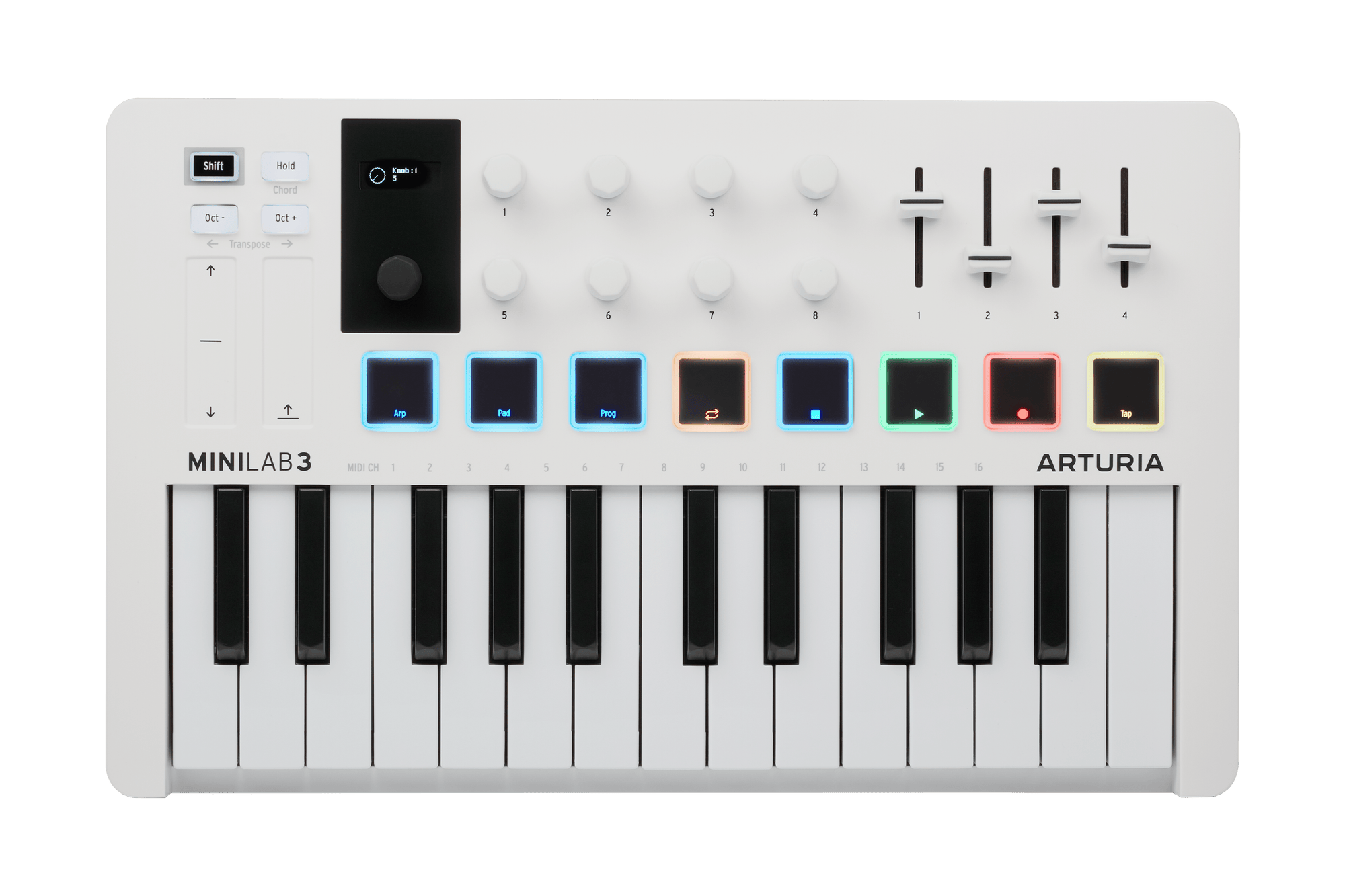
The surface has eight physical pads, described in the store listing as two banks of eight velocity- and pressure-sensitive RGB assignments. It also has eight encoders, four faders, a clickable browsing knob with a mini display, touch strips for pitch and modulation, plus Hold, Chord, an arpeggiator and transport functions. This is a busy layout for a compact board, but it is not sixteen physical pads and it does not include a drum sound merely because the pads can trigger drum notes.
Arturia documents scripts and guides for several DAWs and support information describes distinct MIDI ports for notes, DIN Thru and DAW-control protocols. That separation helps keep note data and transport messages from being confused, but it also means a user may need to select a script or port deliberately. The manufacturer even notes a setup conflict when using both MCU and HUI modes with a particular Reaper configuration. Treat software mapping as a setup task to verify in your own host, not a guaranteed property of the hardware surface.
A host connection, not an audio output
The controller connects over USB-C and is USB-powered. Arturia lists a five-pin DIN output, while its support article describes that port as a MIDI Thru for outgoing MIDI from host software. A practical external-instrument chain therefore uses the USB-C link to a computer, routes host MIDI through the controller’s DIN Out, and connects that cable to the synthesizer’s MIDI In.
That route sends control messages, not sound. The external instrument needs its own power and audio connection; a computer-based setup needs an instrument plug-in or another audio source plus suitable monitoring. Although the hardware has DIN, the documentation I reviewed supports the USB-host path and does not establish a separate computer-free power arrangement. Do not treat a MIDI output as a standalone instrument or infer an adapter requirement without checking current Arturia guidance.
Small footprint, but check the whole workspace
The MiniLab 3 product overview gives a body size of 14.02 inches wide, 8.62 inches deep and 2.13 inches high. The store page rounds those dimensions differently and disagrees with the overview on weight, so I leave weight out of the comparison rather than selecting whichever number looks convenient. For the finder, only the exact overview body width is used; it clears every allowed width value because the questionnaire begins at 16 inches.
A 14.02-inch chassis still needs room for a USB cable, the DIN plug, any pedal and your hands. It may be easy to place beside a laptop, but the front-to-back depth is greater than MiniLab 37’s published 7.20 inches. Check neighboring controls and connector direction before assuming the smaller key count means every part of the setup is shallower.
Software and package checks
Arturia lists a USB-C-to-USB-A cable and registration card along with the controller, and its product material names software and service items such as Analog Lab Intro, Ableton Live Lite, UVI Model D, Melodics, a Native Instruments license and Loopcloud. These are bundle claims, not a promise that every license is permanent, current or available from every reseller package. Confirm registration eligibility, OS support, software versions and exact included items for the offer you are considering.
Who should shortlist it
MiniLab 3 suits a desk where 25 keys are enough for the actual part, the short 14-inch body matters, and pads and DAW controls are welcome alongside the keyboard. Its White finish is visually distinct from the Black, Aquamarine and Rose Quartz configurations, but color does not change the reviewed key count or the controller routing. The image here is specifically of the White model.
Look at MiniLab 37 if a few more notes could reduce octave changes, or a 49-key controller if the part needs substantially more range at once. If your priority is weighted action, keyboard aftertouch, a verified standalone hardware setup or built-in sound generation, those capabilities are not established by the MiniLab 3 sources reviewed here. Confirm the exact manual and test the host workflow rather than assuming that a feature on a neighboring model carries over.
Arturia MiniLab 3 store and package listing · Product overview and dimensions · Arturia support notes on USB, DIN Thru and DAW ports.
Key specifications
Key details at a glance
| Keys | 25 |
|---|---|
| Manufacturer's keybed description | Velocity-sensitive slim keys (manufacturer description) |
| Width | 14.02 in |
| Pads | 8 |
| Velocity-sensitive pads | Yes |
| Pressure-sensitive pads | Yes |
| 5-pin MIDI Out | Yes |
| Computer connection | USB-C |
| USB bus-powered | Yes |
| Assignable pedal input | Yes |
| Depth | 8.62 in |
Use the exact model’s instructions for operating limits, supplied equipment and version differences.
Sources for this review
Sources for this assessment
- Arturia MiniLab 3 US store listing; exact White SKU and package listing
- Arturia MiniLab 3 product overview, keybed and control specifications, and dimensions
- Arturia MiniLab 3 resources and English manual listing
- Arturia MiniLab 3 General Questions: USB, MIDI ports, DIN Thru and DAW setup
- Arturia introduction of the MiniLab 3 Alpine White edition
Start with your setup, not a headline feature
Use the finder to combine key-count, connection, control and desk-fit requirements. Unverified specifications are never treated as a match.