
Your needs, this model
Does it fit your priorities?
What does the MiniLab 37 add over the MiniLab 3 for a compact playing range?
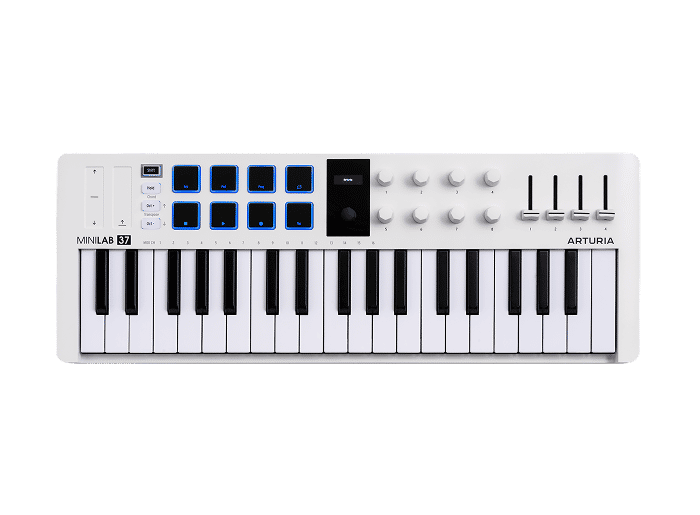
The exact White MiniLab 37 has 37 velocity-sensitive slim keys, twelve more than the 25-key MiniLab 3. That extra range can reduce octave shifting for a short two-hand sketch, but the manufacturer's page does not establish full-size key dimensions, a particular action feel or a measured response; inspect the exact keybed if those decide the purchase.
Explore this need in the finder →Are the MiniLab 37's pad banks sixteen physical pads?
No. Arturia describes two banks of eight velocity- and pressure-sensitive RGB pads, while the product overview shows an eight-pad 2-by-4 surface; treat this as eight physical pads with two banks, not sixteen simultaneously present pads. Pressure on those pads does not prove aftertouch on the keyboard keys.
Explore this need in the finder →Can the MiniLab 37 send MIDI to an external instrument while attached to a computer?
Arturia lists USB-C computer connectivity and a separate 5-pin DIN MIDI Out. Its support note explains that the computer-facing MIDI port can forward controller data to that DIN output. MIDI is control data, not audio; the destination instrument needs its own power and sound-monitoring route, and the MiniLab 37 is specified as USB-powered.
Explore this need in the finder →MiniLab 37 is the broader-range member of Arturia’s compact MiniLab line: a 37-note slim-key controller with a USB-C computer connection, pressure-sensitive pads, DAW controls and a separate five-pin MIDI output. This review uses the White US-store configuration, SKU minilab-37,0,white. It is a research-based assessment of Arturia’s current product and support information, not a hands-on test.
Why the extra octave may matter
The practical question is whether a three-octave span changes what you can record without shifting. Arturia specifies 37 velocity-sensitive slim keys, twelve more than the 25-key MiniLab 3. That does not make the MiniLab 37 a piano-range board, but it can leave more room for a melody and chord voicing to coexist in a short performance. If your part repeatedly crosses beyond three octaves, or if you need a broad simultaneous bass-and-treble range, consider a 49- or 61-key controller instead of relying on octave buttons.
The manufacturer calls these keys slim and velocity-sensitive. The reviewed official pages do not specify key width, a measured action curve, release-velocity response or keyboard aftertouch. I would not translate “premium keybed” copy into a claim about full-size keys or a particular playing feel. If those details are decisive, try the exact keybed in person and check the current manual before ordering.
A compact control surface with bank switching
Arturia lists eight encoders, four sliders, a small display and two touch sensors for pitch and modulation. Eight physical pads are arranged as two banks of eight assignments; the overview shows a 2-by-4 surface, so this is not sixteen pads sitting on the panel at once. The pads are specified as velocity- and pressure-sensitive with RGB lighting. That is useful when a session benefits from a pad gesture or a second control layer, but pad pressure is not the same as pressure aftertouch on the keyboard keys.
The feature set also includes an arpeggiator, Chord and Hold modes, octave and semitone shifting, and transport or performance controls. These are controller functions, not a bundled drum instrument or a guarantee that every DAW will map every button as expected. Arturia supplies DAW scripts and guides for named applications, while its support documentation distinguishes a standard MIDI connection from a DAW-control port. Plan time to select the right script or MIDI port in your actual software; a labeled encoder does not automatically know which third-party plug-in you have open.
USB-C, DIN MIDI and the sound path
The White store page lists USB-C for computer and iPad connection, USB power, a pedal input and a five-pin MIDI Out. Arturia’s MiniLab 37 support article describes the host-connected MIDI route and explains how data can pass from the computer to the DIN output. That makes the unit a plausible compact bridge between a DAW and an external synthesizer: the controller goes to the host over USB-C, then host MIDI can be sent through the controller’s DIN Out.
Keep the signal roles separate. A MIDI cable carries notes and control messages; it does not carry the external instrument’s sound or power it. The MiniLab 37’s own listed power arrangement is USB bus power. The reviewed sources do not establish an independent computer-free supply mode, so I would not plan a standalone DIN setup without confirming a current manufacturer-supported power path. The connected instrument still needs its own power and an audio connection to headphones, speakers or an interface.
Desk fit and included package
Arturia publishes a body size of 19.80 inches wide by 7.20 inches deep and 2.13 inches high, at 2.58 pounds. Against the 25-key MiniLab 3’s overview width of 14.02 inches, the 37-key model is wider but shallower; measure the surface you actually have rather than assuming that “compact” means the same footprint. Leave room for the USB, DIN and pedal leads, hands, a laptop or mixer, and any stand supports. The finder’s width number compares the published chassis only.
The store page lists a USB-C-to-USB-A cable in the box and names software or service offers including Analog Lab Intro, Ableton Live Lite, Melodics, a Native Instruments license and Loopcloud. Such bundles can depend on registration and change over time. Confirm the exact retailer package, activation eligibility, current license terms and host requirements; don’t buy on the assumption that a subscription or DAW entitlement will remain identical indefinitely.
Where it fits—and where it does not
MiniLab 37 is most compelling on paper when you want more than a two-octave controller but still need a modest desktop footprint, hands-on DAW controls, pressure-sensitive pads and a documented route from a computer to DIN MIDI hardware. The 37-key range, pads and MIDI output are real selection points; the display and software integration may be useful but depend on the host setup.
Choose a smaller 25-key board if its range is genuinely enough and a shorter body is the main constraint. Move to a 49- or 61-key model if the music must remain in one physical register without repeated octave changes. None of those alternatives can be judged by key count alone: key size, aftertouch, weighted action, control layout and dimensions vary by exact product. MiniLab 37 is documented as a controller, not as a self-sounding keyboard, so make a separate plan for software or an external sound source and audio monitoring.
Arturia MiniLab 37 store and feature listing · Product overview and dimensions · Arturia support notes on USB, DIN MIDI and DAW ports.
Key specifications
Key details at a glance
| Keys | 37 |
|---|---|
| Manufacturer's keybed description | Velocity-sensitive slim keys (manufacturer description) |
| Width | 19.8 in |
| Pads | 8 |
| Velocity-sensitive pads | Yes |
| Pressure-sensitive pads | Yes |
| 5-pin MIDI Out | Yes |
| Computer connection | USB-C |
| USB bus-powered | Yes |
| Assignable pedal input | Yes |
| Depth | 7.2 in |
Use the exact model’s instructions for operating limits, supplied equipment and version differences.
Sources for this review
Sources for this assessment
Start with your setup, not a headline feature
Use the finder to combine key-count, connection, control and desk-fit requirements. Unverified specifications are never treated as a match.