
Your needs, this model
Does it fit your priorities?
Can the Keystage-61 meet a 61-key minimum and control an external DIN instrument within a 38.75-inch body limit?
KORG names the 61-key size Keystage-61 and lists 38.54 inches of body width plus a 5-pin MIDI OUT. It fits the numeric case-width screen at 38.75 inches, but cable clearance is still required. KORG's manual says external MIDI-tone-generator operation needs separate power; verify the adapter or other compliant supply before ordering.
Explore this need in the finder →Does the 61-key model include a synthesizer that can play without a host?
No. KORG's owner manual explicitly says the Keystage has no built-in sound generator. A computer or mobile app can supply audio over the USB-B audio interface, or a hardware sound generator can receive its 5-pin MIDI OUT. The external instrument, host configuration and audio monitoring remain separate parts of the setup.
Explore this need in the finder →What does the longer 61-key model change compared with the Keystage-49?
The Keystage-61 adds twelve physical keys and measures 38.54 inches wide versus 32.05 inches for the Keystage-49. Both specifications list the same semi-weighted Polytouch keybed with polyphonic aftertouch, eight knobs and USB-B MIDI/audio. Choose by the actual playing range and usable surface, not by assuming that the longer version changes the controller's sound generation.
Explore this need in the finder →The KORG Keystage-61 is a 61-key semi-weighted MIDI controller with polyphonic aftertouch, direct 5-pin MIDI connections and a USB-B MIDI/audio interface. It shares the Keystage family controls with the 49-key model, but its published width is 38.54 inches and it weighs 11.02 pounds. The added range is useful only if the wider case fits the playing and installation space.
Sixty-one keys, not a full piano span
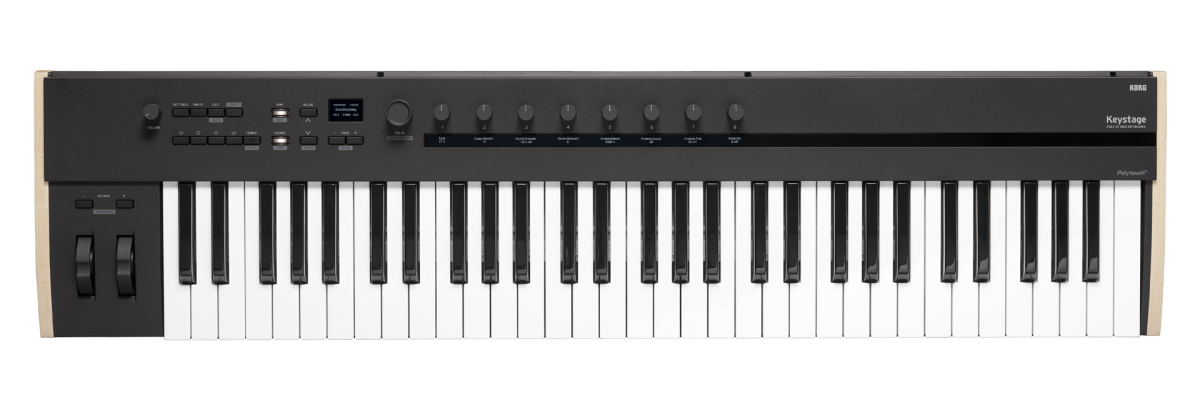
KORG calls this size the Keystage-61 and specifies a 61-key Polytouch bed with velocity sensitivity, channel aftertouch and polyphonic aftertouch. The product page describes the keybed as semi-weighted. This is a factual description of the mechanism, not a test of how it feels under a particular player's technique. Polyphonic aftertouch can report pressure per key, which is different from channel-wide pressure; the receiving instrument must support it for the nuance to matter.
Compared with the Keystage-49, the 61 adds twelve physical notes and extends the case to 38.54 inches. That may reduce octave switching in two-hand arrangements, but it still is not an 88-note instrument. The Keystage-49 is the more compact sibling at 32.05 inches and 9.26 pounds; the 61 measures 9.21 inches deep and 3.23 inches high, weighing 11.02 pounds. Add room for the USB, DIN and pedal cables, hands and stand supports. The published size is a body measurement, not a complete furniture-fit guarantee.
Control surface for software and performance
The control set is shared across the Keystage sizes: eight parameter knobs with individual OLED readouts, a main OLED, pitch and modulation wheels, transport buttons, an arpeggiator and chord-mode controls. KORG specifies 16 scenes, 20 arpeggiator patterns, 32 preset chord sets and 32 user sets. Those functions may suit a player who wants performance tools and editable parameters at the keyboard; they add setup and menu choices for someone who only needs a simple note input device.
There is no documented drum-pad bank. Key aftertouch should not be confused with pressure-sensitive pads, and KORG lists neither pads nor a fader row in the Keystage control surface. The damper input supports half-damper operation, and a separate expression input is available. The named pedals are accessories sold separately, so verify the pedal type and any adapter or cable you need.
USB-B combines controller and audio-interface duties
The Keystage connects to a host over USB Type B. KORG lists one-in/one-out MIDI and two-channel USB audio output, and the owner's manual describes using USB to control a DAW or software sound generator. That interface can send host audio to the 1/4-inch left/right outputs or headphone jack, which can simplify a desk where a separate interface would otherwise be needed. It is still necessary to select and configure the device in the application. KORG's supported software and operating-system information can change, so check the current host requirements instead of assuming every app and computer will behave the same way.
Type B is a material distinction for newer computers. The included Type-A-to-Type-B cable does not turn the keyboard into a USB-C model; a USB-C-only host may need an appropriate data adapter or cable. KORG lists bundled software such as Gadget Producer and Ableton Live Lite, but registration, account eligibility, current license terms and the seller's actual package are separate questions. Treat bundle claims as something to verify, especially on used or open-box offers.
Hardware MIDI is available, but plan power
For a hardware setup, the back panel includes 5-pin MIDI IN and OUT, so the Keystage can send performance data to a separate tone generator. It does not generate those sounds itself. KORG's owner manual is unusually important here: it says to use the separately sold 9 V adapter when controlling an external MIDI tone generator. The manual also lists a standards-compliant USB 2.0 power supply of at least 5 V DC and 550 mA through the USB-B port. Confirm the power path and obtain the right supply before building the external-hardware rig; MIDI DIN carries control messages, not audio.
For computer use, KORG describes the keyboard as bus-powered over USB. After configuration, software audio can reach the controller's outputs through its interface. A combined rig still needs a host or tone generator, monitoring, power and cable routing; the ports do not configure the DAW for you.
Is the wider sibling worth the space?
The 61-key version is the sensible size to assess when the 49-note range would force frequent octave changes and a 38.54-inch body fits the desk or stand. If 49 keys are sufficient, the shorter sibling preserves the family's aftertouch, displays, DIN I/O and USB audio functions with a smaller footprint. Neither size has a built-in sound generator, and the shared semi-weighted description cannot decide which key action suits you. Players who prioritize touch should try the exact model when possible; this review does not claim a hands-on feel test.
The included expansion plate can be mounted in two positions on the Keystage-61, and KORG describes the right-side horizontal placement for a small laptop. This is a model-specific convenience that the 49's manual layout does not share. It is not a rated stand or a universal laptop tray: check the plate orientation, device overhang and stability instructions before placing anything on it.
Bottom line
The Keystage-61 is worth comparing when a 61-key range, per-key expression, mapped controls, computer audio routing and DIN hardware control all have a role in one setup. Its key buying checks are the 38.54-inch body plus clearance, the USB-B host connection, extra power for external MIDI operation, pedal accessories and the current seller software package. Choose it over the 49 because the extra notes justify the larger footprint, not because a longer keyboard is universally better. This is a manufacturer-source assessment, not a claim of ownership, hands-on use or testing.
Primary sources: KORG Keystage product page; KORG Keystage specifications; KORG Keystage Owner's Manual (English, E2); KORG Keystage support downloads. Verify current host/software, package and power requirements.
Key specifications
Key details at a glance
| Keys | 61 |
|---|---|
| Manufacturer's keybed description | Semi weighted |
| Width | 38.54 in |
| Pads | 0 |
| Velocity-sensitive pads | No |
| Pressure-sensitive pads | No |
| 5-pin MIDI Out | Yes |
| Computer connection | Usb-b |
| USB bus-powered | Yes |
| Assignable pedal input | Yes |
| Keyboard channel aftertouch | Yes |
| 5-pin MIDI In | Yes |
| Depth | 9.21 in |
| 5-pin MIDI outputs | 1 |
| CV/Gate/Mod voice outputs | 0 |
Use the exact model’s instructions for operating limits, supplied equipment and version differences.
Sources for this review
Sources for this assessment
Start with your setup, not a headline feature
Use the finder to combine key-count, connection, control and desk-fit requirements. Unverified specifications are never treated as a match.