
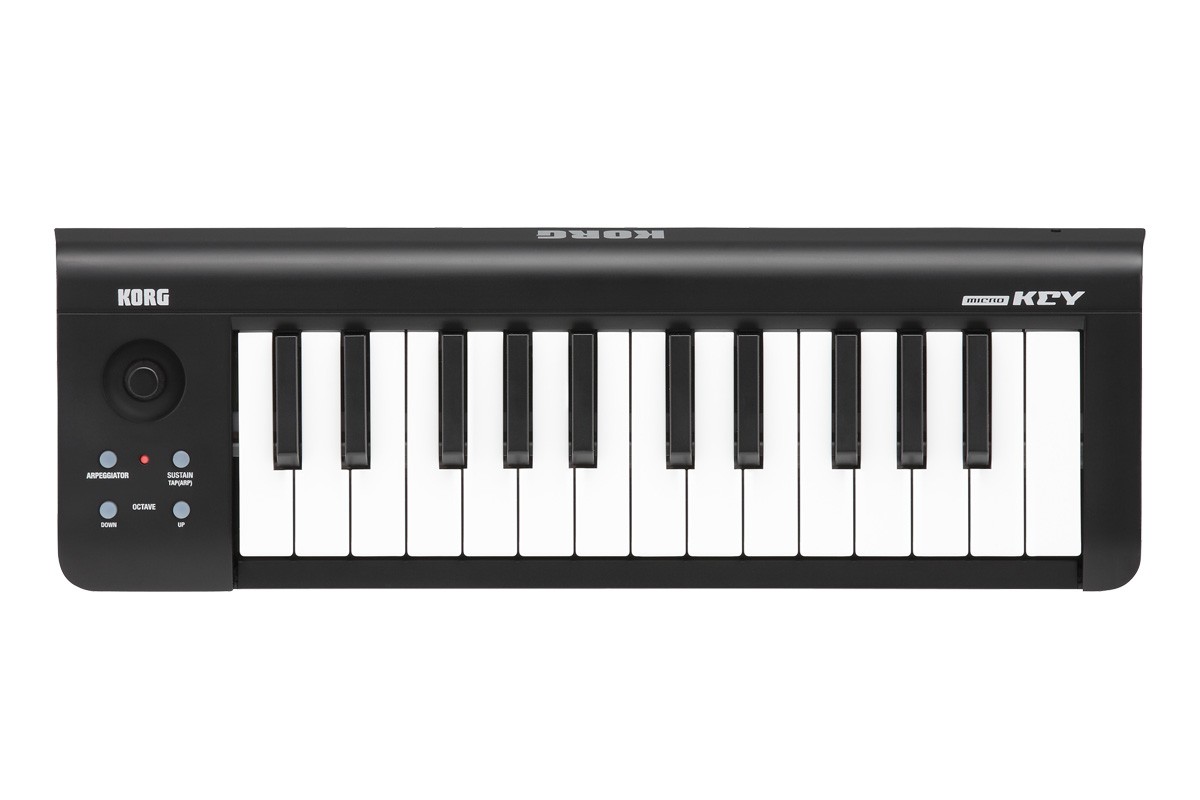
Your needs, this model
Does it fit your priorities?
Is the original microKEY-25 a 16-inch USB-C keyboard?
It is a 15.55-inch-wide, 25-key USB Type-B model. That body clears a 16-inch limit, but its connector is Type-B rather than USB-C and no direct five-pin MIDI output is documented.
Explore this need in the finder →What controls accompany the original 25-key microKEY?
The 25-key configuration uses a joystick, arpeggiator button, Sustain/TAP button and octave-shift buttons. It has a USB Type-B host connection and no downstream USB-A hub ports.
Explore this need in the finder →Does the microKEY-25 need a separate power connection?
KORG specifies USB bus power below 100 mA over its single USB Type-B connection. For an iPad setup, KORG’s legacy guide requires an Apple Camera Connection Kit; that dated guidance is not a guarantee of current tablet compatibility.
Explore this need in the finder →The original KORG microKEY-25 is a 25-key USB-powered MIDI controller with Natural Touch mini keys, a joystick, an arpeggiator button and Sustain/TAP control. It is a different generation from the later microKEY2 and a different product from the Bluetooth microKEY Air. Its concise layout is attractive when a small note-entry surface is the task; it is not a USB-C or direct-DIN controller.
Identify the original model first
KORG’s U.S. product and specification pages call this family microKEY, and enumerate 25-, 37- and 61-key configurations. The 25-key model has its own controller layout: a joystick, arpeggiator button, Sustain/TAP button and octave-shift buttons. The 37- and 61-key models instead use separate pitch-bend and modulation wheels and add two downstream USB-A ports. Those differences are one reason not to borrow facts from a neighboring size or a later microKEY2/Air listing.
The keys are called Natural Touch mini keys, and the English owner manual describes the 25-key keyboard as velocity-sensitive. KORG’s feature page explains eight velocity curves plus a constant-velocity setting. It does not specify key aftertouch, individual key dimensions or a weighted action. “Natural Touch” is the manufacturer’s keybed name; it cannot predict how a particular person will find the mini keys. If note spacing is decisive, see or verify the exact model rather than inferring full-size key dimensions from marketing wording.
Compact range and body size
The 25-key version measures 395 × 131 × 53 mm, or 15.55 × 5.16 × 2.09 inches, and weighs 0.65 kg. The width falls below the finder’s smallest 16-inch body cap, but a 0.45-inch margin is not enough to plan a complete desk position. A USB plug, cable bend, hands and a stable support all take space beyond the bare dimensions.
Twenty-five physical notes make it the most compact member of this original family. The octave buttons can shift the range from −4 to +4, while the feature page says the key-transpose function can reach across the MIDI note range. Neither function creates more keys that can be played simultaneously. If the intended part needs broader two-handed voicings, look at the 37- or 61-key model rather than treating transposition as a substitute for a larger bed.
On this model, the joystick is the main continuous gesture control. The arpeggiator button and Sustain/TAP button add a small performance vocabulary without the wheel pair on the larger sizes. There is no drum-pad bank or panel of knobs. No separate pedal input, USB-A hub, USB-C connector, Bluetooth MIDI, direct five-pin DIN or audio output is documented in the reviewed 25-key materials.
One USB host connection
KORG specifies one USB Type-B connector and USB bus power below 100 mA. That single computer link carries MIDI and powers the keyboard; no separate adapter is listed as necessary for the documented computer setup. The original microKEY does not connect straight to external five-pin MIDI gear, so a computer or a separate MIDI host/interface must provide that route. The keyboard itself has no sound engine or audio output; it sends MIDI messages to software or an external sound source.
KORG’s feature page describes older iPad use. For the 25-key size it names Apple’s Camera Connection Kit and a USB cable; the same page warns that operating-system updates can affect compatibility. That is historical setup guidance, not a claim that current tablets or apps will work. The owner manual likewise lists legacy operating-system baselines and states that functionality is not guaranteed on every computer satisfying them. Check today’s KORG driver/support page and the MIDI behavior of the exact host app before relying on an older unit. The presence of a USB port does not itself establish support for a particular DAW or tablet.
What a listing still needs to prove
The product page’s bundled-software language is not proof that a used unit includes a valid, unused, transferable code. Confirm the actual cable, package and condition with the seller. No inspected source ties a retail SKU or current price/stock to a particular unit. The original model name also matters: a listing titled “microKEY” may be imprecise, while microKEY2 and microKEY Air have separate specifications and wireless options. Match the case, control layout, connector and key count against the exact 25-key configuration before applying any model-specific assumptions.
For a small, velocity-responsive MIDI input with a joystick and software arpeggiator control, the microKEY-25 offers a clear USB-powered plan. Its limitations are just as clear: mini keys, a short simultaneous range, no documented direct DIN, no USB-C and no audio. It is a sensible shortlist candidate only when the host connection and key format match the actual setup—not because a seller’s generic “MIDI keyboard” title establishes compatibility.
Research sources: KORG microKEY product page; features; U.S. specifications; support and downloads; 25-key Owner’s Manual.
Key specifications
Key details at a glance
| Keys | 25 |
|---|---|
| Manufacturer's keybed description | Natural Touch mini keys (KORG description) |
| Width | 15.55 in |
| Pads | 0 |
| Velocity-sensitive pads | No |
| Pressure-sensitive pads | No |
| 5-pin MIDI Out | No |
| Computer connection | USB Type-B |
| USB bus-powered | Yes |
| Assignable pedal input | No |
| 5-pin MIDI In | No |
| Depth | 5.16 in |
| 5-pin MIDI outputs | 0 |
Use the exact model’s instructions for operating limits, supplied equipment and version differences.
Sources for this review
Sources for this assessment
Start with your setup, not a headline feature
Use the finder to combine key-count, connection, control and desk-fit requirements. Unverified specifications are never treated as a match.