
Your needs, this model
Does it fit your priorities?
Will the 49-key microKEY2 fit my body-width limit?
KORG lists the microKEY2-49 at 27.91 inches wide. That is a chassis-only screen; allow for hands, the USB plug and cable bend, and the support surface. This non-Air model uses USB Type-B and has no listed wireless MIDI mode.
Explore this need in the finder →Can the microKEY2-49 send directly to five-pin MIDI hardware?
KORG lists USB Type-B and bus power for the microKEY2-49; its larger-size pedal-switch jack is an input, not a five-pin MIDI output. KORG does not document direct DIN MIDI Out. Use a separately documented host/interface path or select a model with verified DIN output.
Explore this need in the finder →Does the microKEY2-49 have a USB-C computer socket?
No. KORG specifies USB Type-B for the non-Air microKEY2-49; it is bus-powered and has no listed Bluetooth MIDI mode. A USB-C host may need a suitable cable or adapter, but that connector does not establish OS or music-app compatibility.
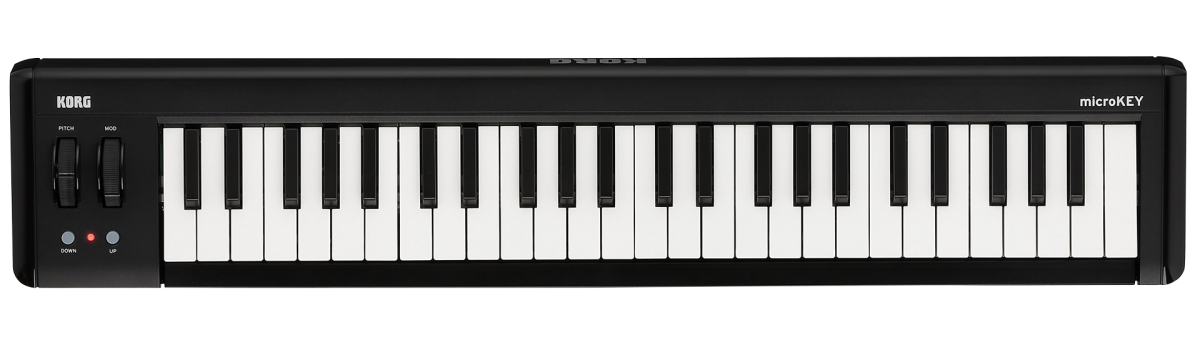
Explore this need in the finder →KORG's microKEY2-49 is the 49-note version of its compact USB MIDI keyboard family, with velocity-sensitive mini keys, pitch and modulation wheels, an assignable switch jack and a body just under 28 inches wide. It sits between the shorter 37-key and longer 61-key options, but its surface and key mechanism remain those of a compact controller. The assessment below uses KORG's US product/specification pages and English manual; it does not claim physical testing, ownership or preferred feel.
Why choose 49 physical keys
Forty-nine keys give a larger physical span than the 25 and 37 versions and can reduce octave changes for parts that move between low notes, chords and melody. They do not provide an 88-note piano range, and the manufacturer calls the Natural Touch keyboard a mini-keyboard. If full-size weighted action is important, key count alone will not answer that question. KORG's table gives the 49 a plus/minus three-octave shift setting, while the 25 and 37 are listed at plus/minus four; the shift controls change the note range sent, not the physical keybed.
The product support manual says the keys respond to velocity and can be adjusted through eight curves or a fixed-velocity setting in KORG KONTROL Editor. That is a useful practical control for adapting MIDI input to a receiving instrument, but the documentation does not specify a measured force curve or prove that the keys feel like another model. The maker's language should be read as a product description, not as a substitute for trying the action.
The larger models share wheels and a pedal switch
Unlike the 25-key panel, which has a joystick, arpeggiator and Sustain/TAP button, the 49 carries separate pitch-bend and modulation wheels plus octave buttons. It also includes an assignable switch jack for a damper pedal or footswitch. KORG lists this socket on the 37, 49 and 61 sizes. The exact pedal is not stated as included in the specification row; plan to verify the seller's box contents if foot control matters. A footswitch connection is not a separate five-pin MIDI path.
The 49-key model is best viewed as a straightforward playing input rather than a large control workstation. KORG documents no pressure-sensitive drum pads or onboard sound engine in the reviewed product information. The model sends MIDI through USB; software or separate sound-generating hardware must create the audio and provide monitoring. Its simplified layout can suit someone who mainly wants more physical notes and the two wheels without adding a larger pad grid or deep DAW-control surface.
USB Type-B is the documented host route
This is the non-Air microKEY2, not a Bluetooth keyboard. KORG lists one USB Type-B connection and USB bus power, with no Bluetooth MIDI mode in the reviewed specification. A USB-C-only computer may still be usable with a suitable cable or adapter, but the controller itself is not USB-C and this does not promise that a specific computer, application or driver will work. KORG's product page describes basic connection to Mac and Windows without installing a driver, while current support also has a Windows MIDI driver; verify the correct port and operating-system guidance for the machine in use.
The product page also describes an iPad/iPhone connection through Apple's Lightning-to-USB Camera Adapter, sold separately. It is worth checking whether that documented route applies to the exact tablet generation and app before treating any USB adapter as interchangeable. KORG's caution that operation is not guaranteed on every machine that meets system requirements is particularly relevant when a studio depends on one specific host.
Dimensions and a specification inconsistency
The official table lists a body measuring 27.91 inches wide by 5.47 inches deep and 2.13 inches high. It pairs 1.4 kg with 2.21 lb, an inconsistent conversion: the English manual lists 1.4 kg as 3.09 lb. For an evidence-led comparison, the 1.4 kg figure is the stable shared source value; do not rely on the inconsistent pound entry for shipping or stand calculations. The width is a bare chassis measure and does not reserve room for the hands, a rear USB lead, cable bend or neighboring equipment. A 28-inch cap clears the listed body, but leaves only about 0.09 inch of nominal margin.
KORG's specifications list a USB cable and a KORG Software Bundle code. That does not settle a particular seller's exact package, the code's activation status or transferability. Confirm the microKEY2-49 model suffix and included items directly with the offer; the maker material reviewed here does not establish a US retail SKU, price, stock or availability.
49 keys versus the 37 and 61
The 37 is about 5.67 inches narrower and keeps the same general wheel/pedal arrangement, but offers 12 fewer notes. The 61 extends the bed by another 12 keys to 33.46 inches. Those choices make the main question physical range against desk footprint, rather than a claim that one size has a different key action. The related microKEY Air versions add Bluetooth and separate battery-powered use; that is a distinct model family with different operating checks, not a hidden mode on this keyboard.
The microKEY2-49 is a plausible fit when 49 physical mini keys and a compact controller surface are more valuable than a wireless connection or built-in sound. Check host compatibility, available width, cable route, pedal needs and actual package contents before deciding. For a fixed DIN-hardware rig, seek a model with a directly verified output or plan a separately documented host/interface chain; neither the USB port nor pedal jack should be mistaken for five-pin MIDI Out.
Key specifications
Key details at a glance
| Keys | 49 |
|---|---|
| Manufacturer's keybed description | Natural Touch mini keys (KORG description) |
| Width | 27.91 in |
| Pads | 0 |
| Velocity-sensitive pads | No |
| Pressure-sensitive pads | No |
| 5-pin MIDI Out | No |
| Computer connection | USB Type-B |
| USB bus-powered | Yes |
| Assignable pedal input | Yes |
| 5-pin MIDI In | No |
| Depth | 5.47 in |
| 5-pin MIDI outputs | 0 |
Use the exact model’s instructions for operating limits, supplied equipment and version differences.
Sources for this review
Sources for this assessment
Start with your setup, not a headline feature
Use the finder to combine key-count, connection, control and desk-fit requirements. Unverified specifications are never treated as a match.