
Your needs, this model
Does it fit your priorities?
Can the nanoKEY2 meet a compact 25-key desk brief?
KORG lists 25 velocity-sensitive keys and a 12.80-inch body width, so the nanoKEY2 fits the finder’s smallest 16-inch bare-body cap. That does not mean the cable, hands or neighboring equipment fit, and it does not establish key dimensions or action. The octave buttons shift the 25-note span but do not add simultaneous keys.
Explore this need in the finder →Does the nanoKEY2 use USB-C or wireless MIDI?
No documented USB-C or Bluetooth MIDI is listed for this configuration. KORG specifies a mini-USB/mini-B host connector and USB bus power on the same cable. If your computer only has USB-C sockets, confirm a working cable/adapter and current host support; the controller port itself remains Mini-B.
Explore this need in the finder →Can the nanoKEY2 send five-pin MIDI to external hardware?
The reviewed KORG specification lists mini-USB as its connection, while the manual describes the USB-MIDI computer route; neither lists a DIN or TRS MIDI output. A DIN instrument therefore needs a separate computer or MIDI interface/host path, and that external device—not the nanoKEY2—must generate its audio.
Explore this need in the finder →Does it provide pressure-sensitive pads?
No pad bank is documented or shown for the nanoKEY2; its controls are keys and dedicated buttons. Keyboard velocity and key aftertouch are different from pressure sensing on drum pads, so this model should not be selected when pressure-sensitive pads are essential.
Explore this need in the finder →The KORG nanoKEY2 is a compact, low-profile 25-key USB-MIDI controller. Its appeal is the short footprint and simple host connection; its limits are equally specific: one USB Mini-B route, no documented wireless or hardware MIDI output, no pad bank, and a key format whose exact size KORG does not publish.
What the nanoKEY2 is—and is not
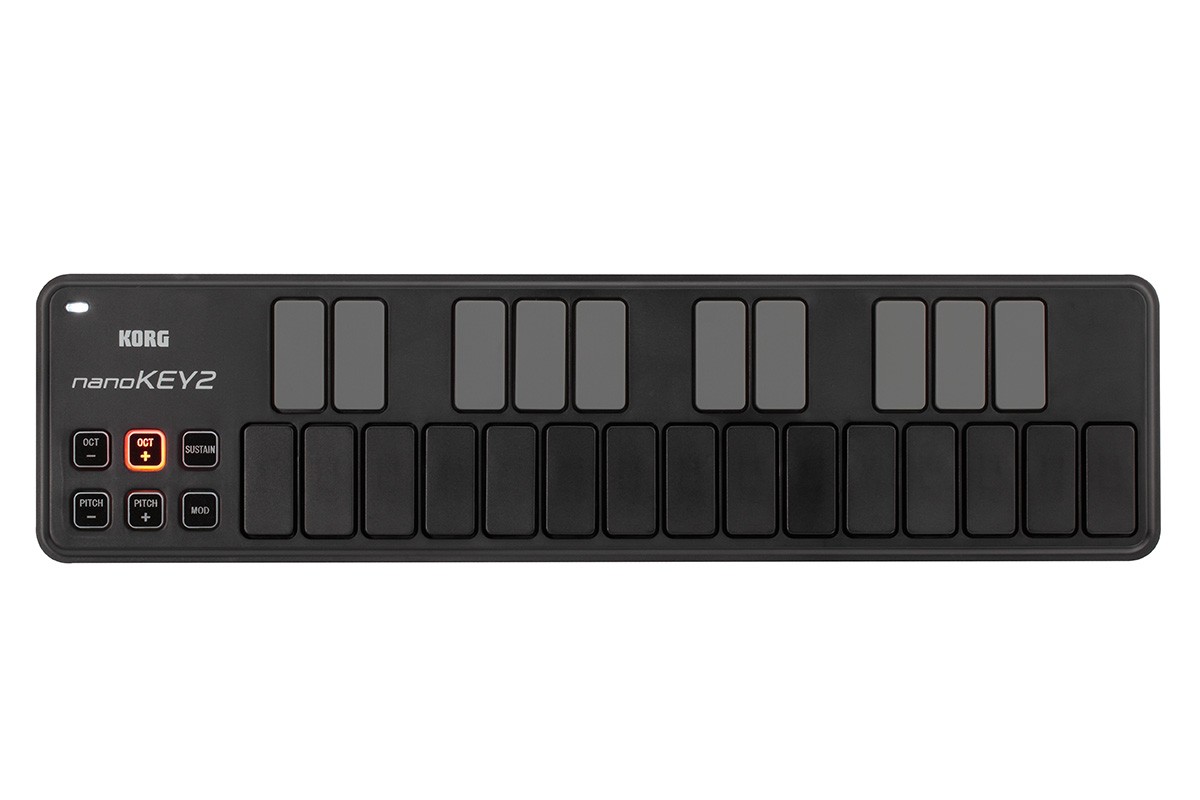
KORG's U.S. product page describes the nanoKEY2 as a slim-line keyboard for computer music. The specifications list 25 velocity-sensitive keys, pitch-up/down, octave-up/down, modulation and sustain buttons, and four velocity settings. This is performance input for a configured MIDI host, not a self-contained piano or synth: the reviewed documentation describes no sound engine or audio output. Plan a software instrument or separate sound generator and a separate monitoring path.
The two finishes shown on KORG's product page are Black and White. This assessment uses the exact Black gallery image; the White finish is a shared cosmetic variant, not evidence of a different key count or connector. KORG does not identify a U.S. retailer SKU or package-specific code on the inspected pages, so a listing title alone cannot establish which condition, cable or software entitlement is being offered.
Range and playing controls
Twenty-five physical keys provide a compact note span. The octave buttons shift the range in steps through four octaves above or below the center, but transposition does not add keys that can be played at once. The controller's manual says the octave LEDs show the current shift and that pressing the two octave buttons together resets to the center. If a passage requires a broader simultaneous span, choose a longer keyboard rather than expecting octave buttons to behave like extra notes.
Each key sends velocity, and KORG's product/specification pages offer three response curves plus a fixed-velocity setting. That gives a host user some control over how hard/soft input is translated, but the reviewed material does not establish key aftertouch, an action type, or individual key dimensions. KORG says the key width and spacing were designed to reduce mistaken presses; there are no published measurements here that let a buyer infer full-size or mini geometry. Treat hand comfort as an unresolved fit check, not a conclusion from the slim case.
The remaining surface is a small set of dedicated buttons, not drum pads, knobs or wheels. Pitch bend is sent with separate up/down buttons; modulation and sustain are also buttons. KORG Kontrol Editor can change the MIDI messages for modulation and sustain, and the product page describes four switching-speed settings for the buttons. These controls suit basic note entry and a few direct gestures, but do not replace the larger real-time control sections on pad- and encoder-heavy boards. No pressure-sensitive pad feature applies because this model has no documented pad bank.
One cable, one documented host route
The rear connection is mini-USB, identified as a mini-B connector in the owner's manual. That cable carries MIDI data and USB bus power together, so the published operating plan does not require a separate power adapter. The physical device port is not USB-C: a cable or adapter may connect it to a newer host, but that does not change the controller's connector or guarantee support from the host, operating system, driver or music application.
KORG's manual instructs users to select the nanoKEY2 MIDI input in the host application and warns that operation is not guaranteed on every computer that meets the stated requirements. Its old manual lists Windows XP/Vista/7 and earlier Mac OS versions; the current U.S. specification page gives later minimum OS baselines, but those dated requirements are not a promise of present-day compatibility. Check KORG's current downloads, the target device's USB-MIDI support and the specific application's MIDI setup. The manual also notes that a passive USB hub may not supply enough power; direct connection or a powered hub is the safer check if it fails to start.
There is no documented Bluetooth MIDI, five-pin DIN output or TRS MIDI jack. If the plan is to control external hardware, the nanoKEY2 cannot connect straight to DIN gear; a computer/interface or another supported MIDI host would have to provide the missing route. KORG's original iPad note refers to a Camera Connection Kit and explicitly cautions that iPad OS changes can affect compatibility, so it should not be read as universal current tablet support.
Where it fits in a shortlist
At 325 × 83 × 16 mm, the specification page lists a 12.80 × 3.27 × 0.65-inch body and 244 g weight; the older manual prints 0.63 inch for height while retaining the same 16 mm figure. The 12.80-inch width clears the finder’s smallest 16-inch body cap and remains inside every wider width-only cap. A body pass is not a desk plan: leave space for the USB plug and cable bend, hands, nearby controls and support points.
Compared with the separately assessed nanoKEY Studio, the nanoKEY2 is a simpler USB-only surface: the Studio adds documented Bluetooth MIDI, pads, knobs and an X-Y touch area but has its own host/power limitations. The nanoKEY Fold is another 25-note alternative with a USB-C port and an adapter-based MIDI-out route; its membrane buttons and folding layout are not the same key design. Those distinctions matter more than a shared “nano” name.
The nanoKEY2 is worth considering when a narrow body, velocity-responsive 25-note input and single-cable computer MIDI match the session. It is a poor fit if USB-C at the controller, wireless operation, direct DIN, pressure-sensitive pads, a wider range or an independently specified key action is essential. Before ordering, confirm the exact finish and seller condition, whether the physical cable is present, whether any software code is still valid, and whether your host and app accept its MIDI port.
Primary documentation
- KORG nanoKEY2 product page (U.S.)
- KORG nanoKEY2 specifications and system requirements
- KORG nanoKEY2 Owner's Manual and KORG U.S. downloads
Key specifications
Key details at a glance
| Keys | 25 |
|---|---|
| Width | 12.8 in |
| Pads | 0 |
| Velocity-sensitive pads | No |
| Pressure-sensitive pads | No |
| 5-pin MIDI Out | No |
| Computer connection | Usb mini-b |
| USB bus-powered | Yes |
| Assignable pedal input | No |
| 5-pin MIDI In | No |
| Depth | 3.27 in |
| 5-pin MIDI outputs | 0 |
Use the exact model’s instructions for operating limits, supplied equipment and version differences.
Sources for this review
Sources for this assessment
Start with your setup, not a headline feature
Use the finder to combine key-count, connection, control and desk-fit requirements. Unverified specifications are never treated as a match.