
Your needs, this model
Does it fit your priorities?
Does the 61 MK3 meet a 61-key minimum below a 39.25-inch body cap?
M-Audio's product page specifies 61 full-size velocity-sensitive semi-weighted keys and a 39.2-inch width. The guide rounds the body width to 39.1 inches and reports 9.0 pounds; the 0.1-inch page/manual difference is preserved. A 39.25-inch screen leaves little nominal clearance, so check the exact unit, plugs and stand.
Explore this need in the finder →Can it send MIDI to a DIN-only hardware synth?
Yes. The dedicated product page, v1.6 manual and rear view document a five-pin MIDI Out. The guide says MIDI Out mode must be selected; it also lists a separately sold 9 V, 500 mA center-positive adapter when operating from the DIN route without USB power. The external synth and its audio monitoring remain separate.
Explore this need in the finder →Does the 61 MK3 include pads or a self-contained piano sound?
The inspected feature list, manual and rear-panel image document keys, a fader, wheels, buttons and a sustain input, not drum pads, an onboard sound engine or audio output. It sends MIDI; choose a software instrument or external sound module and verify the seller package separately.
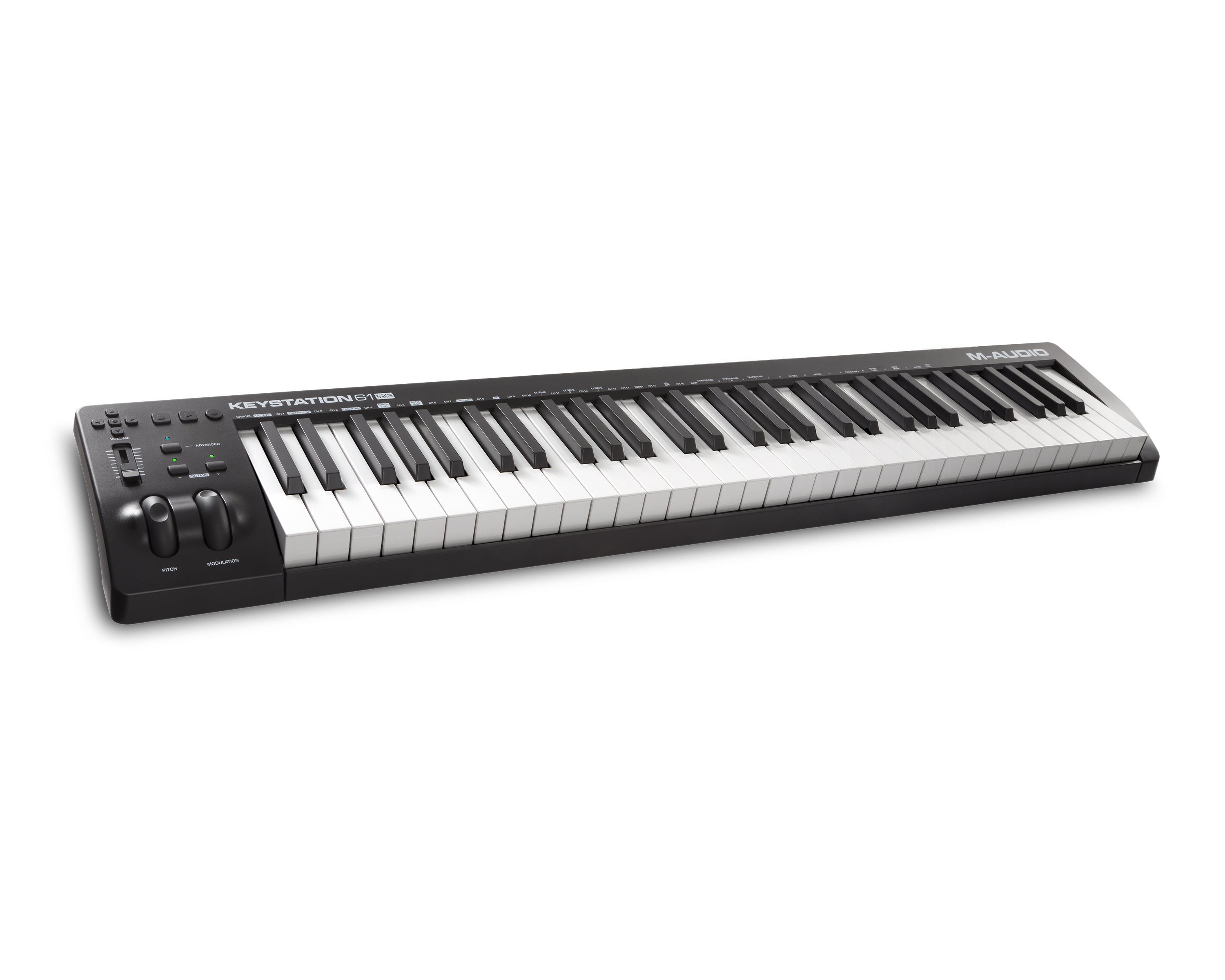
Explore this need in the finder →The Keystation 61 MK3 occupies the middle ground between M-Audio's 49-key and 88-key Keystations: 61 full-size, velocity-sensitive semi-weighted keys, basic DAW controls and a documented five-pin MIDI output. It is a controller, not a self-playing piano. USB can send MIDI to a computer and supply power; the DIN output can send performance data to a hardware sound module. In either case, a separate software instrument or module generates audio.
Five octaves with a straightforward control strip
The exact product page describes 61 full-size semi-weighted keys. On the panel, M-Audio lists pitch and modulation wheels, a volume fader, octave buttons, transport and directional controls, plus an advanced function for assigning controls to a DAW or plugin. This is a relatively simple layout: it offers more physical range than a 49-key bed without the separate 88-key footprint, but it does not have the pad bank or multi-fader surface of a performance-oriented controller such as Hammer 88 Pro.
The published body is 39.2 by 7.44 by 2.68 inches and the manual gives a 9-pound weight. The v1.6 guide rounds its width to 39.1 inches and the other axes to 7.4 by 2.6. Keep both values in mind for a shelf or case; a quarter-inch of nominal side margin still leaves no real allowance for plugs, hands, a stand or cable bends. Measure the exact location rather than judging fit from a product title or the key count alone.
USB for a computer, DIN for external gear
The product page and guide document USB-MIDI and USB power. The rear panel also has five-pin MIDI Out and one sustain-pedal input. The manual explains that MIDI Out mode must be activated before the keyboard's performance messages are sent from that DIN jack. It describes a separately sold DC 9 V, 500 mA center-positive adapter for using MIDI output without USB power. Plan the power source as part of the external-synth setup, and check the external instrument's own input, power and audio connections.
The 5-pin output is not an audio port. A MIDI cable carries control data; it does not produce or carry the sound of a piano. When connected to a computer, load a virtual instrument and choose an audio output. With an external module, route the module's audio to headphones, speakers or an interface. The product and manual do not document an onboard sound engine or audio output.
Sustain, not a full pedal unit
M-Audio specifies a sustain input, and the manual says a momentary-contact foot pedal is sold separately. It describes the startup polarity behavior: the keyboard assumes the pedal is released when it powers on. That detail can matter if notes sustain when the pedal is untouched. The inspected 61 MK3 materials do not establish an expression-pedal input; do not transfer the separate expression jack from Keystation 88 MK3. The top-panel buttons and wheels are built-in controls, while a pedal remains a separate package and connection check.
Compare the range, not just the family name
The 49 MK3 is narrower and lighter, but its dedicated page and rear-panel evidence do not document the 61 MK3's 5-pin output. The 88 MK3 extends the physical range and has an expression input, but its semi-weighted bed and body are different. The Hammer 88 uses weighted hammer action and has multiple pedal inputs. These distinctions make the 61 a specific fit for someone who wants a five-octave semi-weighted controller with direct DIN and simple transport/fader control; it is not a piano-action Hammer or a drum-pad control surface.
Check before ordering
Confirm the MK3 suffix, the long-side fit and the USB cable or optional supply needed for the intended route. If using DIN, verify the MIDI Out mode, the separately powered synth and its audio destination. Check whether a sustain pedal is included; the guide lists it as a separate item. M-Audio's current category and support selector identify the model, but do not establish a current retailer's stock, exact US SKU, price, seller package or unused software-license entitlement. No hands-on feel, measured performance or personal-use result is claimed.
Key specifications
Key details at a glance
| Keys | 61 |
|---|---|
| Manufacturer's keybed description | Semi-weighted synth action |
| Width | 39.2 in |
| Pads | 0 |
| Velocity-sensitive pads | No |
| 5-pin MIDI Out | Yes |
| Computer connection | USB Type-B |
| Assignable pedal input | Yes |
| 5-pin MIDI In | No |
| Depth | 7.44 in |
Use the exact model’s instructions for operating limits, supplied equipment and version differences.
Sources for this review
Sources for this assessment
- M-Audio Keyboard Controllers catalogue entry
- M-Audio Keystation 61 MK3 product page
- M-Audio support downloads selector: Keystation 61 MK3
- M-Audio Keystation 61 MKIII User Guide, version 1.6
- M-Audio Keystation 61 MK3 official front-angle product image
- M-Audio Keystation 61 MK3 official rear-panel product image


Start with your setup, not a headline feature
Use the finder to combine key-count, connection, control and desk-fit requirements. Unverified specifications are never treated as a match.