
Your needs, this model
Does it fit your priorities?
Does the Kontrol S49 MK3 combine a 49-key playing range with a direct connection to hardware MIDI gear?
Yes. Native Instruments identifies 49 semi-weighted Fatar keys and documents a rear 5-pin MIDI OUT; its MK3 manual also explains using the keyboard's MIDI sockets for external equipment. Its computer connection is USB-C. The controller does not document onboard sound generation, so an external synth or sound module still needs its own audio path. Measure the 31.58-inch published body width plus room for plugs and hands.
Explore this need in the finder →Will the Kontrol S49 MK3 connect to a USB-C computer and MIDI equipment at once?
The published plan includes a USB-C HOST connection and a separate 5-pin MIDI OUT/IN pair. NI says the keyboard is bus-powered when the host or hub can provide enough power. Its setup instructions for a USB-A-only host call for an adapter plus a separate USB-C supply, which is not included; confirm the host, hub, power and cables before choosing it.
Explore this need in the finder →What is the practical keybed difference between the S49 MK3 and an 88-key controller?
The S49 MK3 has 49 semi-weighted Fatar TP/90 keys with polyphonic aftertouch, meaning the pressure data is per key. The S88 MK3 uses a separate fully weighted hammer-action Fatar TP100 bed and also supports polyphonic aftertouch. This S49 has the shorter 31.58-inch body and weighs about 12.13 lb; the 88-key model needs substantially more desk and lift capacity. Neither keyboard contains a sound engine according to the reviewed controller documentation.
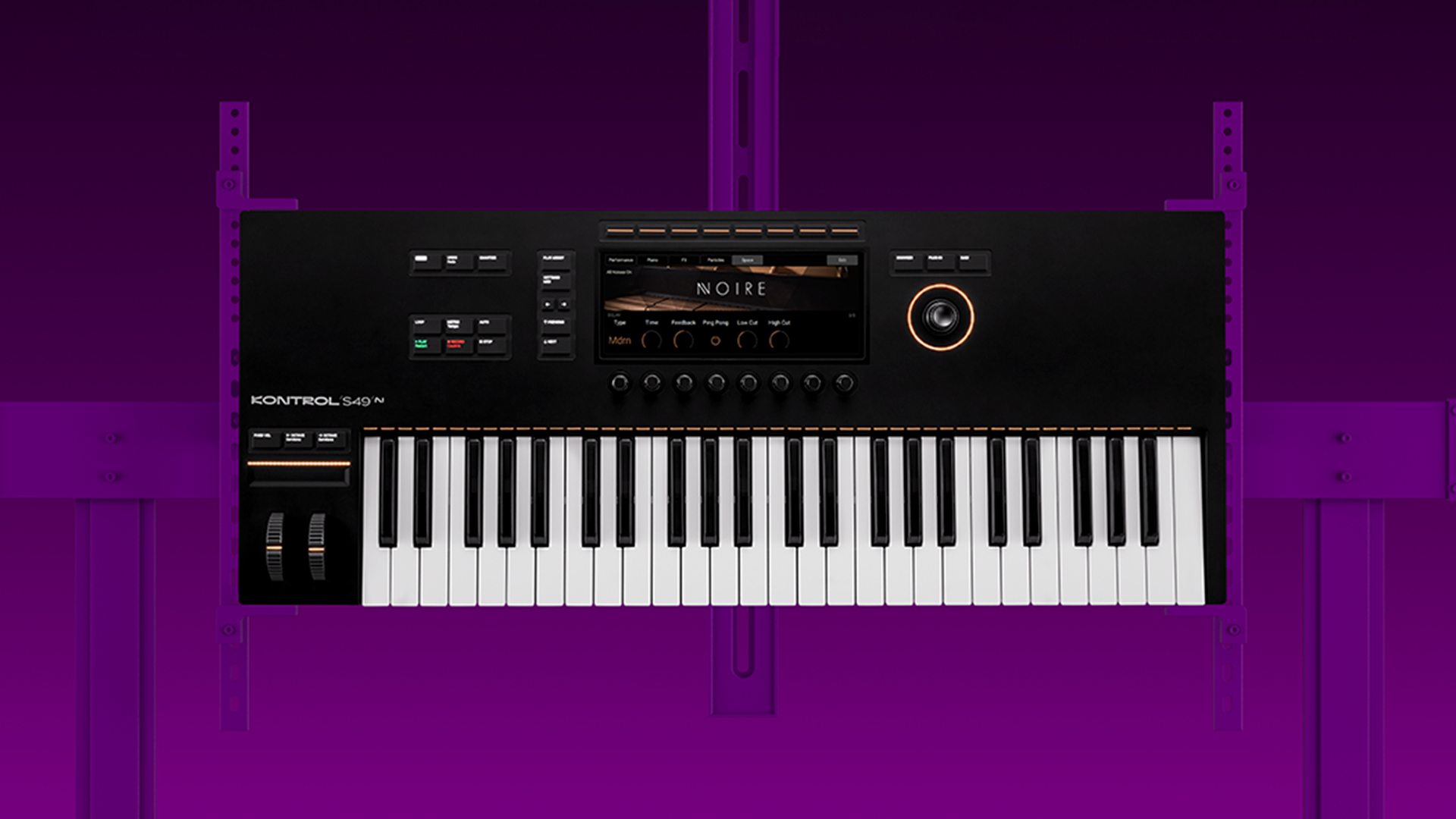
Explore this need in the finder →The Native Instruments Kontrol S49 MK3 is a 49-key USB-C MIDI controller built around software integration, per-key polyphonic aftertouch and a direct connection to external MIDI hardware. Its defining trade is not simply “more controls”: it combines a semi-weighted Fatar keybed, a detailed color display, hands-on browsing, pedal connections and 5-pin MIDI I/O in a body that is narrower than the 61- and 88-key versions.
What the S49 MK3 is built to control
Native Instruments describes the current S-Series as a controller for Kontakt, Komplete Kontrol and supported DAWs. The MK3 line adds embedded processing for direct Kontakt and next-generation NKS workflows, so browsing and mapped parameters are meant to live closer to the keyboard instead of depending on a single generic MIDI template. That integration is most persuasive when the instruments and host you already use are in NI's supported ecosystem. The product page lists Ableton Live, Bitwig, Cubase, Digital Performer, FL Studio, Logic Pro, Pro Tools and Studio One, with version requirements; verify the current NI list against your exact DAW and operating system before treating a named host as plug-and-play.
This is still a MIDI controller, not a documented standalone synthesizer. A software instrument needs a computer and its own audio monitoring route; a hardware sound module needs a 5-pin MIDI cable and then its own audio connection. Neither the instrument's sound nor speakers are built into the S49 according to the official page and manual. That distinction matters if a buyer is moving from an all-in-one keyboard or expects the DIN ports to carry audio.
49 semi-weighted keys with a specific kind of expression
The S49 MK3 has 49 semi-weighted keys on a Fatar TP/90 bed. NI specifies polyphonic aftertouch: pressure is sent per key, which can let compatible software or hardware respond to finger pressure independently across held notes. This is different from ordinary channel aftertouch and unrelated to pressure-sensitive drum pads; the keyboard has no documented pad bank. Polyphonic aftertouch is a capability, not a guarantee that every plug-in will use it, so check the receiving instrument's MIDI-expression support if that feature is the reason for choosing the board.
Forty-nine notes can be a useful middle ground for melodies, bass parts and many two-hand ideas, but it does not keep a full 88-note span under the hands. Octave controls provide range shifts, not extra physical keys. The S61 adds a wider 61-key layout while retaining semi-weighted TP/90 action. The S88 changes the playing feel to a fully weighted hammer-action Fatar TP100 bed and adds 88 keys; it is not just an extended S49. Players who care about the difference between synth-style, semi-weighted and hammer-action keys should audition the exact keyboard where possible because a spec label cannot tell you whether its response suits your technique.
Controls, screen and pedal routing
Above the keybed, NI documents a 1280-by-480 color glass display, eight touch-sensitive encoders, a four-direction push encoder, pitch and modulation wheels, a touch strip, a Light Guide and transport controls. The screen and encoder are intended to support browsing, parameter adjustment and mixing without constant mouse movement. The Light Guide indicates mapped notes and play-assist information; it is not a pad grid. The rear panel also has four assignable pedal inputs for sustain, expression and two additional assignments, a broader connection set than the single sustain input on the KOMPLETE KONTROL A49.
That depth has a learning cost. A buyer who only needs notes and a sustain pedal may pay in desk space and setup complexity for features that remain unused. By contrast, a session that alternates between sound browsing, DAW transport, per-note expression and external hardware can make more use of the S49's integrated surface. The product manual explains how to configure its host and MIDI ports; treat setup as part of the purchase, not as an automatic guarantee for every DAW project.
USB-C does not eliminate every power check
The S49 connects to a computer through a USB-C HOST port and supports USB MIDI. A second USB-C socket is for supplemental power. NI says the keyboard can be bus-powered when the computer or hub supplies enough power, but its documented USB-A-only setup requires an adapter plus a separate USB-C power supply rated at least 5 V, 7.5 W and 1.5 A. The included USB-C cable is not a promise that a particular dock will provide adequate power. Before ordering, check the available host ports, hub data capability, cable routing and whether your planned computer has the power margin the manual calls for.
The S49 MK3 also has 5-pin MIDI IN and OUT, so a computer-host setup and an external MIDI device can coexist when the software is routed correctly. That makes it a stronger hardware bridge than a USB-only board. Still, MIDI sends control events only: an external synthesizer must generate audio, and the DAW or standalone software needs a separately configured audio device. Confirm whether your intended synth expects standard DIN and which MIDI channel or mode it uses.
Measure the desk and compare the right sibling
NI publishes the S49 body at 802.2 mm wide, 323 mm deep and 86 mm high, with a 5.5 kg weight—about 31.58 by 12.72 by 3.39 inches and 12.13 pounds. Those are case dimensions, not a complete installation footprint. Add USB, MIDI and pedal cable bends, space for both hands and the actual stand or keyboard tray. A published width also does not validate furniture load capacity.
Compared with the KOMPLETE KONTROL A49, the S49 MK3's strongest factual differentiators are polyphonic aftertouch, its Fatar TP/90 keybed, USB-C, direct DIN MIDI and four pedal sockets; the A49 is a different, USB-centered design whose reviewed manual shows one pedal connection and no DIN pair. Against S61 MK3, the S49 sacrifices twelve notes for a shorter body. Against S88, it avoids a much wider, heavier weighted-key installation. These are workflow and fit differences rather than a universal quality ranking.
Bottom line
The Kontrol S49 MK3 is worth considering when 49 keys are enough and the desired setup genuinely uses NI's software workflow, per-key aftertouch, USB-C and hardware MIDI output together. Its most important limits are just as concrete: the keyboard does not make its own sound, software integration depends on current versions and setup, USB-A hosts require extra power accessories, and a 31.58-inch body needs clearance beyond its published width. Check the selected S49 MK3 variant rather than a previous S49 generation, verify the seller's actual software package and inspect the connection plan that will sit behind the keyboard. This is a source-based assessment, not a claim of hands-on use or testing.
Primary sources: Native Instruments Kontrol S49 product page and specifications; Kontrol S-Series MK3 Manual, English; Native Instruments MIDI-keyboard collection. Check the current host, license and seller-package details before purchase.
Key specifications
Key details at a glance
| Keys | 49 |
|---|---|
| Manufacturer's keybed description | Semi weighted |
| Width | 31.58 in |
| Pads | 0 |
| Velocity-sensitive pads | No |
| Pressure-sensitive pads | No |
| 5-pin MIDI Out | Yes |
| Computer connection | USB-C |
| USB bus-powered | Yes |
| Assignable pedal input | Yes |
| Keyboard channel aftertouch | Yes |
| 5-pin MIDI In | Yes |
| Depth | 12.72 in |
| 5-pin MIDI outputs | 1 |
| CV/Gate/Mod voice outputs | 0 |
Use the exact model’s instructions for operating limits, supplied equipment and version differences.
Sources for this review
Sources for this assessment
Start with your setup, not a headline feature
Use the finder to combine key-count, connection, control and desk-fit requirements. Unverified specifications are never treated as a match.