
Your needs, this model
Does it fit your priorities?
Does the FLkey 61 MK1 fit a 61-key setup under 37.5 inches?
The exact model-specific manual lists a 952 mm body width, or 37.48 inches, so it passes the 37.5-inch cap by only 0.02 inches and fails at 37.25. That margin is not practical room for the USB, DIN and sustain cables, hands or a nearby control surface.
Explore this need in the finder →Can the older 61-key FLkey control external MIDI gear directly?
Yes. The version-2 guide identifies a five-pin DIN MIDI Out and a computer-free setup using a separate 5 V USB supply rated at least 500 mA. DIN carries data, not audio; the external instrument needs its own supply and an audio-monitoring route. The same guide identifies USB Type-B to a computer, not USB-C.
Explore this need in the finder →What does the 61-key MK1 add beyond the 49-key model?
The MK1 61 expands the 49-key version by twelve notes, one octave, while retaining the eight knobs, nine 45 mm faders, small character display, pad-aftertouch settings, wheels and DIN output. It grows from a 31.06-inch to a 37.48-inch body and from a listed 6.68 to 7.56 pounds, so range and support space matter together.
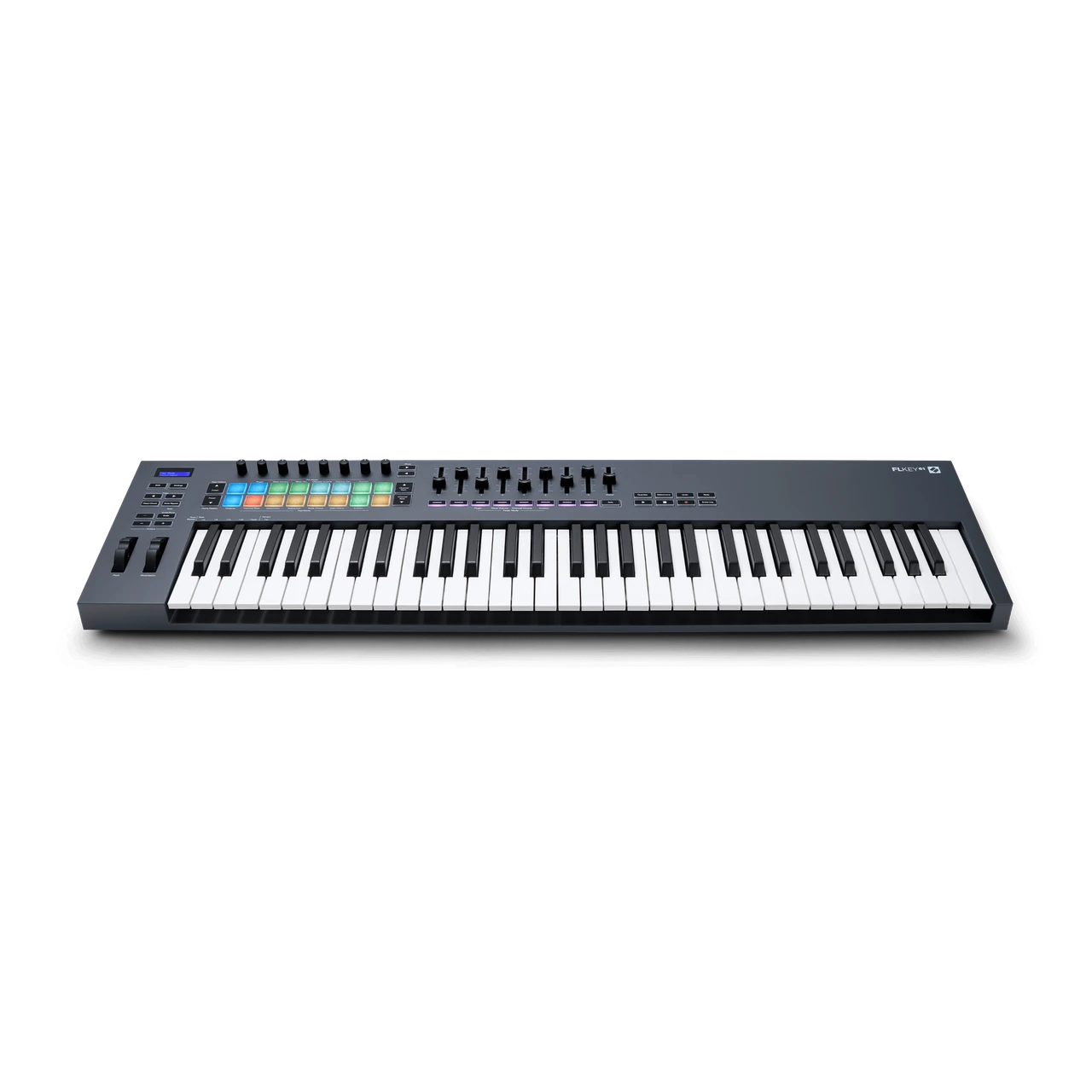
Explore this need in the finder →The Novation FLkey 61 MK1 is the earlier five-octave, full-size version of Novation's FL Studio-oriented controller. The exact first-generation configuration pairs velocity-sensitive keys with eight knobs, nine faders, sixteen pads, a compact character display, USB Type-B and direct five-pin DIN MIDI Out. Novation's version-2 manual documents pad aftertouch, but not weighted key action or keyboard-key aftertouch. This is a source-based assessment, not a hands-on test.
Five octaves and the full control layout
Sixty-one physical keys provide a wider span for two-handed playing and parts that combine lower notes with an upper melody. That range can reduce octave shifting compared with the 49-key model, though it also asks for more support space. The key count alone does not imply a weighted piano-style action: the reviewed MK1 page and guide specify full-size, velocity-sensitive keys but leave weighting and key aftertouch unspecified. Novation's later FLkey 61 MK2 is described as semi-weighted; that statement belongs to the newer generation and should not be carried over to the MK1.
The control surface has eight knobs, nine 45 mm faders and sixteen velocity-sensitive RGB pads, plus pitch-bend and modulation wheels and a 16-by-2 character screen. The 49 and 61 MK1 versions share this main control arrangement; their clearest difference is the 61's additional octave and wider chassis. The pad configuration has a separate distinction: the version-2 manual provides Off, Channel and Polyphonic Pad Aftertouch settings and a threshold. This is pressure response on the pads, not an assertion of keyboard aftertouch.
Pad modes address FL Studio tasks including Channel Rack selection, instrument triggering and sequencer entry. Scale, Fixed Chord, User Chord, Scale Chord and Note Repeat are among the documented playing tools; custom modes let users map pad and encoder functions. These features matter only insofar as they fit an actual production routine. They send note and control data and do not replace a sound module or a complete sequencer.
A controller requires a separate sound and monitoring path
The inspected product page and manual do not specify an onboard sound engine or audio output. A software instrument running on the computer or an external synthesizer must produce the audio, and that source needs its own route to headphones, speakers or another monitoring system. The DIN connector is MIDI data, not audio. A 61-key controller can offer more physical range, but it does not by itself supply piano sounds or amplification.
Novation's version-2 English guide gives FL Studio 21.0.3 or later for its documented setup procedure. That manual-era baseline is useful context, not a guarantee of support on every modern computer or future DAW version. Check current downloads and setup instructions for the intended system. The exact US product listing mentions an FL Studio Producer Edition trial; verify current eligibility, registration and license transfer terms before relying on a software offer associated with an older unit.
Computer connection and MIDI hardware
USB Type-B is the host connection and provides bus power. The guide lists a 1.5-metre USB-A-to-Type-B cable in the box. A USB-C host can be accommodated with an appropriate cable or adapter, but this MK1 is not itself the USB-C model. The later FLkey 61 MK2 uses USB-C and an OLED; check suffix and exact ports rather than shopping by the family name alone.
For external instruments, the FLkey 61 MK1 provides a full-size five-pin DIN MIDI Out. It can send note and control information while USB connects to and powers the computer. The manual also documents computer-free operation with a separate standard USB supply rated 5 V DC and at least 500 mA. The receiving synth must have its own power and audio-monitoring plan. The 6.35 mm pedal input is documented for sustain, so verify pedal behavior and polarity where compatibility matters; it is not evidence of a general-purpose expression input.
The footprint needs practical margin
The version-2 guide lists the body at 952 mm wide (37.48 inches), 258 mm deep (10.16 inches) and 77 mm high (3.03 inches including knob caps), with a listed mass of 3.43 kg (7.56 lb). At a selectable finder width cap of 37.5 inches it technically passes by 0.02 inches; at 37.25 inches it fails. That clearance is a mathematical fit against the chassis specification, not room for DIN and USB plugs, cable bends, fingers, neighboring gear or a stand's side supports. The desk or stand should have usable depth as well as width.
The 49 MK1 lists 31.06 inches and 6.68 pounds, so the 61 trades a substantial 6.42 inches and 0.88 pounds for twelve more keys. There is no universal best size: someone who plays parts across a broader range may value the extra reach; a crowded desk or frequent moving may favor a shorter board. The published numbers inform that trade-off but do not establish the fit or comfort of a particular setup.
Generation checks and purchase questions
This MK1 is worth comparing if five octaves, the FL Studio control layout, pad-aftertouch settings and direct DIN are important and USB Type-B is acceptable. It is a poor match for a USB-C-required setup without an adapter, an unverified weighted-key requirement, a narrow 37.25-inch space, or a need for onboard sounds. A current 61 MK2 may better suit a USB-C preference, but it is a different specification and should be evaluated on its own evidence.
For a used or older example, verify the MK1 suffix on the unit, all keys and controls, pad response, display, wheels, faders, power behavior, cable contents and seller return terms. Check the latest support directions and any software license conditions rather than assuming an old boxed offer remains redeemable. Ensure there is physical room for the cables and a separate audio route for the sound source. None of those questions can be answered from a model-level feature list alone.
Novation US FLkey 61 MK1 product page · Novation FLkey 61 downloads · FLkey 49 and 61 User Guide, version 2 · Novation FLkey MK1 family overview.
Key specifications
Key details at a glance
| Keys | 61 |
|---|---|
| Manufacturer's keybed description | Velocity sensitive full size keys |
| Width | 37.48 in |
| Pads | 16 |
| Velocity-sensitive pads | Yes |
| Pressure-sensitive pads | Yes |
| 5-pin MIDI Out | Yes |
| Computer connection | USB Type-B |
| USB bus-powered | Yes |
| Assignable pedal input | Yes |
| Depth | 10.16 in |
Use the exact model’s instructions for operating limits, supplied equipment and version differences.
Sources for this review
Sources for this assessment
- Novation US FLkey 61 MK1 exact product page and embedded product identity
- Novation FLkey 61 downloads and version-2 English guide index
- Novation FLkey 49 and 61 User Guide, version 2, English
- Novation FLkey MK1 family overview and generation-specific control comparison
- Novation FLkey range comparison including the later FLkey 2 generation
Start with your setup, not a headline feature
Use the finder to combine key-count, connection, control and desk-fit requirements. Unverified specifications are never treated as a match.