
Your needs, this model
Does it fit your priorities?
Does the FLkey Mini MK1 meet a narrow 25-key brief?
The older Mini has 25 velocity-sensitive mini keys and an exact manual-listed 12.99-inch width. It clears every width cap allowed in the finder, including 16 inches, but that chassis figure still excludes the USB, pedal and TRS cable bend. Choose it for a genuinely small note span rather than treating the numeric match as a promise of two-handed reach.
Explore this need in the finder →Can this Mini MK1 control a hardware instrument without a computer?
The version-4.02 manual says the controller's MIDI output can operate without a computer when the FLkey Mini receives a separate 5 V USB supply rated at least 500 mA. Its output is 3.5 mm TRS Type-A, not a DIN socket; check the external instrument's required adapter, its own power and an audio-monitoring route before treating this as a complete setup.
Explore this need in the finder →What should I verify before using an older Mini with a computer?
This exact first-generation unit uses USB Type-B and is bus-powered. The manual lists a 1.5-metre USB-A-to-B cable in the box, so a USB-C-only computer may require a suitable cable or adapter. Novation's later FLkey Mini 25 MK2 uses USB-C; do not infer its host cable, firmware or pad-pressure features from the similar product name.
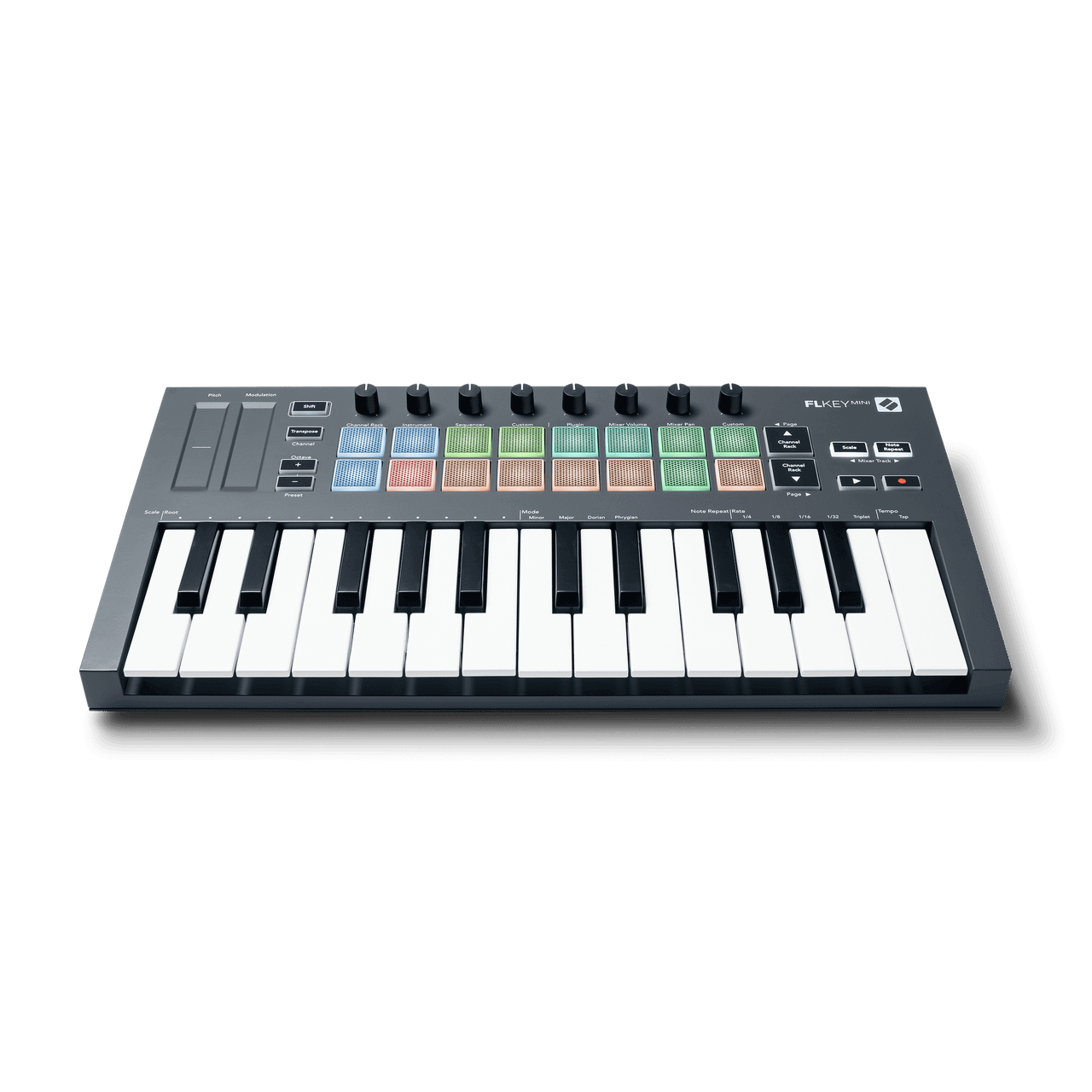
Explore this need in the finder →Novation's FLkey Mini MK1 is an earlier 25-mini-key controller for an FL Studio-centered setup. Its official manual documents velocity-sensitive keys and pads, eight knobs, USB Type-B and a 3.5 mm TRS Type-A MIDI output. It is notably narrow at 12.99 inches, but the small body does not turn it into a self-contained instrument or remove the need to plan the MIDI cable and power arrangement. This is a source-based assessment, not a hands-on review.
A short mini-key span with transpose tools
Twenty-five mini keys provide two octaves of immediate reach. That can suit a compact writing station where the player records one part at a time: a bass phrase, a lead line or a chord voicing can be entered, then shifted by octave controls or transposed for another take. Those tools extend the note range the controller can send, but they do not put additional keys under both hands at the same moment. A part that needs sustained low notes and a broad melody together may call for a longer keybed instead.
The manufacturer lists velocity sensitivity on both the keys and the sixteen RGB pads. Eight knobs and the pad rows provide hands-on control for FL Studio's mixer, plugin, Channel Rack and sequencer workflows. The manual describes Scale mode, Note Repeat, Fixed Chord, and pad and knob custom modes. It does not document keyboard aftertouch or pressure response on this Mini's pads, so neither should be assumed. That matters if pad pressure is a firm part of the performance brief: the finder leaves undocumented pressure capability out rather than treating velocity sensitivity as the same feature.
Built around FL Studio, not a sound engine
The FLkey Mini MK1's controls are arranged for direct work with FL Studio: pads can select or trigger Channel Rack sounds, operate step-sequencer patterns, and control supported instrument pad modes. The knobs give assigned mixer and plugin parameters a physical control surface, while the transport and navigation buttons reduce the need to reach for the mouse. Scale and chord tools can help shape note entry, but all of these features send performance and control data. The reviewed sources specify no internal sound engine or audio output. A software instrument, external synthesizer or other sound source still has to make the audio, and a separate monitoring path is needed to hear it.
Novation's version-4.02 guide describes FL Studio version 20.9.2 or later for its setup procedure. That is a statement from this manual edition, not a guarantee that current operating systems, host versions, drivers or firmware will work without checking. The product page describes a six-month Producer Edition offer, but a remaining-stock or second-hand unit may have different registration and license terms. Verify the exact offer and account eligibility rather than treating old included-software language as a transferable license.
USB Type-B to the computer; TRS Type-A to hardware
The computer connection is USB Type-B, and the controller is bus-powered when connected to a computer. The version-4.02 guide lists a 1.5-metre USB-A-to-Type-B cable in the box. A USB-C-only laptop may therefore need a suitable replacement lead or adapter; the MK1 should not be confused with the later FLkey Mini 25 MK2, which uses USB-C. Keep the host connector, cable included with the exact unit and current generation in view when evaluating a used or remaining-stock offer.
External MIDI is available through a 3.5 mm jack that the manual identifies as TRS Type-A. It is not a five-pin DIN socket. If a hardware instrument uses DIN, you will need an appropriate Type-A adapter or cable and should confirm that it is wired for this standard. The guide also documents computer-free MIDI operation with a separate USB power supply rated 5 V DC and at least 500 mA. In that setup, power reaches the controller from the separate supply, while MIDI data goes to the external instrument; the instrument still needs its own supply and audio route. The 6.35 mm pedal input is documented for sustain, not every expression or keyboard pedal type.
What the narrow body does—and does not—mean
The exact US page lists 330 by 172 by 41 mm; the guide gives a 12.99-inch width, 6.77-inch depth and 1.61-inch height including knob caps. Its listed mass is 0.69 kg. The body clears every selectable finder limit, which starts at 16 inches, but plugs, cable bends, hands and neighboring equipment still need space.
The Mini's footprint is a real distinction from the earlier 37-, 49- and 61-key FLkeys, which use full-size keys and direct DIN. It also differs from the current Mini 25 in the computer port and listed width. Do not infer the MK2's pad-pressure specification, USB-C wiring or broader current bundle from the family name. Novation's later MK2 family page describes newer features; this assessment keeps them separate from the first-generation product page and manual.
Who should compare it—and the checks to make
This earlier Mini makes sense to compare when a 25-mini-key surface and a narrow body take priority, FL Studio is the intended host, and a USB Type-B cable and TRS Type-A route are acceptable. It is a weaker fit if direct DIN is essential, if the computer requires USB-C without an adapter, or if pressure-sensitive pads must be confirmed. For more simultaneous playing range and built-in DIN, compare the separate FLkey 37 MK1; for a current Mini with USB-C, compare the FLkey Mini 25 MK2, while checking its different dimensions, pads and exact bundle.
Before buying an older unit, confirm the MK1 suffix, seller photos, cable contents, working pads and controls, support path, return terms and license eligibility. Verify TRS Type-A wiring and power for the MIDI hardware. Model specifications do not establish a particular unit's condition, bundle or availability.
Novation US FLkey Mini MK1 product page · Novation FLkey Mini downloads · FLkey Mini User Guide, version 4.02 · Novation FLkey MK1 family overview.
Key specifications
Key details at a glance
| Keys | 25 |
|---|---|
| Manufacturer's keybed description | Velocity sensitive mini keys |
| Width | 12.99 in |
| Pads | 16 |
| Velocity-sensitive pads | Yes |
| 5-pin MIDI Out | No |
| Computer connection | USB Type-B |
| USB bus-powered | Yes |
| Assignable pedal input | Yes |
| Depth | 6.77 in |
Use the exact model’s instructions for operating limits, supplied equipment and version differences.
Sources for this review
Sources for this assessment
- Novation US FLkey Mini MK1 exact product page and embedded product identity
- Novation FLkey Mini downloads and version-4 English guide index
- Novation FLkey Mini User Guide, version 4.02, English
- Novation FLkey MK1 family overview and generation-specific control comparison
- Novation FLkey range comparison including the later FLkey 2 generation
Start with your setup, not a headline feature
Use the finder to combine key-count, connection, control and desk-fit requirements. Unverified specifications are never treated as a match.