
Your needs, this model
Does it fit your priorities?
Will Impulse 25 give a 25-key DIN/pad setup within a 20.75-inch bare-body cap?
Yes on the documented fields: it has 25 full-size keys, eight pressure-sensitive pads, a 5-pin MIDI Out and a 525 mm body. The metric width converts to 20.67 inches, so 20.75 inches admits the chassis with almost no nominal spare space; it is not cable or hand clearance. This is USB Type-B, not USB-C.
Explore this need in the finder →Can Impulse 25 control a computer and external synth together?
The V5 family guide describes USB connection to a computer and separate 5-pin MIDI hardware routing. For a computer the controller normally draws power from host USB; for computer-free use the manual calls for a suitable external USB mains adapter. The destination synthesizer generates audio; Impulse itself does not.
Explore this need in the finder →What does the 25-key Impulse give up compared with the larger models?
It keeps the eight knobs, eight pads, LCD, transport, wheels and pedal/DIN connections, but has only one assignable fader and lacks the larger variants' nine-fader and per-fader-button bank. Its 525 mm width is shorter than the exact 49/61 models, but its playing range is still 25 keys.
Explore this need in the finder →A compact-by-width, older controller with full-size keys, keyboard aftertouch and DIN MIDI—provided a short range and legacy USB workflow suit the setup.
What the 25-key version is—and is not
The Impulse 25 is a MIDI controller, not a self-playing keyboard. Its 25 velocity-sensitive, full-size semi-weighted keys send notes and assignable channel aftertouch. Novation also describes its High Rate Scan technology; that is a manufacturer specification, not an independent response-time test. The key range is the first practical trade: 25 notes can cover compact parts, bass lines and a few octaves under the hands, but passages that need a sustained two-handed span will require octave shifts or a larger board. The available sources do not establish graded hammer action or key width, and “semi-weighted” should not be taken as a promise of a particular touch. [US product page; V5 English manual]
Eight pads and a deliberately reduced fader section
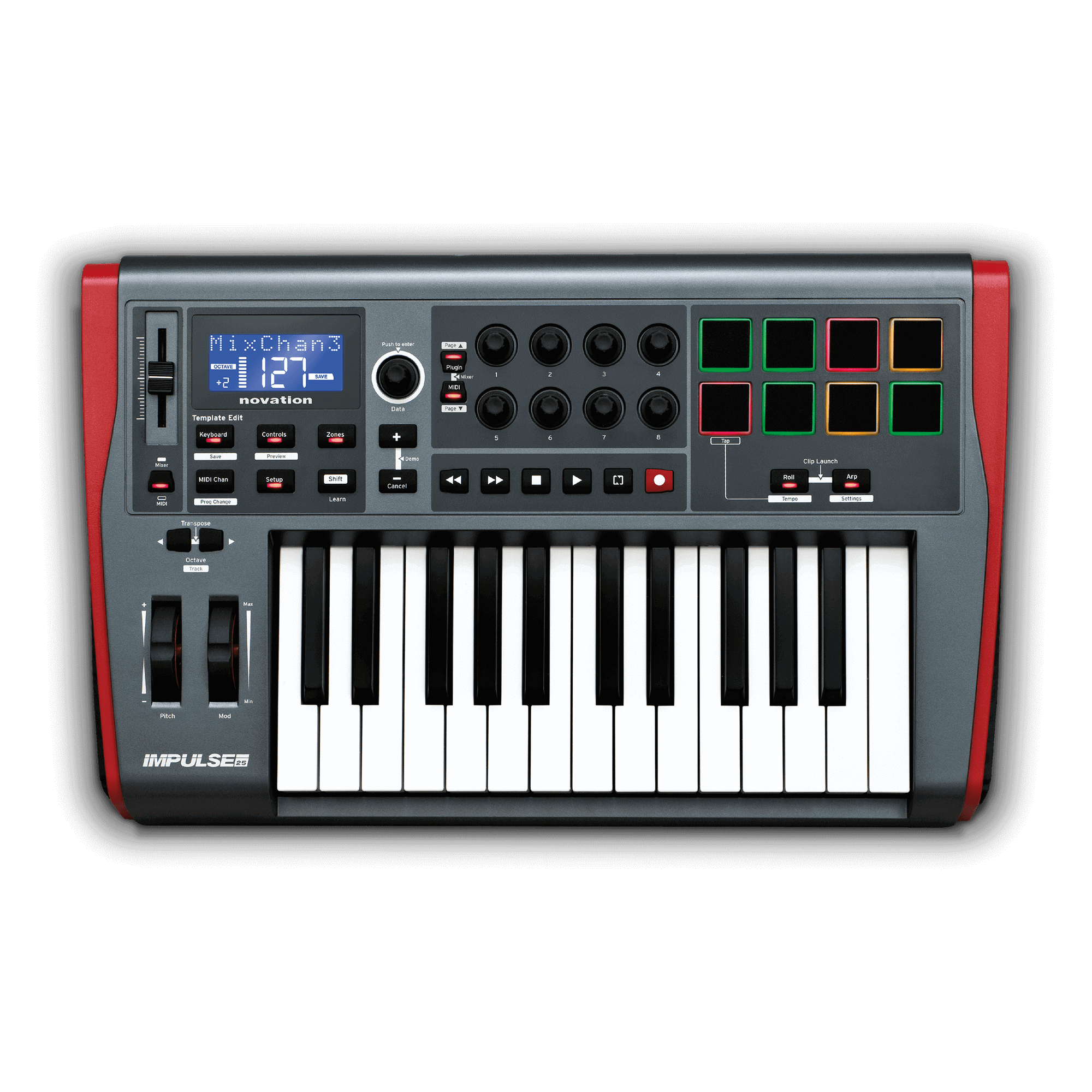
The surface gives the 25 eight pressure-sensitive, velocity-sensitive pads, eight endless encoders, a blue-backlit LCD, pitch and modulation wheels, six transport buttons and an arpeggiator with Roll and Clip Launch functions. The important difference is at the fader bank. The family guide specifies just one assignable fader on Impulse 25 and no assignable buttons under a full fader bank; the 49- and 61-key versions have nine faders and nine associated buttons. That makes this model a real short-width variant, not a 49-key body with its keyboard cropped. Novation’s range-page copy says the 25 “sacrifices its faders,” which is imprecise against the manual’s explicit one-fader detail; this assessment follows the manual and product-specific page rather than erasing the difference. [Impulse range; Impulse 25 downloads]
USB-B and DIN make two different jobs possible
The computer connector is USB Type-B, not USB-C. The manual describes the normal computer arrangement as USB carrying MIDI and power; it also documents a setup where the computer is connected over USB while the keyboard sends MIDI to external hardware from its five-pin DIN output. MIDI In, a sustain-pedal socket and an expression-pedal socket add options for a hardware rig. The receiving instrument still needs its own power and audio path: the published Impulse 25 connections do not include an audio output or sound engine.
For computer-free use, the V5 guide says to supply a suitable USB AC-to-DC mains adapter; it is not among the listed box contents. Novation recommends connecting directly to a native computer USB port rather than a hub and warns that some laptops may not provide enough current, especially on battery. If a host only has USB-C, an appropriate cable or adapter may form part of a real setup, but the controller itself remains a Type-B device and does not meet a USB-C-port requirement. [V5 manual: setup and power]
Published body size and desk reality
Novation lists a 525 × 332 × 100 mm body. The width converts to about 20.67 inches; that is a useful first screen for a compact tabletop, not a complete fit test. A 20.75-inch cap leaves only about eight hundredths of an inch beyond the converted width before any plugs, cable bends, fingers or neighboring hardware are considered. Depth is about 13.07 inches. The exact US product page does not publish weight, so no sibling’s mass is borrowed here. [Impulse 25 specifications]
Software and earlier-model checks
The US page names Ableton Live Lite and identifies integrations for Ableton Live, Logic Pro and Pro Tools; the manual explains template and HUI-style control. Those statements describe supported workflows, not a guarantee that every DAW version or mapping behaves identically today. The downloads page still lists Automap 4.12 and explicitly says it is not supported on macOS Catalina. Confirm the exact operating system, DAW, available driver and desired mapping before relying on a used unit. The current product page displayed “Out of stock” on 31 October 2026, while embedded inventory fields contained contradictory purchase/stock flags and a zero US-inventory value. This is an earlier comparison entry, not a claim of permanent discontinuation or current seller availability.
For an older offer, check that the keys, pad sensors, fader, display, wheels, pedal sockets, DIN ports and USB connector work; confirm the USB-A-to-B cable and registration/software status rather than assuming every historical bundle transfers. There is no reason to choose this over the 49 or 61 unless the smaller range and one-fader layout match the desk and playing task. Conversely, the listed DIN output, pressure-sensitive pads and channel aftertouch make the 25 more than a basic note-entry keyboard. This is a specification-based assessment from Novation’s US page and V5 guide, not a hands-on test.
Key specifications
Key details at a glance
| Keys | 25 |
|---|---|
| Manufacturer's keybed description | Full-size piano-style semi-weighted keys |
| Width | 20.67 in |
| Pads | 8 |
| Velocity-sensitive pads | Yes |
| Pressure-sensitive pads | Yes |
| 5-pin MIDI Out | Yes |
| Computer connection | USB Type-B |
| USB bus-powered | Yes |
| Assignable pedal input | Yes |
| Keyboard channel aftertouch | Yes |
| 5-pin MIDI In | Yes |
| Depth | 13.07 in |
Use the exact model’s instructions for operating limits, supplied equipment and version differences.
Sources for this review
Sources for this assessment
Start with your setup, not a headline feature
Use the finder to combine key-count, connection, control and desk-fit requirements. Unverified specifications are never treated as a match.