
Your needs, this model
Does it fit your priorities?
Can the Launchkey 37 MK4 combine 37 full-size keys, USB-C computer control and direct DIN hardware output?
Yes. Novation's exact US page and version-3 guide document a 37-note full-size synth-action keybed, a USB-C connection that sends and receives data and supplies bus power from a connected computer, and a separate five-pin MIDI Out. The manual also lists sixteen velocity-sensitive pads with polyphonic aftertouch. Confirm that the USB-C-to-A lead or an appropriate host cable suits your computer; the external synth still needs its own sound and audio-monitoring path.
Explore this need in the finder →Does the Launchkey 37's pad aftertouch mean the keys have aftertouch too?
No such key-aftertouch capability is established in the reviewed sources. Novation specifically identifies polyphonic aftertouch on its sixteen velocity-sensitive pads, a separate surface from the full-size synth-action keys. If keyboard-key aftertouch is essential, verify that exact message support in the current manual rather than treating pad pressure as a substitute.
Explore this need in the finder →What changes between the 37-key Launchkey MK4 and 37-key Launchkey Mini MK4?
The standard Launchkey 37 has full-size synth-action keys, a direct five-pin DIN MIDI Out and a published 21.93-inch width. The Mini 37 has mini keys, a 3.5 mm TRS Type-A MIDI jack and an 18.81-inch body. Both use USB-C, have sixteen pads with polyphonic aftertouch and put their documented sound generation in software or external gear rather than a specified onboard audio engine. Check cable needs and the actual part's key reach, not note count alone.
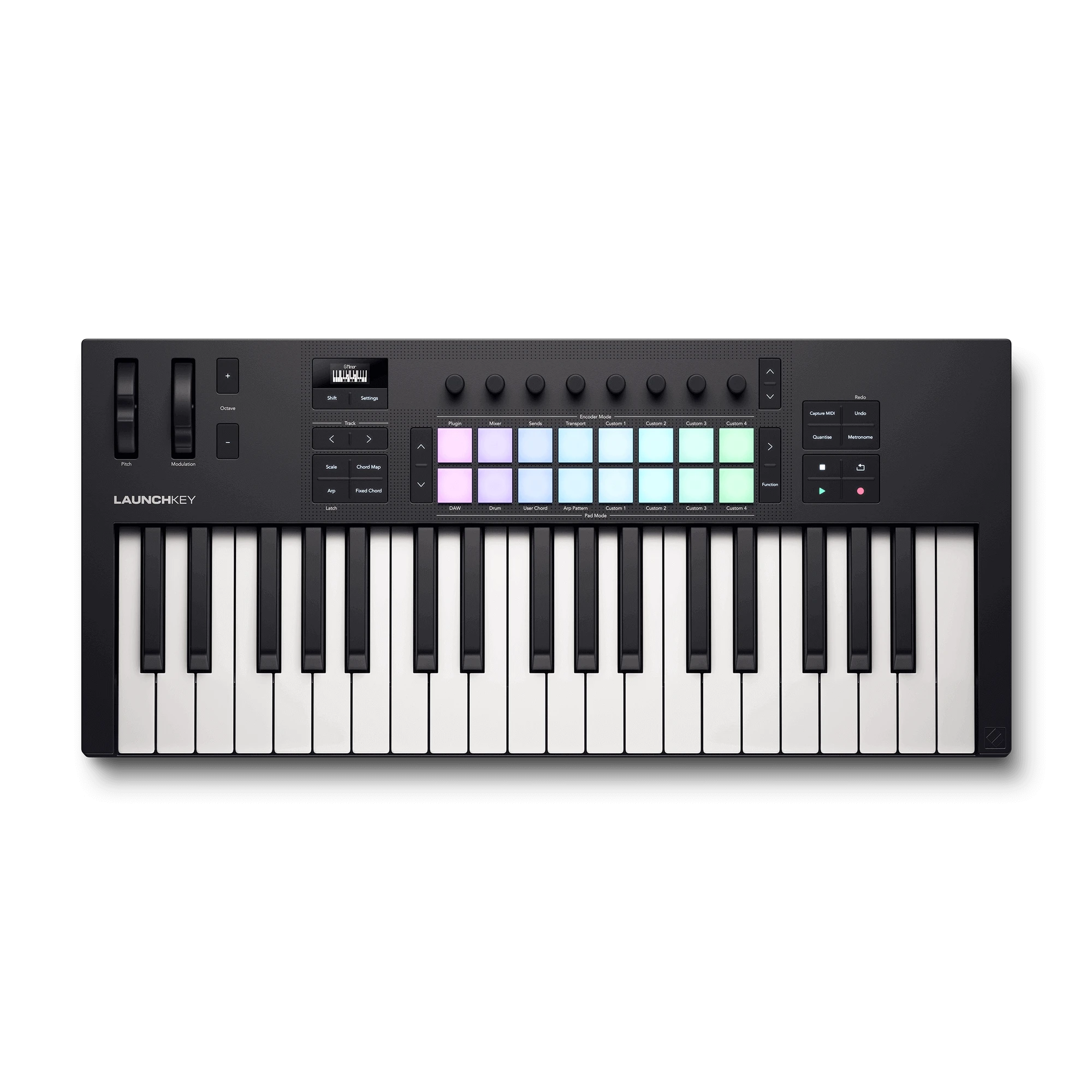
Explore this need in the finder →The standard Launchkey 37 MK4 occupies the space between Novation's compact Mini range and its longer full-size boards: 37 full-size synth-action keys, a USB-C computer connection, direct five-pin MIDI Out, and a pressure-aware pad bank. Its exact US SKU/MPN is NOVLKE37MK4. This assessment uses Novation's product specifications and version-3 guide rather than hands-on testing.
Three octaves with full-size keys
Novation describes this model's 37 keys as full-size and synth-action. That is a different physical proposition from its 37-key Launchkey Mini sibling, whose smaller keys permit a narrower layout. The standard 37 also differs from the standard Launchkey 25: it adds twelve notes while remaining shorter than the 49-key boards. Thirty-seven notes can be a sensible desk range for bass, melody, and modest two-handed passages, but octave buttons do not make its physical span equivalent to a longer keyboard. If a part must cover a wide bass-and-treble split at once, set a higher minimum rather than assuming that a three-octave controller will stretch.
The source descriptions establish synth action and velocity response, not a weighted piano mechanism or the numerical width of each key. Novation's page and guide identify aftertouch on the pads, but the reviewed materials do not establish aftertouch on the keybed. That distinction matters for a player whose sound design depends on pressure messages from held notes. Pad aftertouch is useful in its own right, but it cannot be treated as a substitute for keyboard-key aftertouch.
Hands-on controls for software
The control surface combines sixteen RGB velocity-sensitive pads with polyphonic aftertouch, eight endless encoders, pitch-bend and modulation wheels, octave controls, a small monochrome OLED, and transport and workflow buttons. Novation's descriptions connect these controls to DAW tasks such as mixer, sends, plug-in adjustment, sequencing and clip control. The exact behavior depends on software integration and configuration: named scripts are documented for a set of DAWs, while the guide describes HUI support for other compatible DAWs. Treat the product's integration list as a compatibility starting point, not proof that every function works identically in every version or with every project template.
The built-in Scale, Chord and arpeggiator tools provide ways to shape MIDI performance without replacing the DAW or the instrument that generates sound. Likewise, Novation Play and the other listed software belong to the bundle, not to a sound engine inside the keyboard. The reviewed sources specify no audio output. Plan where software or external gear will produce sound and how that audio will reach headphones, speakers or an interface.
Computer and hardware routes can coexist
This model's key advantage for a compact hybrid setup is the combination of USB-C computer connection and a separate five-pin DIN MIDI Out. The manual says USB-C carries data and supplies bus power when connected to a computer. It also lists a 6.35 mm sustain input for pedals and momentary foot switches. In the same documented computer-connected plan, USB can connect the keyboard to the DAW while DIN sends notes to an external synthesizer. MIDI carries control information rather than sound, and the external instrument still needs its own power and audio-monitoring route.
Check the included cable before assuming it fits the computer: the box contents specify a USB-C-to-USB-A cable, 1.5 metres long. A computer with only USB-C ports may require a suitable cable or adapter. The manual's documented bus-power arrangement is computer-connected; do not infer a standalone power mode from the separate MIDI output. Confirm the exact host, cable, pedal polarity and destination instrument in their current manuals if the setup depends on them.
Desk width and reach
The version-3 manual lists a body width of 557 mm (21.93 inches), depth of 251 mm (9.88 inches), height of 79 mm (3.11 inches), and weight of 2.18 kg (4.81 pounds). A 21.93-inch width cap is a body-only screen: allow additional room for the DIN and USB connectors, pedal cable, wrists and adjacent equipment. The Mini 37 measures 18.81 inches wide in its own documentation, so a desk under 21.93 inches may favor the Mini if mini keys and its TRS Type-A MIDI jack fit the actual workflow. This standard model's jack is direct five-pin DIN; it is not the same connection as the Mini's small TRS socket.
Who should shortlist it?
Consider the Launchkey 37 MK4 if the 37-note floor is enough, full-size synth-action keys matter, and you want software control plus direct DIN routing without stepping up to a 49-key body. Its documented pad pressure and multiple control modes make a broader DAW workflow possible than a bare keyboard controller, while the DIN port gives it a direct path to external MIDI gear. Compare the Launchkey Mini 37 if minimizing width is more important than key size and you can accommodate a TRS-to-DIN adapter where needed. Compare a 49-key model if a passage requires more continuous reach, or another product if weighted action, confirmed key aftertouch, onboard sound or built-in audio output is essential.
Before buying, check the exact MK4 suffix and SKU, current manual, host cabling, pedal connection, DAW script support, software-account terms, seller package and return conditions. This is a source-based evaluation, not a claim about personal use or real-world key feel.
Novation US Launchkey 37 product page · Novation downloads and guide index · Launchkey 37 User Guide, version 3.
Key specifications
Key details at a glance
| Keys | 37 |
|---|---|
| Manufacturer's keybed description | Velocity sensitive synth action full size keys |
| Width | 21.93 in |
| Pads | 16 |
| Velocity-sensitive pads | Yes |
| Pressure-sensitive pads | Yes |
| 5-pin MIDI Out | Yes |
| Computer connection | USB-C |
| USB bus-powered | Yes |
| Assignable pedal input | Yes |
| Depth | 9.88 in |
Use the exact model’s instructions for operating limits, supplied equipment and version differences.
Sources for this review
Sources for this assessment
Start with your setup, not a headline feature
Use the finder to combine key-count, connection, control and desk-fit requirements. Unverified specifications are never treated as a match.