
Your needs, this model
Does it fit your priorities?
Does the 49-key MK3 give a wider range and more DAW control than Launchkey 37?
The 49 adds twelve physical notes, a nine-fader bank and fader buttons; the 37 has the smaller 21.85-inch body and does not have the 49/61 fader bank. The 49 is 31.06 inches wide, so its extra control surface is a real desk-space tradeoff.
Explore this need in the finder →Can the Launchkey 49 MK3 use USB and direct DIN MIDI together?
Its documented computer plan combines USB Type-B bus power/data with a separate five-pin MIDI Out. The manual also documents a standalone mode using DIN with an external 5 V, 500 mA minimum supply; the DIN-connected sound module still needs its own power and audio route.
Explore this need in the finder →Does Launchkey 49 MK3 have pressure-sensitive pads or USB-C?
The reviewed 49-key MK3 materials document 16 velocity-sensitive pads but do not establish pressure response. The package cable is Type-A-to-B, so the device is not a verified USB-C model; an adapter does not change the controller's port type.
Explore this need in the finder →Launchkey 49 MK3 is the earlier four-octave, nine-fader member of Novation's MK3 controller family. Its exact US SKU/MPN is NOVLKE49MK3. This is a specification-led assessment from the manufacturer's page and English manual, not a report of use, ownership or testing.
Four octaves plus a fader bank
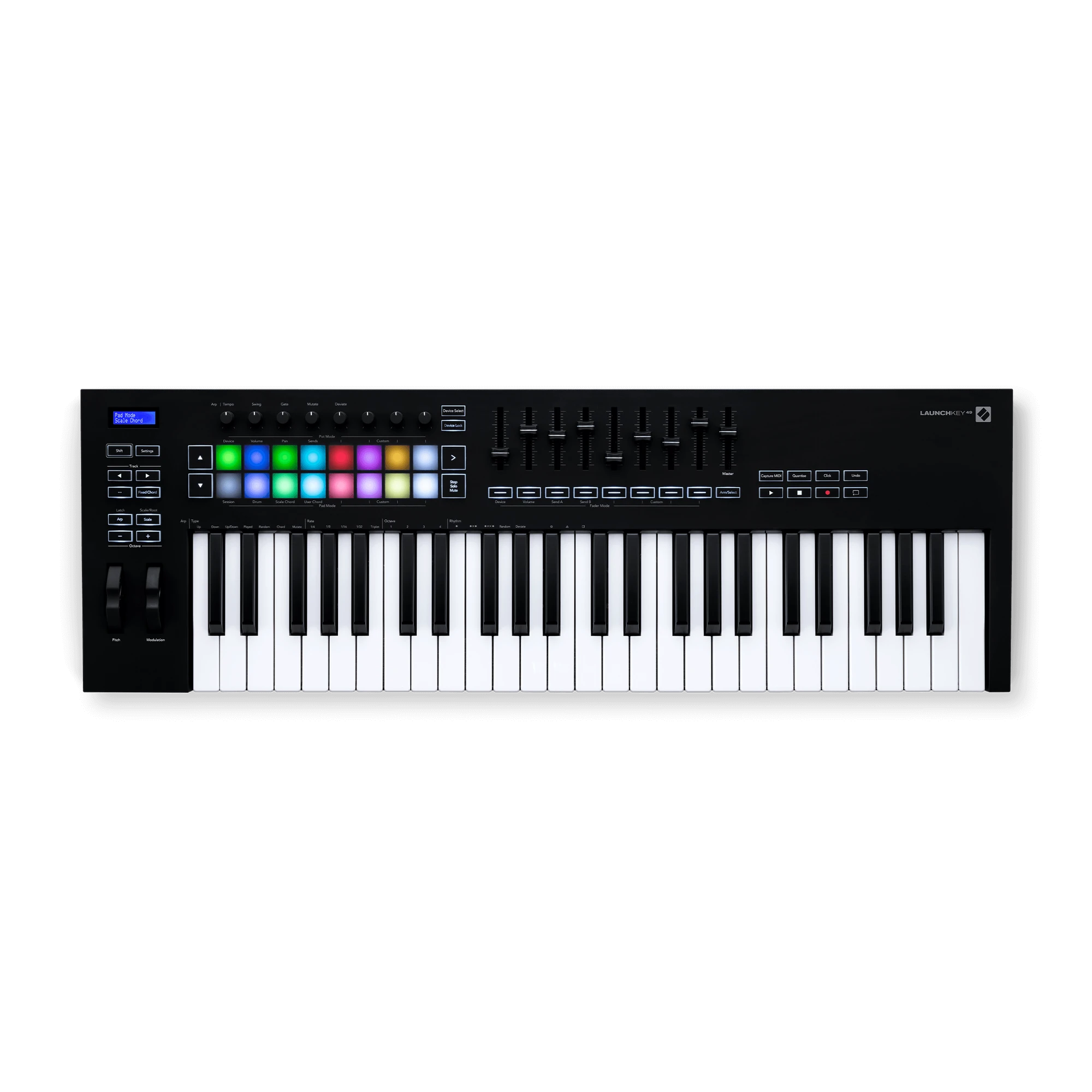
The 49-key configuration uses full-size, velocity-sensitive synth-action keys and is 31.06 inches wide. In comparison with Launchkey 37 MK3, the additional octave reduces shifting during parts that span more than three octaves, and this is the point in the family where Novation lists nine faders with buttons. Those two changes arrive together: someone who only needs more physical range can weigh the extra width against other 49-key designs, while a DAW mixer workflow may make the fader section more relevant. “Velocity-sensitive” describes how key strike affects MIDI velocity; it is not a claim about hammer action, piano feel or aftertouch.
Pitch and modulation wheels, sixteen velocity-sensitive pads, eight knobs, transport controls, a display and programmable modes broaden the surface. The controller can send notes, controller assignments and performance data to a computer or external hardware. It does not become a synthesizer by adding pads and knobs: the Novation materials reviewed do not specify an onboard sound engine or audio output. A software instrument or MIDI sound module supplies the sound, and its monitoring connection remains a separate system decision.
Do not overread pad or keyboard expression
For the 49 MK3, the manual describes the pads as velocity-sensitive; the individual product information inspected does not establish pressure-sensitive pad aftertouch. The keyboard specification similarly describes velocity-sensitive keys and does not establish key aftertouch. The 88-key MK3 is a separate configuration whose product page describes pressure-sensitive pads, and those facts should not be transferred to the 49 simply because they share the Launchkey name. If pad pressure or key aftertouch is necessary, use only a model whose exact source documents that capability.
Novation lists arpeggiator, scale and chord functions along with Custom Modes. They can make incoming notes or control mappings more convenient, but the details depend on the DAW, preset and connected instrument. The receiving plug-in must support the intended messages. Verify the task itself—mixing, clip launching, parameter control or external synth performance—against the exact manual before assuming that every encoder or pad will be pre-mapped to it.
Two MIDI routes can operate in the same arrangement
The computer port is USB Type-B, and the box contents specify a 1.5-metre USB Type-A-to-B cable. In the documented host plan, the USB connection provides bus power and communication with the computer; a separate five-pin DIN MIDI Out sends notes or controller information to external hardware. A host with only USB-C ports may require a different cable or a suitable adapter. The port on the keyboard remains Type-B, even if an adapter makes it physically connect to a USB-C computer.
For hardware-only operation, the version-6 manual says to use a standard USB supply rated at 5 V DC and at least 500 mA. The MIDI socket transmits data, not audio or power for a receiving instrument. The external synth needs its own supply and an independent audio route. There is also a 6.35 mm sustain-pedal socket; confirm the pedal function and cable positioning as part of the desk plan.
Older DAW integration needs current verification
The MK3 family was presented with Ableton Live integration and links or scripts for other major DAWs, with HUI available for compatible hosts. User guides often record the setup requirements that were current when published. The product page and downloadable support record should be checked for the software version you actually run, plus operating-system support and MIDI-port selection. HUI is a general control protocol; it is not a promise that every third-party instrument or mixer page follows the Launchkey layout. If your main work happens outside a DAW, test the external MIDI routing logic against the target device's manual and channel settings.
Body fit and neighboring choices
The guide lists the body at 789 mm (31.06 inches) wide, 258 mm (10.16 inches) deep and 77 mm (3.03 inches) high; mass is listed as 3.1 kg (6.84 lb). These are manufacturer dimensions and weight, not measurements taken by this author. At a 31-inch questionnaire cap, the body misses by 0.06 inch; at the next valid 31.25-inch setting, it passes as a bare chassis. That margin does not include the DIN cable, USB lead, sustain cable, hands or neighboring equipment. A stand's advertised outer width also does not prove its usable support surface matches the keyboard.
Compared with MK3 37, this model is wider and adds the 49/61 family fader bank. Compared with MK3 61, it saves 6.42 inches and 0.88 lb but gives up twelve notes. The current Launchkey 49 MK4 retains 49 full-size notes and DIN while using USB-C and documenting pressure-responsive pads, so a port or pad requirement can make generation matter. Choose the older 49 only if the exact control layout, full-size range, hardware path and available desk space fit the job. Inspect the suffix, package and seller's exact listing; do not rely on a family photo or title alone.
Novation US Launchkey 49 MK3 page · official 49 MK3 downloads and guide · Launchkey MK3 family page.
Key specifications
Key details at a glance
| Keys | 49 |
|---|---|
| Manufacturer's keybed description | Synth action |
| Width | 31.06 in |
| Pads | 16 |
| Velocity-sensitive pads | Yes |
| 5-pin MIDI Out | Yes |
| Computer connection | USB Type-B |
| USB bus-powered | Yes |
| Assignable pedal input | Yes |
| Depth | 10.16 in |
Use the exact model’s instructions for operating limits, supplied equipment and version differences.
Sources for this review
Sources for this assessment
Start with your setup, not a headline feature
Use the finder to combine key-count, connection, control and desk-fit requirements. Unverified specifications are never treated as a match.