
Your needs, this model
Does it fit your priorities?
Could the Mini 25 MK4 suit a compact 25-key USB-C setup with pressure-responsive pads?
Yes for the documented feature set: Novation specifies 25 synth-action mini keys, USB-C computer connectivity and 16 velocity-sensitive pads with polyphonic aftertouch. The listed body is about 13.33 inches wide, but that does not reserve cable bends, hand space or room for adjacent equipment. Pad aftertouch is not keyboard aftertouch.
Explore this need in the finder →Does the Mini 25 MK4 provide a five-pin MIDI DIN output without an adapter?
No. Its documented external MIDI output is a 3.5 mm TRS Type-A jack. If the receiving instrument expects five-pin DIN, confirm that a correctly wired Type-A TRS-to-DIN adapter is included or buy the compatible adapter separately; the guide's box list names the controller and USB cable, not a MIDI adapter.
Explore this need in the finder →Can pad pressure substitute for aftertouch on the keys?
No such equivalence is documented. The 16 pads send polyphonic aftertouch, while the keyboard is specified as velocity-sensitive synth-action mini keys and the reviewed documents do not confirm key aftertouch. Choose the board for its pad response only if pressure on the pad surface—not pressure on held notes—is the control you need.
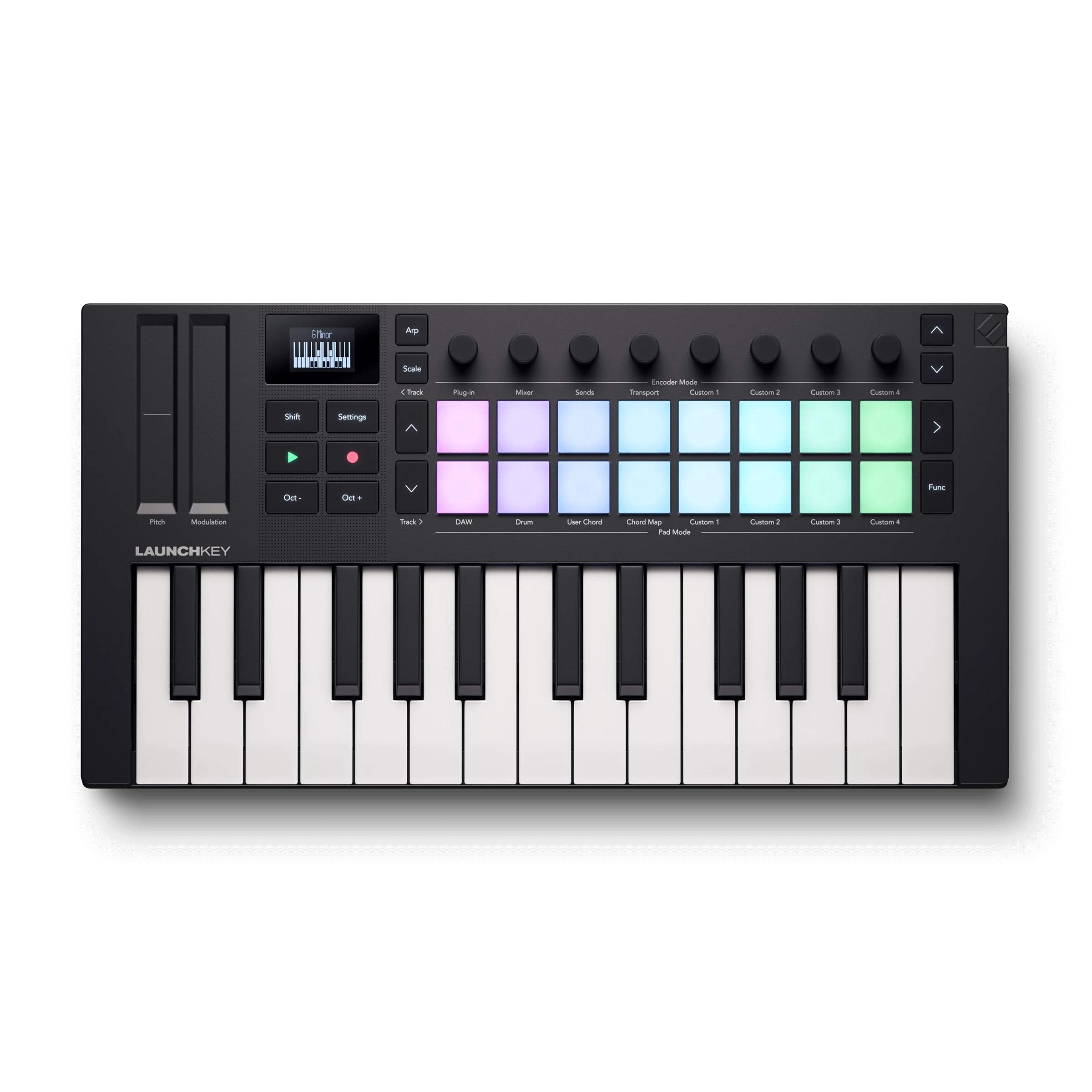
Explore this need in the finder →The Novation Launchkey Mini 25 MK4 is a small, software-centred MIDI controller with 25 mini keys, 16 pressure-responsive pads, eight encoders and a USB-C computer connection. Its external MIDI output is a 3.5 mm TRS Type-A jack, not five-pin DIN. This assessment is based on Novation's US product page and version 3 of its user guide; it is not a hands-on test.
A compact range with a clear limit
Twenty-five mini keys can cover a short bass part, melody, chord voicing or a line recorded in layers. Octave buttons let you move the register, but changing octaves does not put more notes under your hands at once. If a part needs broad two-handed reach without a shift, the 25-note span is the first limitation to test against the music—not a reason to assume that every small controller is only for beginners.
Novation describes the keybed as synth-action and velocity-sensitive. The reviewed materials do not state a measured key width or confirm aftertouch on the keyboard itself. The manufacturer does specify polyphonic aftertouch for the pads, which is a separate control surface. Do not mistake pad pressure response for key aftertouch, and do not treat the product name “Mini” as a complete measurement of how its key spacing will feel to you.
Sixteen pads and eight encoders change the workflow
The top panel has 16 velocity-sensitive RGB pads in two rows, with polyphonic aftertouch, pad-mode selection and page controls. They can serve DAW clip, drum, chord or custom modes; this makes the compact board a control surface as well as a keyboard, but it does not mean the pads contain drum sounds. Eight endless encoders, two touch strips for pitch and modulation, an OLED display and transport/track controls add more ways to work without reaching for the mouse.
Novation's current materials describe a built-in arpeggiator, Scale mode, Chord Map, Fixed Chord and User Chord modes. These can help generate or reshape MIDI ideas, while the manual explains that some control modes depend on the DAW and its integration script. If a particular mapping is essential, confirm the host, version and firmware requirements before buying; a listed control does not guarantee the same behaviour in every application.
USB-C for the computer; TRS for external MIDI
The Launchkey is USB bus-powered, and Novation lists an included USB-C-to-USB-A cable. Its computer connection is USB-C, so the connector on the host side may require a different cable or a suitable adapter for a newer USB-C-only computer. The user guide documents a separate 3.5 mm TRS Type-A MIDI Out jack for external MIDI equipment. That is not a five-pin DIN socket: if your synthesizer has DIN MIDI In, check that you have the correct TRS Type-A-to-DIN adapter and that it is included in the exact package you are considering. The manufacturer's box list names the controller and USB cable, not a MIDI adapter.
A useful supported plan is a USB-C link to the computer for data and power while the TRS MIDI Out sends control messages to an external synth. MIDI is not audio. An external synth still needs its own power and audio connection; a software instrument needs a host and a separate way to hear its audio. The product specifications reviewed here describe a controller and its MIDI ports, not a built-in audio engine or audio output. I found no documented five-pin MIDI Out, computer-free operating plan or keyboard-aftertouch claim for this exact model.
Body width, weight and real clearance
Novation's US page lists a 338.5 mm body width, while its user guide rounds that to 339 mm; both convert to about 13.33 inches. That is comfortably inside the finder's lowest 16-inch body-width threshold, but it is not a desk-fit guarantee. Leave room for the USB lead, the side-mounted MIDI and sustain connections, your hands and any adjacent gear. The published depth is about 6.96 inches, and the listed height includes the encoders.
The US product page and the manual disagree on weight (0.78 kg versus 0.82 kg), so I do not use weight to rank or match it. If the instrument will sit on a stand, check its support area and stability separately. A compact body can still be awkward if a plug is pressed against a wall or the pads and controls have no reachable clearance.
Software and package checks
Novation advertises integration with several major DAWs and a software bundle that includes Ableton Live Lite and other instruments and effects. The exact licenses, software versions and registration terms can change; verify the current US package and your computer's operating-system support. The user guide also recommends updating firmware through Novation Components, so include that setup step rather than assuming every feature is ready out of the box.
The Launchkey Mini 25 MK4 is a strong shortlist candidate when a 25-key USB-C controller, expressive pads and a very narrow body are the priorities, and a 3.5 mm TRS Type-A MIDI route is acceptable. It is a weaker fit for a player who needs a longer keybed, a built-in sound source, or five-pin DIN without a separate correctly wired adapter. If you are comparing it with another 25-key board, compare the exact output connector and included accessories alongside key range and dimensions; “USB-C” alone does not settle the hardware-MIDI question.
Novation US product page and specifications · Novation downloads and user-guide listing · Launchkey Mini 25 MK4 User Guide, version 3.
Key specifications
Key details at a glance
| Keys | 25 |
|---|---|
| Manufacturer's keybed description | Velocity sensitive synth action mini keys |
| Width | 13.33 in |
| Pads | 16 |
| Velocity-sensitive pads | Yes |
| Pressure-sensitive pads | Yes |
| 5-pin MIDI Out | No |
| Computer connection | USB-C |
| USB bus-powered | Yes |
| Assignable pedal input | Yes |
| Depth | 6.96 in |
Use the exact model’s instructions for operating limits, supplied equipment and version differences.
Sources for this review
Sources for this assessment
Start with your setup, not a headline feature
Use the finder to combine key-count, connection, control and desk-fit requirements. Unverified specifications are never treated as a match.