
Your needs, this model
Does it fit your priorities?
Does the A-300PRO offer more than a small note-entry keyboard?
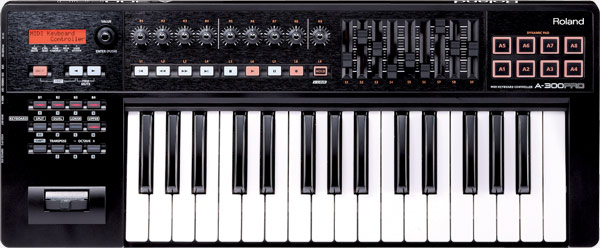
Its 32 keys provide a compact range, but Roland also lists eight Dynamic Pads, nine knobs, nine sliders, buttons, transport controls and a two-line LCD. The manual documents a PAD AFTERTOUCH CURVE for pressure applied to the pads. It is a controller surface, not an integrated synth or audio interface, and its layout still needs desk and cable clearance.
Explore this need in the finder →Can a computer send MIDI through the A-300PRO to a hardware module?
Yes. The shared A-PRO manual describes the MIDI connectors as a USB MIDI interface, with messages from the connected computer sent to an external sound module at MIDI OUT. That requires the USB host/software path and the appropriate MIDI I/F setting; MIDI messages are not audio, so the sound module still needs an audio output and monitoring path.
Explore this need in the finder →Can I run the A-300PRO straight to a MIDI instrument without a DAW?
Roland's A-PRO support instructions say to set MIDI I/F Switch to OFF for the direct keyboard-to-MIDI-OUT route without a computer. The controller is specified as USB-bus-powered or AC-adapter-powered; if no powered USB host is present, the separately sold compatible adaptor is a setup check. It has no documented AA-battery mode.
Explore this need in the finder →The A-300PRO is the 32-key member of Roland's discontinued A-PRO controller family. It combines a short keybed with a surprisingly broad control panel, rather than minimizing the whole device to the smallest possible travel keyboard. This assessment draws on Roland's US product listing and shared English manual; it is not a hands-on review, and it makes no claim about a used unit's condition or software entitlement.
A compact key count with a full control surface
Thirty-two velocity-sensitive keys with channel aftertouch are enough for one-handed parts, bass lines, short riffs and note entry, but they leave less room for two-handed passages than a 49- or 61-key controller. That is the defining trade: the A-300PRO keeps the case to 23-7/8 inches wide while retaining eight pads, nine knobs, nine sliders, a two-line LCD, transport controls, a bender/modulation stick and pedal inputs. The width is the body measurement, not the space needed around the USB, MIDI and pedal connections.
The keybed is described by Roland as responsive and capable of aftertouch; the specifications do not identify a weighted action type. I would not turn those phrases into a promise about playing feel. If key action is central to the choice, try the exact unit or compare it with a retailer that permits a return.
The pads have a documented pressure response
Roland's page identifies eight velocity-sensitive Dynamic Pads, and the shared A-PRO manual includes a PAD AFTERTOUCH CURVE setting that maps pressure on the pads to aftertouch data. That makes this more expressive than a keyboard whose pads are documented only as triggers. It is a separate capability from the A-300PRO's channel aftertouch on the keys. The product page describes the panel as assignable, but a control count alone does not promise a ready-made map for every DAW: the A-PRO Editor and control maps are part of the workflow, so confirm that the required software is available for the computer you use.
The manual lists the usual split and dual keyboard controls across the A-PRO family. This can make a small 32-key range useful for paired sounds, but it does not create extra physical keys. A split arrangement still has to fit into the existing span and requires deliberate channel and note-range setup.
USB and MIDI DIN are two different routes
For computer work, the A-300PRO connects over USB and can be bus-powered. The exact USB connector shown in Roland's product image is Type-B, not USB-C. The product also has MIDI IN and OUT sockets. With the A-PRO's MIDI I/F setting enabled, the manual describes computer MIDI arriving over USB and being passed to a sound module at MIDI OUT. Roland's support instructions describe switching MIDI I/F off for a direct controller-to-hardware route without a computer. These modes are useful, but they should be configured intentionally rather than assumed to mirror the same data to every destination.
There is also an important power distinction. USB bus power suits a host-connected session; a hardware-only setup without a computer needs the separately sold compatible AC adaptor or another supported USB power host. The original box list names an Ableton Live Lite serial card and a CD-ROM, but a current used seller may not supply them, and the card does not prove a transferable or still-usable license.
It is a controller, not a sound module
Roland documents the A-300PRO as a MIDI controller with USB and MIDI connections; the reviewed specifications do not list audio outputs or an onboard sound engine. For computer instruments, the computer or interface must handle audio. For a hardware synth, that instrument produces the sound and must connect to a mixer, amplifier or headphones through its own audio output. MIDI sends performance and controller data, not an audio signal.
How it compares within the family
The A-500PRO keeps the eight-pad, aftertouch and large assignable-control layout but expands the range to 49 keys and a 33-1/16-inch body. The A-800PRO offers 61 keys at 39-1/2 inches. The A-300PRO is the clear size choice if a 32-key range is sufficient and desk width matters; the larger models are better candidates when sustained two-handed reach takes priority. The A-500S also has 49 keys, but it is a simpler surface with no documented pads or channel aftertouch and a different battery-power option.
Practical buying checks
Roland's page marks the A-300PRO discontinued. It does not establish current availability, price or condition. Before considering a secondhand offer, check the exact model label, all 32 keys, pad response, knob and fader travel, screen, buttons, USB port and MIDI IN/OUT sockets. Confirm whether the correct USB cable, AC adaptor, software media or serial card are present, but do not value the old license as guaranteed. Finally, confirm that the current computer supports the available A-PRO driver or a usable generic mode. It is a thoughtful small controller only when the host and hardware routes fit the actual setup.
Key specifications
Key details at a glance
| Keys | 32 |
|---|---|
| Width | 23.88 in |
| Pads | 8 |
| Velocity-sensitive pads | Yes |
| Pressure-sensitive pads | Yes |
| 5-pin MIDI Out | Yes |
| Computer connection | USB Type-B |
| USB bus-powered | Yes |
| Assignable pedal input | Yes |
| Keyboard channel aftertouch | Yes |
| 5-pin MIDI In | Yes |
| Depth | 9.88 in |
| 5-pin MIDI outputs | 1 |
Use the exact model’s instructions for operating limits, supplied equipment and version differences.
Sources for this review
Sources for this assessment
- Roland US Owner's Manuals model directory
- Roland A-300PRO US product page and specifications
- Roland US A-300PRO Owner's Manual support record
- Roland A-300PRO/A-500PRO/A-800PRO English Owner's Manual
- Roland A-PRO standalone MIDI routing support article
- Roland A-300PRO rear-angle manufacturer product image

Start with your setup, not a headline feature
Use the finder to combine key-count, connection, control and desk-fit requirements. Unverified specifications are never treated as a match.