
Your needs, this model
Does it fit your priorities?
Does the A-37 give me more than a five-octave playing span?
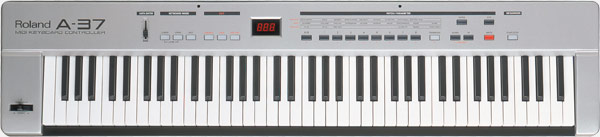
Roland specifies 76 synth-weighted keys with channel aftertouch. That is more than a 61-key five-octave controller but less than the 88-key range. The chassis is 47-1/16 inches wide, so measure the surface and cable room rather than treating the key count as a desk-fit guarantee.
Explore this need in the finder →Can the A-37 work with a computer over USB?
The US specifications list MIDI IN, OUT A, OUT B and THRU, but no USB computer port. A computer-based setup would need a separately chosen MIDI interface that can accept the A-37's actual output connector, plus a supported driver and an audio path for the computer instrument. The captured specification does not state connector pin count, so verify it from the exact unit before ordering cables.
Explore this need in the finder →What should I confirm before planning separate keyboard zones on an A-37?
Roland specifies two independent keyboard zones, 128 user patches and two MIDI outputs, and names Lower, Upper, Layer and Split modes. However, the captured US support page exposes MIDI Implementation rather than an accessible English operating-manual file. Do not assume how zones map to OUT A and OUT B until the exact manual or unit is checked.
Explore this need in the finder →The A-37 is a discontinued 76-key MIDI controller, not a current model with a fresh support promise. Roland's US page still documents its configuration, so this assessment focuses on whether that specific arrangement fits a hardware-oriented rig. It is a source-based review of the published specifications and support record; I have not played, owned or tested the keyboard.
Why its 76-note range stands out
Seventy-six keys sit between the common 61- and 88-key sizes. That middle span can be useful when a 61-key board leaves too little reach for split parts or two-handed passages, but a full 88-key chassis is more length and weight than a desk or stand can support. Roland describes the keys as synth-weighted and specifies both velocity and channel aftertouch. Those are manufacturer descriptions, not a report about the actual feel, condition or response of a used unit. No key width or action measurement is published in the sources reviewed here.
The 47-1/16-inch case is the practical counterweight to the range. It weighs 17 pounds and is listed at 10-11/16 inches deep. A desk limit should include more than the case: leave space for hands, the music rest if present, pedal leads and the MIDI cable. Its body is short of a conventional full 88-key board, but it is not a compact controller.
Zones and controls are aimed at a MIDI rig
The product page lists two independent keyboard zones, 128 user patches, Lower, Upper, Layer and Split modes, a Data Entry slider, transpose and clock controls, plus sequencer Start/Stop buttons. That makes the A-37 more than a note keyboard with octave buttons: it has on-board patch and zone controls intended for a multi-device performance setup. The combined bender/modulation lever adds a familiar performance control, while a damper and expression input leave room for separately chosen pedals.
Roland also lists MIDI IN, OUT A, OUT B and THRU. Two physical output sockets give the model a different routing story from the later single-output A-PRO keyboards. However, the captured US support route exposes the MIDI Implementation document rather than an accessible English operating-manual file. I therefore do not claim that each zone can be assigned independently to OUT A and OUT B, or that both outputs carry separate parts simultaneously. Confirm that exact routing from the manual or the specific unit before planning a live set around it.
Plan an external power and sound path
Unlike current USB keyboards, the A-37's specification does not list a USB connection. It lists dry AA batteries and an AC/DC adaptor jack, with the adaptor optional, and says that a MIDI cable is included in the original package. That is a coherent arrangement for an external MIDI instrument, but it is not a direct USB connection to a modern computer. A computer-based setup would need a compatible MIDI interface and its host support; the interface, driver, cable and audio output path are separate parts of the system.
The manufacturer labels the unit a MIDI keyboard controller and lists MIDI connections, but no audio output or built-in sound engine appears in the reviewed specification. Treat it as a source of control messages, not as a keyboard that makes audible sound by itself. A connected sound module or computer instrument has to generate the audio and feed headphones, speakers or a mixer through its own audio connection.
Where it compares with the A-PRO models
The A-800PRO is the closest later Roland option in this group if the priorities are a large playing span and direct USB-to-computer workflow. It has 61 keys, an eight-pad bank, nine knobs and nine sliders, but is shorter and lighter than the A-37. The A-500PRO is a 49-key alternative with the same broad control panel in a smaller footprint. Neither should be treated as an A-37 replacement if the two-output arrangement or 76-key span is the main requirement. Conversely, the A-37 is not the answer for someone who needs USB-C, a current driver list or a compact laptop controller.
Checks before considering a used unit
Roland marks the product discontinued. No price, stock, warranty or seller condition is established by its product page. For any used listing, confirm the exact A-37 name, all keys and panel controls, both MIDI outputs, the input and THRU sockets, the power switch and adaptor jack. Check which accessories are actually included: the historical page lists batteries, a MIDI cable and music rest, but that does not establish a present seller's package. Verify the connector format on the unit before buying cables; the captured product specification names MIDI sockets but not their pin count.
The A-37 is therefore best considered as a specific legacy tool for a player who values its 76-key range, channel aftertouch and multiple MIDI sockets more than a modern host connection. If those distinct traits are not essential, compare newer documented USB models first. If they are essential, verify operating instructions, exact routing and condition before deciding—the published page alone cannot settle those questions.
Key specifications
Key details at a glance
| Keys | 76 |
|---|---|
| Manufacturer's keybed description | Synth weighted |
| Width | 47.06 in |
| Pads | 0 |
| Velocity-sensitive pads | No |
| Pressure-sensitive pads | No |
| Assignable pedal input | Yes |
| Keyboard channel aftertouch | Yes |
| Depth | 10.69 in |
| 5-pin MIDI outputs | 2 |
Use the exact model’s instructions for operating limits, supplied equipment and version differences.
Sources for this review
Sources for this assessment
Start with your setup, not a headline feature
Use the finder to combine key-count, connection, control and desk-fit requirements. Unverified specifications are never treated as a match.