
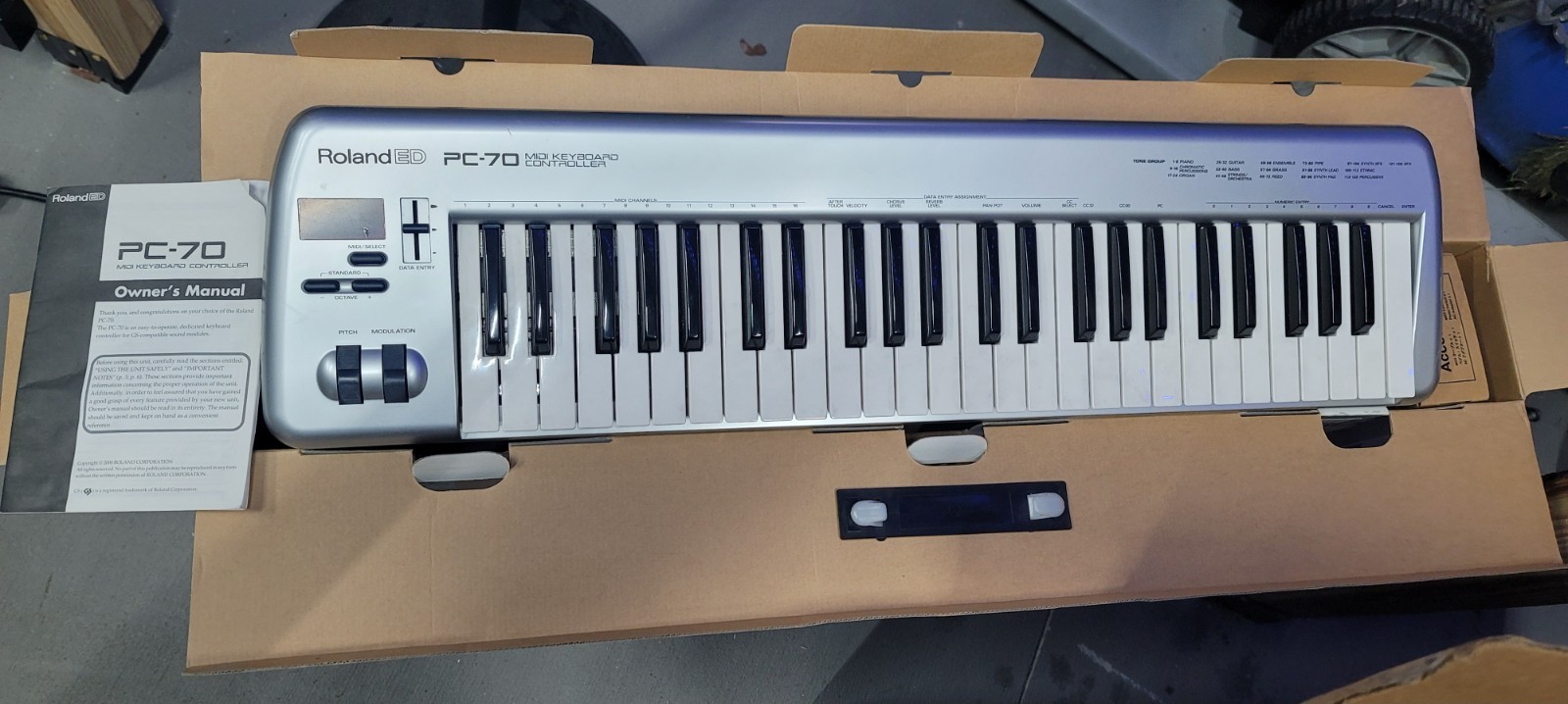
Your needs, this model
Does it fit your priorities?
Will the PC-70 fit a 49-key brief with a strict 33.25-inch body-width cap?
Roland lists 49 standard full-size velocity-sensitive keys and a 33-1/4-inch case width. With earlier models included, that documented body fits a 33.25-inch cap exactly, but it misses a 33-inch cap. Leave additional room for cables, hands and the support surface.
Explore this need in the finder →Does the PC-70 make sound or does it need a separate instrument?
It does not contain sound-generating circuitry. Its MIDI OUT sends notes and messages such as Program Change/Bank Select to an external sound module or computer instrument. That other device must create audio and connect to headphones or speakers through its own audio path.
Explore this need in the finder →Does pressing a PC-70 key harder after the initial strike send key aftertouch?
No. The manual explicitly says its keyboard cannot transmit Channel Aftertouch messages. The Data Entry slider can be assigned to transmit Channel Aftertouch, but moving a slider is not pressure on a held key; the receiving module or software must also be configured to respond.
Explore this need in the finder →The PC-70 is a discontinued 49-key MIDI keyboard controller for sending notes and control messages to an external sound source. Roland's page calls the keys full-size and velocity-sensitive; the Owner's Manual explains that the unit has no sound-generating circuitry. This is a source-based review of the documented configuration, not a report of hands-on use, current host testing or a seller's package.
A standard-size 49-key range in an older layout
Forty-nine keys cover four octaves before octave shifting. Roland describes a standard full-size velocity-sensitive keybed and includes octave up/down controls; the manual says the normal range can be shifted across note numbers 0–127. The documentation does not identify a named key action or weight, so there is no basis here to call the keys synth-weighted, semi-weighted or piano-like. A 49-key count also does not make the body especially compact: the specified chassis is 33-1/4 inches wide, 8-5/16 inches deep and 2-7/8 inches high, at 6 pounds.
The top panel keeps performance controls simple: a pitch/modulation wheel assembly, octave controls, a three-character LED display and one Data Entry slider. That slider is assignable to controls such as volume, pan, reverb, chorus, velocity and channel aftertouch. Program Change and Bank Select are available for choosing sounds on an attached module. Unlike a modern controller with a broad DAW surface, this is a small set of controls whose assignments and values are entered through buttons, the display and keys. It suits a message-oriented MIDI workflow better than a search for extensive mixing or clip-control hardware.
Velocity yes; pressure aftertouch comes from the slider
A key press sends velocity, and the manual provides adjustable velocity response. It is important not to confuse this with key aftertouch: Roland explicitly says the keyboard cannot transmit Channel Aftertouch from pressure on a held key. Instead, the Data Entry slider can be assigned to send Channel Aftertouch messages. That is a different physical gesture and is not equivalent to a pressure-sensing keybed. A GS module or software instrument must also be set to respond to the message; the manual notes that a GS module does not respond to aftertouch at its factory default.
The product is a controller, not a self-contained keyboard instrument. For a straightforward rig, connect the PC-70's MIDI OUT to a sound module's MIDI IN, set the same transmit and receive channel, and route the module's audio output to headphones, powered speakers, a mixer or another listening system. Roland specifically positions the unit for GM/GS sound modules and describes its Program Change/Bank Select workflow. Other external MIDI devices may respond differently to GS-oriented banks, sound numbers or controller messages, so consult the receiving device's manual rather than assuming every tone-selection command is universal.
Power and computer connection need a deliberate plan
The Owner's Manual lists a 9 V AC adaptor, 160 mA current draw, one MIDI OUT connector, a sustain-switch jack and a power switch. It does not list a USB connector or USB bus power. Its computer diagrams show a serial connection through a compatible external sound module or a separate MIDI interface; they are not evidence of plug-and-play USB-MIDI, present-day drivers or current operating-system compatibility. Plan for an external MIDI interface with a connector verified to fit the exact unit, plus whatever computer software and audio path the setup requires. The manual's textual connector list does not specify the MIDI OUT pin format, so inspect the particular used keyboard before buying a cable or DIN-only interface.
Roland's historical PC-70 page says the original package included a power supply, MIDI cable and sustain pedal, while the manual's accessories list names an AC adaptor, MIDI cable and pedal switch. Neither list establishes what accompanies any used unit today. Verify the exact adapter and its label, MIDI cable, sustain switch, pedal operation and return terms before relying on a listing.
Measure the body, not just the key count
At 33-1/4 inches wide, the PC-70 is a threshold choice for someone setting a firm 33-1/4-inch body limit: it is wider than a 33-inch cap and fits only at the next quarter-inch step, 33.25 inches. That is the published case width, not the desk area needed to play. Leave additional room for cable bends, hands, a stand and any nearby equipment; verify the support surface and the unit's physical condition rather than relying on a numeric screen alone.
Compared with the similarly sized discontinued Roland A-500S, the PC-70 has the older, module-focused GM/GS selection interface and a particularly clear manual statement that no sound engine is built in. The A-500S documentation lists a direct computer USB route and identifies its DIN MIDI output, while the PC-70 manual does not document USB and leaves the connector pin format unstated. These are meaningful setup differences even though both have 49 velocity-sensitive keys. Do not treat the PC-70 as a USB keyboard or as a DIN-confirmed match until the exact unit is checked.
Who should consider this model
The PC-70 makes the most sense as a researched legacy option for a player who wants 49 full-size velocity keys, a pitch/modulation control and direct Program Change/Bank Select access to a compatible external sound module. Its modest six-pound weight and sub-34-inch case are useful physical facts, but its age, lack of onboard sound, lack of a documented USB port and connector uncertainty narrow the setup it can serve. The A-500S or a current USB controller may be a better starting point when a direct computer connection matters; a keyboard with pressure-sensitive keys is necessary when aftertouch must come from key pressure. Before considering a used PC-70, confirm the nameplate, inspect every key and control, establish the MIDI connector type, test the sustain jack and source the correct power supply. No price, current availability, seller condition or present-day computer compatibility is established by the reviewed Roland sources.
Key specifications
Key details at a glance
| Keys | 49 |
|---|---|
| Width | 33.25 in |
| Pads | 0 |
| Velocity-sensitive pads | No |
| Pressure-sensitive pads | No |
| USB bus-powered | No |
| Assignable pedal input | Yes |
| Keyboard channel aftertouch | No |
| 5-pin MIDI In | No |
| Depth | 8.31 in |
| 5-pin MIDI outputs | 1 |
Use the exact model’s instructions for operating limits, supplied equipment and version differences.
Sources for this review
Sources for this assessment
Start with your setup, not a headline feature
Use the finder to combine key-count, connection, control and desk-fit requirements. Unverified specifications are never treated as a match.