
Your needs, this model
Does it fit your priorities?
Is the MPK Mini MK3 a standalone sound source?
Akai's model FAQ describes the MPK Mini MK3 as a class-compliant USB-MIDI keyboard that sends MIDI to software for sound generation and music control. No onboard sound engine or audio output is listed in the reviewed model specifications, so plan for a computer or external sound source and a separate monitoring path.
Explore this need in the finder →Does the MPK Mini MK3 use USB-C and have aftertouch on its keys?
The model FAQ specifies a standard USB-A-to-USB-B cable and bus power, not a USB-C device connector. The product specifications call the 25 keys velocity-sensitive and the pads velocity- and pressure-sensitive, but do not document keyboard-key aftertouch. Treat the connector and the sensing surfaces as separate checks.
Explore this need in the finder →Are the MPK Mini MK3 pads pressure-sensitive?
Yes, Akai's product specification explicitly describes eight assignable backlit pads as both velocity- and pressure-sensitive, arranged across two banks. That is a documented pad capability, not evidence of aftertouch on the keyboard keys or polyphonic aftertouch on each pad.
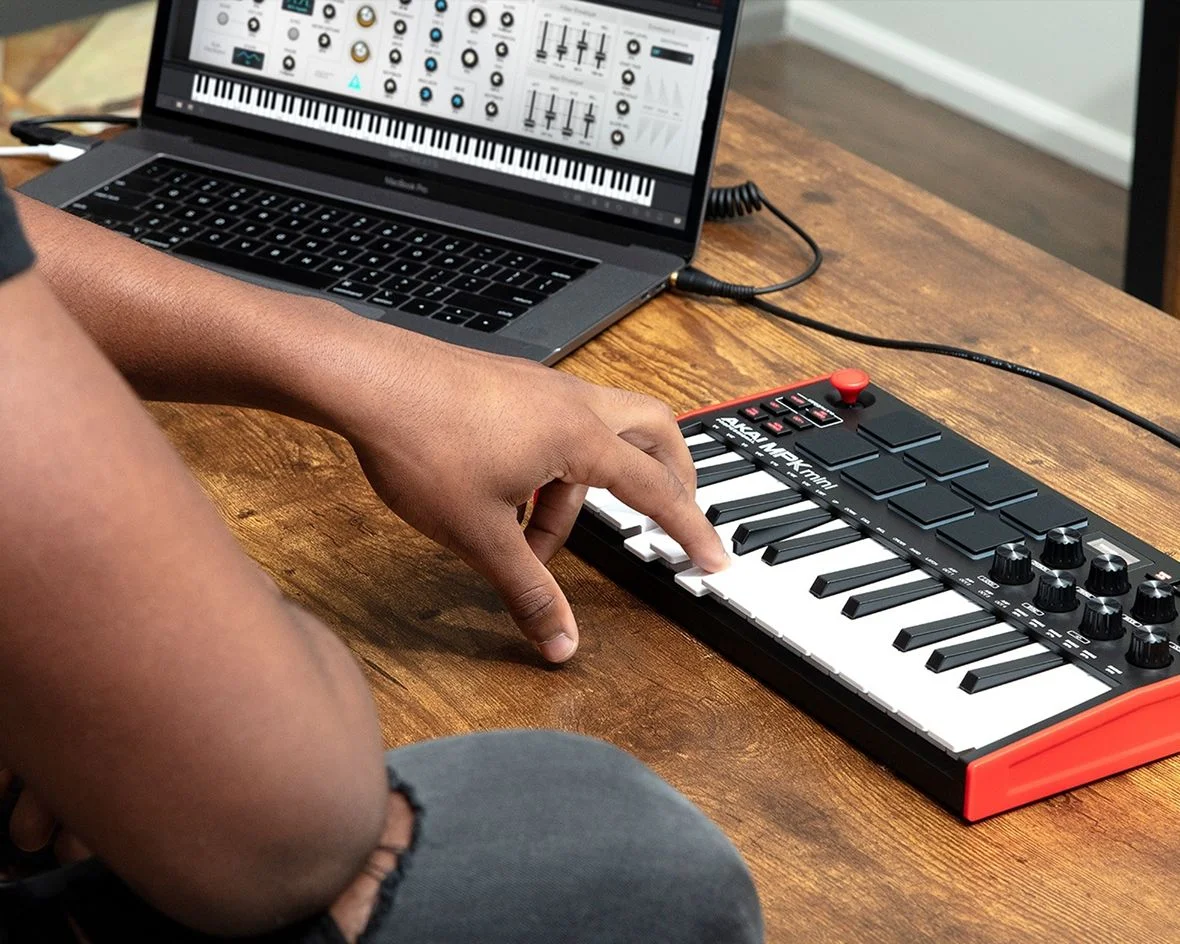
Explore this need in the finder →The MPK Mini MK3 is Akai's small, computer-oriented controller in the MPK family. Its exact product page lists 25 velocity-sensitive keys, eight velocity- and pressure-sensitive pads, eight assignable 360-degree knobs and USB bus power. Akai's support FAQ is unusually useful for setup: it identifies the device as class-compliant USB-MIDI, explains the USB-A-to-USB-B cable, gives body dimensions and says the keyboard itself sends MIDI to sound-generating software. That makes the model's boundary straightforward: it is compact control hardware, not a self-contained keyboard instrument.
Twenty-five mini keys favor portability over physical range
The 25-key bed has octave-up and octave-down controls, so the controller can address a wider note span over time. That does not increase the number of notes available at once, nor does it turn the mini keys into full-size keys. The exact specifications describe the keys as velocity-sensitive and the model FAQ calls the keybed a Gen 2 enhanced dynamic design. The sources do not provide a key-width measurement, a measured action, or a keyboard-key aftertouch specification. A familiar marketing label is not a substitute for trying a keybed if touch is a deciding factor.
For entering short melodies, bass lines, chords or parts in a DAW, a 25-key footprint may be sufficient if octave shifting is acceptable. If a wider range is essential, compare with 37-key controllers such as the MPK Mini Plus; that model adds a sequencer and hardware MIDI/CV connections but uses a different USB plug and chassis. The Mini MK3's key count is its core limit, not an indicator of musical suitability.
USB-B carries MIDI data and bus power
Akai's MPK Mini MK3 FAQ describes the controller as class-compliant USB-MIDI and says a standard USB-A-to-USB-B cable connects and powers it from a USB host. This is not a USB-C device connector. A host with USB-C ports may require a compatible cable or adapter, and the chosen computer, operating system and DAW still need to recognize the MIDI device. The model FAQ says a driver is not required for the class-compliant keyboard itself, but software bundled with a product may have separate operating-system requirements.
The keyboard does not create sound on its own, according to the model FAQ. MIDI notes and control messages must reach a computer or other compatible source that provides an instrument, audio output and monitoring. The reviewed product page and FAQ do not establish five-pin DIN output. A computer's USB port, an audio connection and hardware MIDI Out are separate functions; if a direct DIN cable to a synthesizer is required, verify it from an exact-model manual rather than assuming one is present.
Eight pads and eight knobs give a compact control surface
Akai lists eight assignable, backlit pads across two banks, with velocity and pressure sensitivity, plus eight assignable 360-degree knobs. Its FAQ explains that the pads can be assigned for notes, continuous-controller messages or program changes, and that the joystick can send pitch bend or modulation. The default MPC preset can be selected to align pad notes with MPC Beats; separate pad and key MIDI channels can be configured when the DAW needs both surfaces on separate tracks.
That flexibility depends on configuration. A pad mapping that suits one drum instrument may not match another plug-in, and changing presets or MIDI channels can affect the setup. The pad pressure statement applies to the pads; it does not prove keyboard aftertouch, nor does the product page specify polyphonic aftertouch. A pressure-sensitive pad need is therefore documented, while a keyboard-pressure need remains unknown.
Desk fit is small, but not a full setup measurement
Akai's FAQ lists a body 12.5 inches wide, 7.13 inches deep and 1.75 inches high, with a published weight of 1.65 pounds. Those measurements make it one of the narrower options in the reviewed library. They do not include room for the USB-B plug, sustain accessories if separately verified, hands or neighboring gear. Check the actual desk depth and cable direction rather than using the body width as the entire footprint.
The official page's pictured red-sided controller is tied to the exact MPK Mini MK3 page, but the source record does not provide a retail finish suffix or SKU. Confirm that an offer is the 25-key MK3 and not the Mini Play MK3, the 37-key original Mini Plus or the later Mini IV. Finish, cables, software redemption and stock are not established by this assessment.
Standard Mini or Mini Play?
The MPK Mini Play MK3 shares the family’s compact 25-key format but adds an onboard sound bank, speaker and headphone output; the Mini MK3's reviewed sources do not document those features. The Play product page also leaves its physical USB connector unspecified, so the standard MK3's USB-B cable detail must not be copied across models. Conversely, the Mini MK3's USB-B information should not be assumed for the Play.
Keep the Mini MK3 on a shortlist when small USB-MIDI control, pressure-sensitive pads and assignable knobs are the actual requirements and the computer is already part of the sound path. Choose the Play when integrated sounds are important, or another model when direct DIN, USB-C or a longer physical range is required. This analysis relies on manufacturer documentation, not ownership or testing, and makes no claim about the feel of its keys or quality of any included software.
Key specifications
Key details at a glance
| Keys | 25 |
|---|---|
| Manufacturer's keybed description | Velocity sensitive mini keys |
| Width | 12.5 in |
| Pads | 8 |
| Velocity-sensitive pads | Yes |
| Pressure-sensitive pads | Yes |
| Computer connection | Usb-b |
| USB bus-powered | Yes |
| Depth | 7.13 in |
Use the exact model’s instructions for operating limits, supplied equipment and version differences.
Sources for this review
Sources for this assessment
Start with your setup, not a headline feature
Use the finder to combine key-count, connection, control and desk-fit requirements. Unverified specifications are never treated as a match.