
Your needs, this model
Does it fit your priorities?
Does the original V25 have 25 physical keys, or does octave shifting add more keys?
The exact product page calls it a 25-key controller and the V25 v1.2 guide calls its keyboard 25 notes. Octave Up/Down shifts that physical key span to address more of the MIDI note range; it does not add keys to the instrument.
Explore this need in the finder →Are the original V25 pads documented as pressure-sensitive?
Alesis's exact V25 page lists eight velocity- and pressure-sensitive backlit pads. The manual describes the pads as velocity-sensitive and does not specify polyphonic pad aftertouch. Pad pressure is a separate control from aftertouch on keyboard keys.
Explore this need in the finder →Can the V25 connect directly to a five-pin MIDI sound module?
No direct DIN output is listed in the exact V25 guide's connection and rear-panel callouts; it documents USB to a computer and a separate optional sustain input. A computer or MIDI host/interface would be needed for a DIN-only instrument, which must still provide its own audio.
Explore this need in the finder →The original Alesis V25 is a 25-key USB-MIDI keyboard controller, not the later V25 MKII and not a self-contained keyboard instrument. Its exact product page describes eight backlit pads as velocity- and pressure-sensitive; the matching v1.2 guide separately documents the 25-note keybed, assignable controls, USB computer connection and sustain input. This earlier-generation assessment keeps those source-backed features apart from the MKII's arpeggiator, transpose controls and different software claims.
Twenty-five physical keys with a wider MIDI note range
The V25 gives you 25 full-size, velocity-sensitive keys, and the manual explains how its Octave Up/Down buttons let that small physical span reach across the available 127 MIDI notes. Those are two different ideas: octave shifting can move the notes under your fingers, but it cannot play a bass note and a chord far apart at the same time. A player entering short phrases, bass lines, chords in one hand or a part one octave at a time may find that manageable. If a two-handed arrangement needs broad simultaneous range, compare the separately reviewed V49 or V61 instead of assuming the octave buttons replace extra keys.
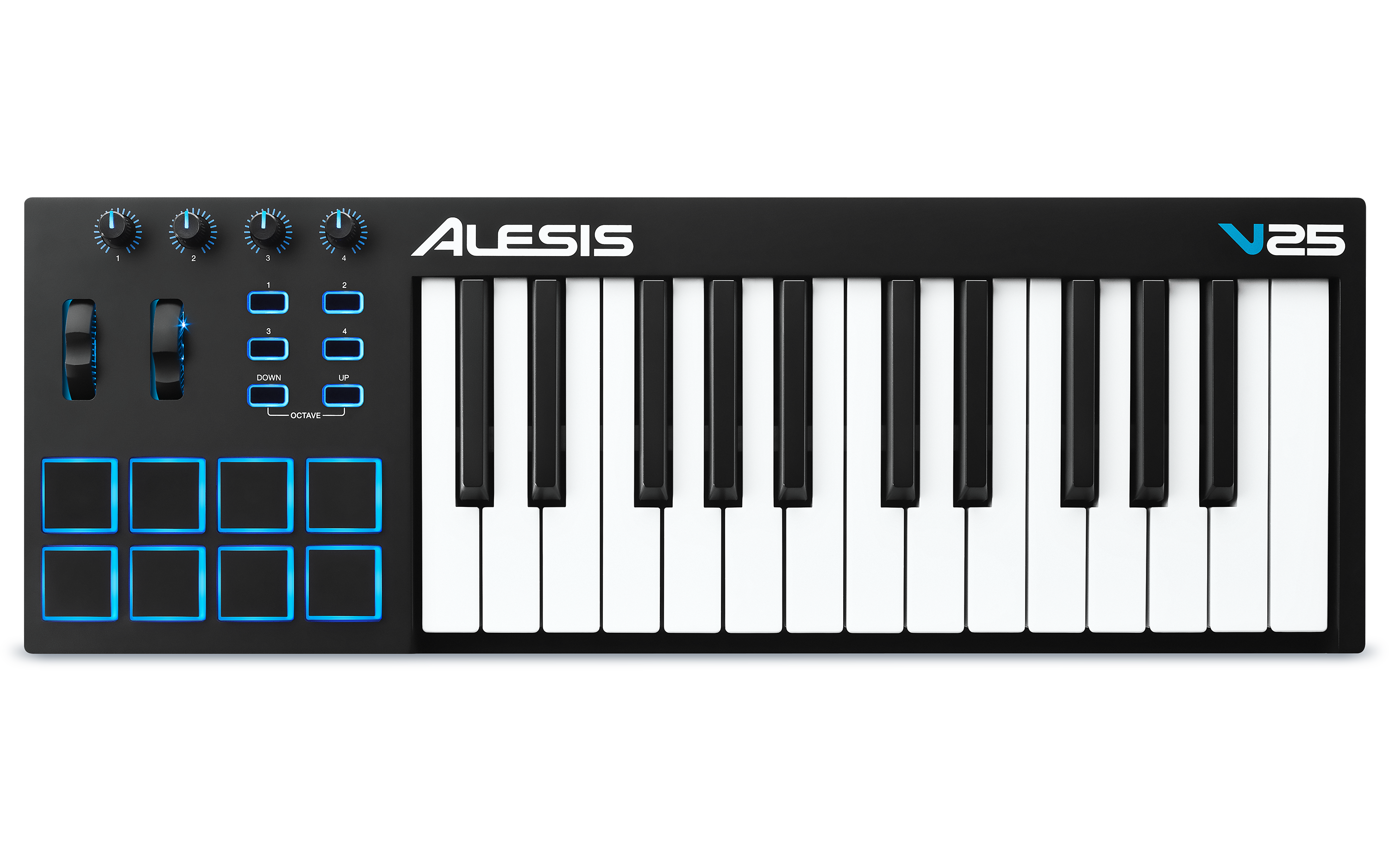
The manufacturer calls the keys full-size and velocity-sensitive, but the page and v1.2 guide inspected for this review do not classify the action as synth, semi-weighted or piano-weighted. They also do not publish key width, key travel, body dimensions, mass or keyboard aftertouch. The official front image identifies the V25 and its 25-note span; its proportions are not a reliable way to calculate a desk-fit measurement. Check the exact used unit and support surface if the chassis footprint or a particular key feel is a hard constraint.
Pads and mapped controls make the small keybed more useful
The front panel pairs eight illuminated pads with four assignable knobs and four assignable buttons. Alesis's exact page labels the pads velocity- and pressure-sensitive, while the manual explains their velocity response and says the pads can be configured to send MIDI CC or Program Change messages through V Editor. The manual does not define a polyphonic-aftertouch mode, so pressure capability should not be inflated into a claim about a specific message protocol or pressure response on the keyboard keys. The two wheels send pitch-bend and modulation information; V Editor can change the modulation assignment. The controls add a few tactile parameters and trigger pads, but they are not the same as a larger mixer-style control surface with faders and transport buttons.
The guide also documents four 270-degree knobs and four assignable buttons for MIDI control. The practical value depends on mapping those controls to the software instrument or DAW you actually use. A button may act momentarily or latch; V Editor can assign knobs and buttons to MIDI messages. Nothing in this control count means every application has a ready-made template. If you're buying for DAW operation rather than note entry, verify the mapping workflow for your software and decide whether four knobs, four buttons and eight pads cover the tasks you have in mind.
Computer MIDI and USB power are the documented route
The V25's single USB connection sends and receives MIDI with a computer and supplies power from the computer USB port. The manual's connection diagram shows a computer, USB lead and optional sustain pedal. Its connection callouts do not list five-pin MIDI sockets. Accordingly, this is not a direct keyboard-to-DIN-synth arrangement: a DIN-only sound module would need a computer or a suitable USB-MIDI host/interface between controller and instrument. The MIDI stream itself carries control data rather than audio, so the sound module or software instrument must generate sound and be connected to headphones, speakers or an audio interface separately.
Alesis's written sources say USB and standard USB cable, but do not specify the controller-side socket's physical shape. USB-C is therefore not confirmed. If a particular cable end is required, check the socket on the exact unit or ask for a clear rear-panel photograph; don't equate a USB data description with USB-C.
Earlier-model and software checks matter more than a bundle headline
The current Alesis MIDI Controllers category separately links both the V25 and V25 MKII, and their product pages/manuals describe different feature sets. The original V25 review here does not assign the MKII's built-in six-mode arpeggiator, transpose button, or separately described pad modes to this model. It is listed as an earlier generation for the site's optional comparison, not as proof that it has been discontinued or is unavailable. If a seller uses only “V25” in a title, confirm the suffix from the label and rear-panel details before relying on an assessment.
The original product page lists Ableton Live Lite 9 and AIR Xpand!2 downloads, but the v1.2 guide's box list instead names V Editor software and a software download card. That difference is kept explicit rather than treated as a guaranteed current bundle. A used code can be redeemed, region-limited, expired or already registered; confirm package contents, transferability and the current software/OS requirements with the seller and Alesis. The optional sustain pedal is not listed among the guide's included items.
Who should consider it?
On the documented facts, the V25 suits someone who deliberately wants a 25-key full-size controller and will connect it to computer software, with pads and a few mapped controls alongside note entry. It is a weaker fit for a direct DIN hardware chain, a mandatory USB-C socket, a fixed tray-width requirement, or a player whose simultaneous physical range or key action is central. Those cases need documented connections, published measurements or a different mechanism—not an assumption based on the product family. This assessment is based on Alesis's exact product page, category card and V25 v1.2 guide, not hands-on use; verify the precise generation, condition, included cable and any software claim for the specific unit.
Primary sources: Alesis V25 product page; Alesis V25 User Guide v1.2; Alesis MIDI Controllers category.
Key specifications
Key details at a glance
| Keys | 25 |
|---|---|
| Manufacturer's keybed description | Velocity sensitive full size keys |
| Pads | 8 |
| Velocity-sensitive pads | Yes |
| Pressure-sensitive pads | Yes |
| 5-pin MIDI Out | No |
| USB bus-powered | Yes |
| Assignable pedal input | Yes |
| 5-pin MIDI In | No |
| 5-pin MIDI outputs | 0 |
Use the exact model’s instructions for operating limits, supplied equipment and version differences.
Sources for this review
Sources for this assessment
Start with your setup, not a headline feature
Use the finder to combine key-count, connection, control and desk-fit requirements. Unverified specifications are never treated as a match.