
Your needs, this model
Does it fit your priorities?
How much physical range does the VI25 give you without octave shifting?
The exact VI25 guide specifies 25 physical full-size keys. Its octave buttons can move those keys through the broader MIDI-note range, but they cannot make a wide chord or bass-plus-melody part playable simultaneously across a larger bed. Choose it when a short physical span is sufficient, rather than treating octave access as extra keys.
Explore this need in the finder →Can the VI25 connect directly to a five-pin hardware sound module?
Yes. The VI25's own rear-panel guide lists five-pin MIDI Out. For a computer-free module setup, the manual specifies an optional 9 V DC, 500 mA, center-positive adapter; a standard USB charger is described as an alternative power source. The module, not the controller, must make sound and connect to monitoring.
Explore this need in the finder →Is the VI25's computer socket confirmed as USB-C?
No. Alesis documents USB and a standard cable, but the reviewed product page and model guide do not name the device-side connector shape. Do not count it as a verified USB-C controller; inspect the exact unit and cable before buying for a USB-C-only host.
Explore this need in the finder →The Alesis VI25 is a compact-key-count controller, not a mini-key controller. Its own product page calls the 25 keys full-size and semi-weighted, and the v1.1 guide confirms velocity response and keyboard aftertouch. That makes the VI25 a distinctive option if your physical desk space is tight along the keyboard's long axis but you still prefer full-size keys and hands-on controls. It is not a substitute for a 49-key bed when the part requires wide notes to sound together.
What the 25-key span does—and does not—cover
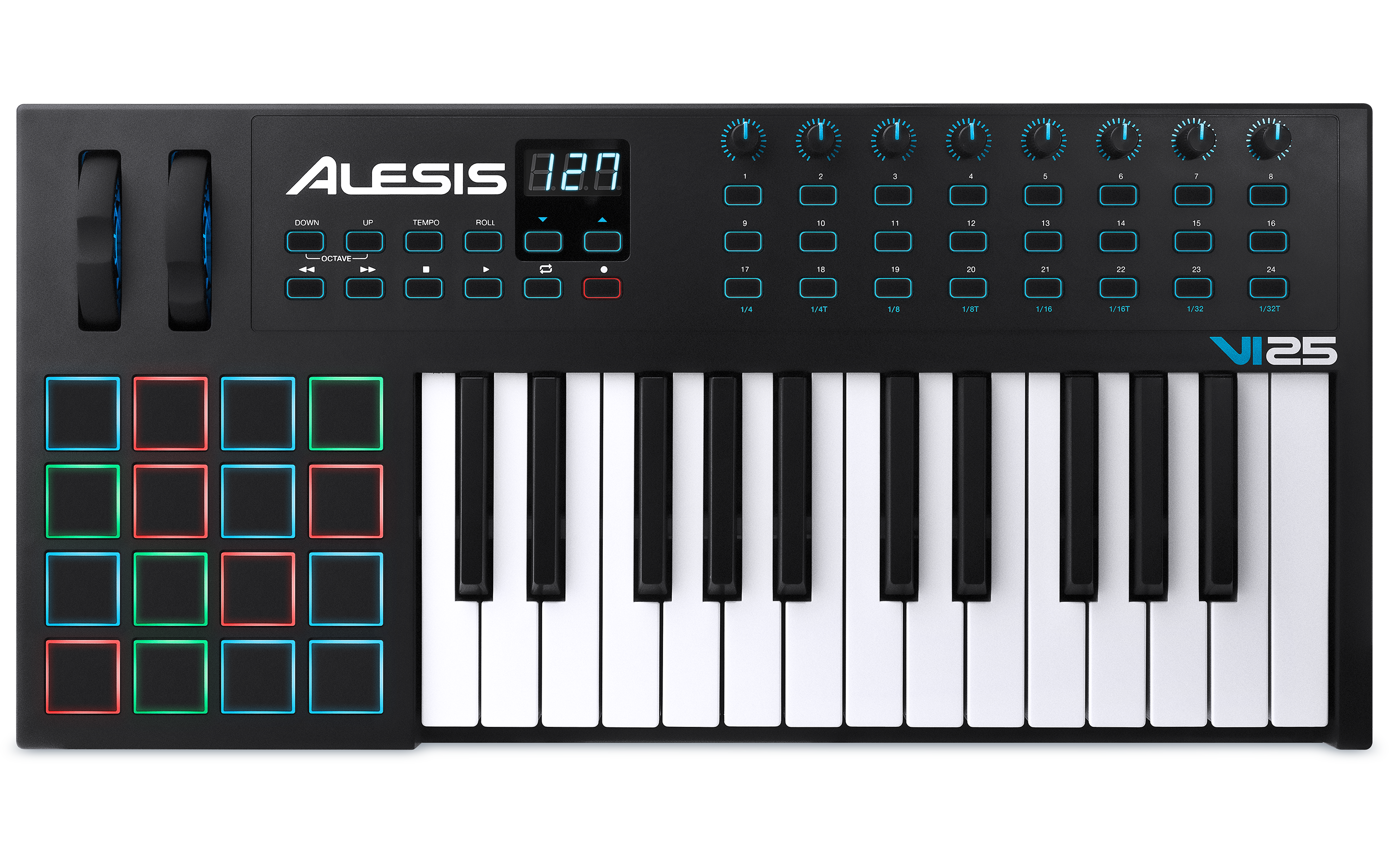
Twenty-five physical keys make a relatively narrow playing window. Octave-up and octave-down controls can move that window through the MIDI note range, but a shifted 25-key bed still cannot hold distant bass and melody notes at once. The keyboard's aftertouch adds a documented expressive control dimension after a note is played; Alesis does not specify its transmission type, so the review does not promise a particular channel or polyphonic implementation. Alesis also describes the keys as semi-weighted rather than hammer-action piano keys. Treat that label as a manufacturer description, not a prediction of feel in your hands.The rest of the surface is much larger than the key count alone suggests. A 4-by-4 bank of 16 velocity-sensitive pads sits alongside eight assignable rotary knobs and 24 assignable buttons. Six buttons are transport controls, while the remaining controls can send MIDI messages and can be configured through the VI Editor. The guide also documents a three-digit display, octave controls, tap tempo and Roll mode: the pads can repeat at a chosen tempo division, with gate and swing adjustments. This turns the VI25 into more than a small note-entry board; it has a real-time performance and parameter-control surface. The pads are documented as velocity-sensitive, but pressure sensitivity beyond velocity is not established.
USB to a computer, or DIN to a sound module
The USB port carries MIDI and supplies bus power from a computer. Alesis says to use a standard USB cable, but neither the product page nor the model guide names the device-side socket shape. Buyers with a strict USB-C-only host should inspect the actual unit and cable rather than treating “USB” as “USB-C.” In a computer setup, the VI25 itself is still only a controller: a configured software instrument creates sound, and the computer or audio interface must connect to headphones, speakers or a mixer.There is also a direct five-pin MIDI Out, plus a 1/4-inch TS sustain input. The manual describes using DIN to drive an external module and gives an important power condition: for a computer-free module setup, use an optional 9 V DC, 500 mA, center-positive adapter; it also describes a separately sold standard USB charger as an alternative supply. The product's listed package contents do not include that adapter or a sustain pedal. MIDI DIN carries notes and control data, not audio, so the external module must make sound and connect to monitoring separately. The guide also describes computer MIDI arriving over USB and being forwarded to a connected device at MIDI Out, which can bridge a DAW track to external hardware.
Desk footprint and useful comparisons
The user guide publishes a 24.6-inch width, 12.4-inch depth and 4.5-inch height, with a 7-pound weight. That is a 25-key instrument with a relatively deep control panel; it may fit a narrow desk width, but it is not a shallow strip. Include cable plugs, playing posture and the room your hands need around the pad bank when measuring a workspace. The image shows the exact VI25 layout and key span, but a photograph is not a scale drawing.Compared with the Alesis V25 MKII, the VI25 has far more controls and a documented five-pin output, and its own guide specifies keyboard aftertouch. The V25 MKII instead has a simpler eight-pad/four-knob surface and no documented DIN output. The Q Mini offers more physical notes in a compact-key format but lacks the VI25's documented full-size semi-weighted bed, DIN output and pad bank. Those are configuration differences, not a ranking: the better choice depends on whether the priority is compact keys, a short full-size span, or a more expansive control panel.
Software support is a separate purchase check
Alesis advertises downloadable Ableton Live Lite and Xpand!2 and offers a VI Editor, but registration, redemption and current software requirements need checking for the exact seller package. At the manufacturer support pages checked on November 3, 2026, the Windows 11 hardware table marks VI25 “In Testing,” while the macOS 14 hardware table marks it “Supported”; the VI Editor is marked “Not Supported” in both listed software tables. These are specific operating-system records, not a blanket promise for later releases. Confirm your current OS, DAW and the editor functions you actually need before relying on a preset workflow.This assessment is based on the exact Alesis VI25 page, its matching user guide and the named manufacturer support tables. No hands-on use, measurement beyond the published dimensions, seller package inspection or current offer is claimed. Verify the exact model label and supplied accessories before ordering.
Key specifications
Key details at a glance
| Keys | 25 |
|---|---|
| Manufacturer's keybed description | Full-size semi-weighted keys (manufacturer wording) |
| Width | 24.6 in |
| Pads | 16 |
| Velocity-sensitive pads | Yes |
| 5-pin MIDI Out | Yes |
| USB bus-powered | Yes |
| Assignable pedal input | Yes |
| Keyboard channel aftertouch | Yes |
| 5-pin MIDI In | No |
| Depth | 12.4 in |
| 5-pin MIDI outputs | 1 |
Use the exact model’s instructions for operating limits, supplied equipment and version differences.
Sources for this review
Sources for this assessment
Start with your setup, not a headline feature
Use the finder to combine key-count, connection, control and desk-fit requirements. Unverified specifications are never treated as a match.