
Your needs, this model
Does it fit your priorities?
Will the nanoKEY Studio fit a 16-inch-wide position if I need at least 25 keys?
KORG lists a 10.94-inch body width and 25 velocity-sensitive keys, so the nanoKEY Studio falls inside the finder’s smallest 16-inch bare-body cap. That dimension excludes cable exit, hands, other controls and stand support; its key action and key dimensions are not specified. Its compact layout adds eight velocity-sensitive pads, eight knobs and an X-Y touchpad. See the model’s width and control limitations before treating the body-only pass as a complete workstation fit.
Explore this need in the finder →Can I use the nanoKEY Studio wirelessly with a phone or tablet?
KORG documents Bluetooth Low Energy MIDI and an operating mode powered by two AAA batteries; it estimates about 10 hours with factory settings and alkaline cells, with runtime varying by battery and use. Its manual also describes wireless MIDI while USB supplies power. In Battery mode, however, a connected USB cable does not turn the unit into a USB-MIDI device. Verify current app/OS requirements and the exact pairing steps in KORG’s latest connection guide.
Explore this need in the finder →Does its computer port meet a USB-C requirement?
No. KORG specifies a USB micro-B Type-B computer connection, not USB-C; Bluetooth LE MIDI is a separate wireless path and does not change the physical USB socket. Check the exact host/cable route and software requirements rather than assuming an adapter changes the controller's port type.
Explore this need in the finder →Can I connect the nanoKEY Studio directly to five-pin MIDI hardware?
KORG lists USB micro-B and Bluetooth LE MIDI, but no five-pin DIN MIDI output. A USB/Bluetooth MIDI computer route is not a direct DIN socket; use a separately verified host/interface path or choose a controller with documented DIN output. The nanoKEY Studio is a controller, not the external device's sound source.
Explore this need in the finder →This is a source-based assessment, not a hands-on test. KORG’s stated dimensions, controls and connection modes do not guarantee fit, host compatibility or a seller’s package.
A compact keyboard surface, not a miniature piano claim
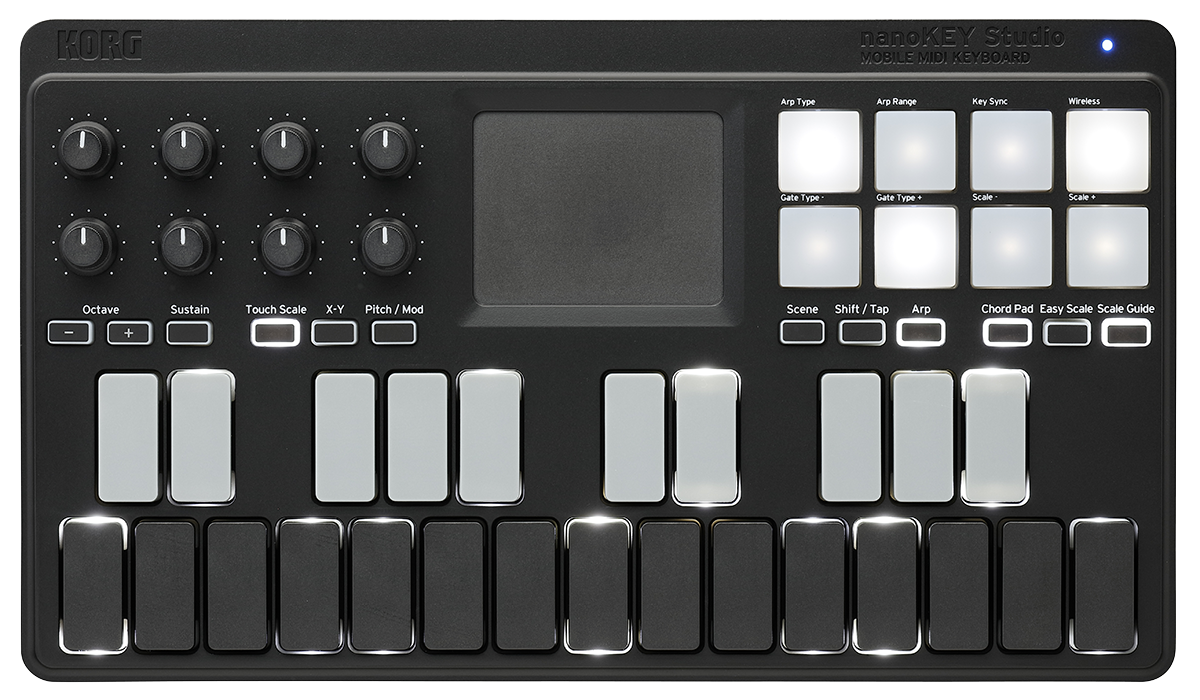
KORG documents 25 velocity-sensitive keys with four response curves, but does not identify their action or say whether they are full-size or mini. That distinction matters: the short range makes the nanoKEY Studio easier to place than a 49- or 61-key board, but it does not provide those models’ simultaneous note span. Octave buttons can move its range from minus four to plus four; they do not add physical keys. Anyone choosing by key feel should verify the exact layout in person or compare the manufacturer’s image with a model whose key action is explicitly described.
The larger distinction is the control surface: eight velocity-sensitive trigger pads, eight knobs and an X-Y touchpad. KORG says the pads can transmit notes and, depending on their settings, control-change or program-change messages. The knobs can be assigned to MIDI controls; the touchpad handles pitch/modulation or two assigned parameters. Eight stored scenes can hold different assignments, but these are not guaranteed DAW mappings or a self-contained drum instrument. The software still needs a suitable instrument and configured MIDI port.
KORG calls the pads velocity-sensitive but the reviewed specifications and Owner’s Manual E2 do not establish pressure/aftertouch sensing on them. This is why the nanoKEY Studio is not counted as a confirmed pressure-pad match. Key velocity, keyboard aftertouch, touchpad movement and pad pressure are separate inputs; a requirement for one should not be satisfied by evidence about another.
Two MIDI paths, with a real mode distinction
The physical computer socket is USB micro-B Type-B, not USB-C. KORG’s US specification table lists USB bus power for a USB connection and Bluetooth Low Energy MIDI for wireless operation. In USB mode, connect the supplied cable to a host and set the MIDI input in the music application. That is a familiar computer-centered route, but it uses the smaller older USB plug rather than a USB-C port.
Wireless operation is not “leave the cable in and it becomes Bluetooth.” Battery mode uses two AAA cells and cannot act as USB-MIDI, even if a USB cable is attached. KORG estimates about ten hours from alkaline cells with factory settings, with runtime varying by battery and use. The manual separately documents USB power with wireless MIDI to an iPhone/iPad. That can reduce battery swapping, but does not establish that one note stream is mirrored to every destination.
KORG’s US downloads page links a Bluetooth MIDI guide updated in April 2026 and a Windows BLE-MIDI driver. Its app-specific pairing steps vary across iOS/iPadOS, Mac and Windows. KORG also warns that meeting its listed system requirements does not guarantee every device will work. Treat Bluetooth as a documented route, not proof that a particular phone or DAW will connect without setup; check the current support downloads and application instructions for your system.
Small body, but account for the whole playing position
KORG lists a body of 278 × 160 × 33 mm, or 10.94 × 6.30 × 1.30 inches, and a weight of 471 g without batteries. The 10.94-inch width is well inside the finder’s smallest 16-inch body cap. It is the chassis dimension only: hands need room above the keys and pads, the cable exits need a bend, and a stand must support the body securely. Neither a small width nor the light weight is a desk-layout measurement.
The sources round depth and height differently: the current spec converts 160 × 33 mm to 6.30 × 1.30 inches, while the 2024 manual prints 6.29 × 1.29 inches beside the same metric values. Both list the width as 10.94 inches. Do not turn rounding into extra clearance; include cables and playing space.
Plan for a separate sound source
The nanoKEY Studio sends MIDI; KORG’s connection table lists USB and Bluetooth, not an audio output or five-pin DIN connector. A computer or mobile music app can supply the instrument, while a separate MIDI interface or host would be needed to build a different route to external hardware. The receiving sound module must generate audio and have its own listening path. Do not confuse the controller’s Bluetooth MIDI connection with Bluetooth audio, or assume that connecting a USB cable gives it a DIN output.
This separates it from the 25-key KORG microKEY2-25, which is a USB Type-B mini-key controller with no listed Bluetooth mode or pad bank, and the foldable nanoKEY Fold, whose membrane buttons, USB-C port and adapter-based TRS MIDI output support a different task. The Studio’s trade is a 25-key limit and micro-B connector in exchange for a broader bank of assignable pads, knobs and touch control plus a documented BLE path.
Who should compare it—and what to verify
The documented combination suits a buyer who wants a compact 25-key range and nearby pads/knobs for a USB or BLE software setup. It is a weaker fit if you need a longer span, specified piano action, confirmed pad pressure, USB-C, direct DIN or a self-contained sound source. A separate host, interface or instrument may solve some gaps, but must be planned independently.
Before choosing an offer, confirm the model and condition, USB cable, software-code terms and whether its wireless mode needs two AAA batteries. Check current KORG OS/driver materials and app setup; a bundle code is not proof of transferable software access. Use 10.94 inches as a first screen, then plan cable routing, support and monitoring. Compact size and control count do not guarantee a complete mobile studio.
Key specifications
Key details at a glance
| Keys | 25 |
|---|---|
| Width | 10.94 in |
| Pads | 8 |
| Velocity-sensitive pads | Yes |
| 5-pin MIDI Out | No |
| Computer connection | Usb type-b (micro-b device socket) |
| USB bus-powered | Yes |
| Assignable pedal input | No |
| 5-pin MIDI In | No |
| Depth | 6.3 in |
| 5-pin MIDI outputs | 0 |
Use the exact model’s instructions for operating limits, supplied equipment and version differences.
Sources for this review
Sources for this assessment
- KORG Computer Gear catalogue (US)
- KORG nanoKEY Studio product page (US)
- KORG nanoKEY Studio specifications (US)
- KORG nanoKEY Studio support downloads (US)
- KORG nanoKEY Studio Owner's Manual E2 download record (US)
- KORG nanoKEY Studio Owner's Manual E2 (2024-07-10)
- KORG nanoKEY Studio Bluetooth MIDI Connection Guide download record (US)
- KORG Bluetooth MIDI Connection Guide, English (2026-04-01)
Start with your setup, not a headline feature
Use the finder to combine key-count, connection, control and desk-fit requirements. Unverified specifications are never treated as a match.