
Your needs, this model
Does it fit your priorities?
Does the VI49 give you 49 physical keys for parts that span several octaves?
Yes. The VI49-specific page and v1.1 guide identify a 49-key full-size semi-weighted bed with velocity and aftertouch. That is a four-octave-plus-one-key physical span; octave buttons move it elsewhere but cannot add notes outside those 49 physical keys while playing a wide chord.
Explore this need in the finder →Can the VI49 drive a DIN-equipped module without a computer?
Its manual lists one five-pin MIDI Out and a computer-free external-module arrangement. For that arrangement the VI49 needs a separate 9 V DC, 500 mA, center-positive adapter, or the documented USB-charger alternative; the sound module and an audio route are separate equipment.
Explore this need in the finder →Is the VI49 a safe choice for a USB-C-only computer or a recent Mac editor workflow?
The connector shape is not named in the VI49 manual, so USB-C is not established. Alesis's checked Windows 11 table calls hardware support In Testing, and the macOS 14 hardware table says Not Supported; the VI Editor is listed Not Supported in those same support tables. Verify current host and software support before relying on this older controller for a new system.
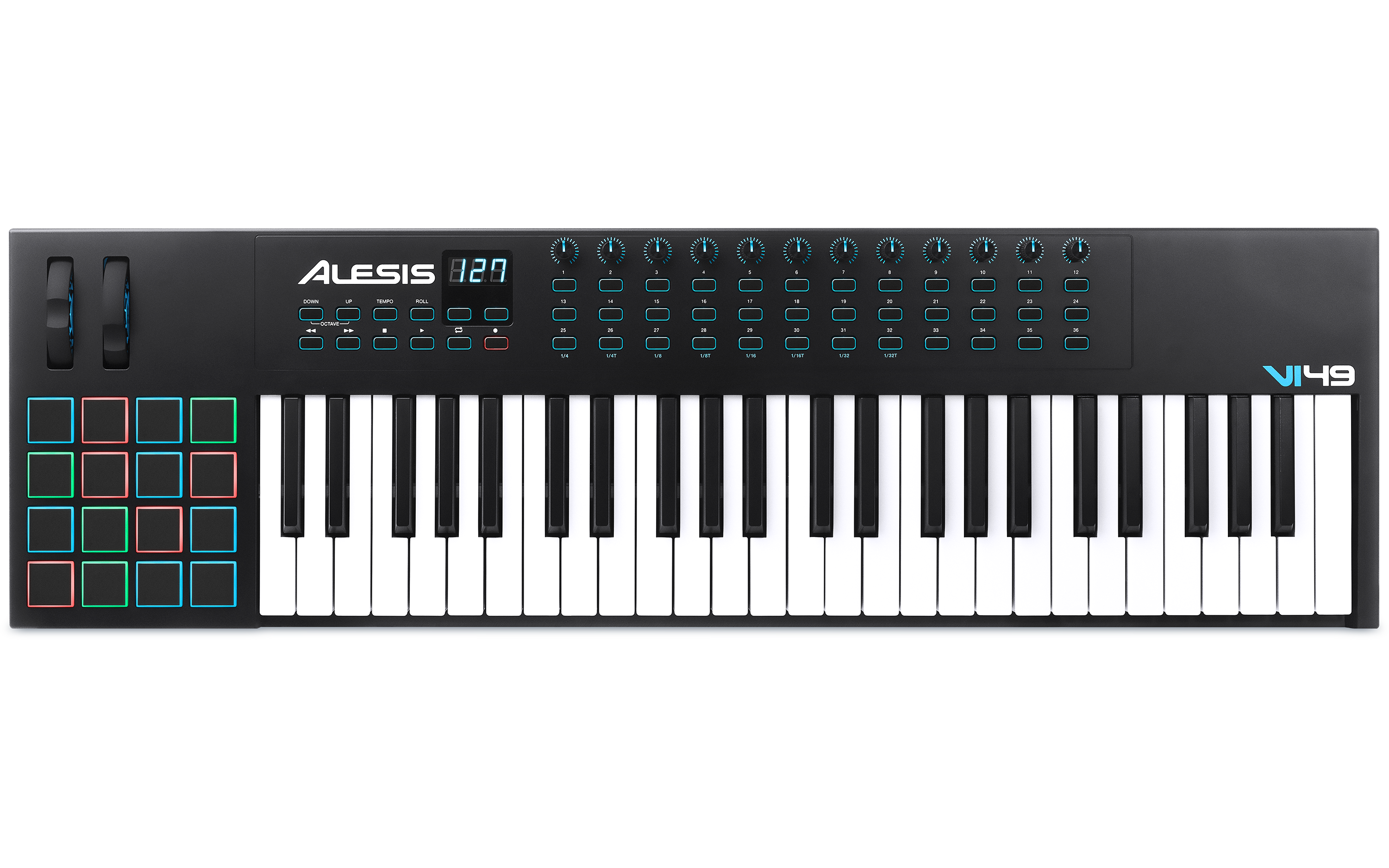
Explore this need in the finder →The VI49 is the middle member of Alesis's older VI controller family, with an unusually generous control surface for a 49-key board. It gives you a physical full-size keybed, a 16-pad grid, a dozen assignable knobs, 36 assignable buttons and a five-pin MIDI output. Its value is in that combined role: play a part, trigger pads, shape parameters and send MIDI to a computer or external module from one desk position. The compromise is not just price or footprint; the checked Alesis compatibility tables also make the VI49 a more cautious choice for newer host systems than its shared feature list might suggest.
Four octaves of physical keys with a broad surface
Alesis specifies 49 full-size, square-front, semi-weighted keys with velocity response and aftertouch. The guide's octave buttons move the active note range, but they do not make the keyboard wider for simultaneous chords. A 49-key span can cover many two-handed accompaniment patterns, riffs and layered control tasks, yet a passage that needs broad bass-to-melody reach may still call for a larger bed. “Semi-weighted” is the maker's key description; the sources do not say hammer action, measure key width or identify the aftertouch transmission type. The 16 velocity-sensitive RGB pads are assignable for drum hits, samples or other MIDI functions. Above them, the 12 rotary controls and 36 assignable buttons can send MIDI CC or program-change messages, while the six transport buttons are identified for rewind, fast-forward, stop, play, loop and record. Alesis also documents a small three-digit display, pitch and modulation wheels, tempo tap and Roll mode. In Roll mode, a pad set to Note On retriggers at the selected tempo division, and the first two knobs adjust gate and swing. This is a more involved surface than a keyboard-only controller; it also means the user must decide which controls matter enough to justify the panel space. The manual establishes velocity-sensitive pads, not pressure sensing.Plan the host and standalone paths separately
The VI49's USB port carries MIDI and powers the controller from a computer. The model guide says “standard USB cable” but does not identify the instrument-side socket, so USB-C is not a documented fit. If the host needs a specific connector, inspect the exact device and cable rather than using the USB-MIDI label as evidence of a plug type. The computer route also needs a software instrument for audio; the VI49's documented job is to transmit MIDI, not to generate sound itself. The rear panel also includes a five-pin MIDI Out and a 1/4-inch TS sustain input. For a computer-free external-module setup, the manual specifies an optional 9 V DC, 500 mA, center-positive power adapter; it also describes using a standard USB charger at the USB port. Neither supply nor a pedal appears in Alesis's listed VI49 box contents. When a computer is part of the setup, the manual describes USB messages being sent through the VI49 to connected external MIDI hardware. In either case, the external sound module needs its own power and audio connection. DIN is a control-data path, not an audio output.Measure the body and check the software table
The guide lists the VI49 at 37.6 inches wide, 12.4 inches deep and 4.5 inches high, weighing 11 pounds. Plan for the full footprint plus cables and room to reach the pads and wheels; key count by itself does not describe desk fit. That published width is useful for an initial screen, not a guarantee that a narrow stand's usable surface or clamp layout is suitable. Check the stand's load and support points too. The most important caveat is operating-system specificity. At the manufacturer support pages checked November 3, 2026, Alesis lists VI49 hardware as “In Testing” for Windows 11 and “Not Supported” in its macOS 14 hardware table. The VI Editor is marked “Not Supported” in the Windows 11 and macOS 14 editor tables. Those records do not tell us whether a different release, generic MIDI input or another software configuration will work, and a product-page software bundle does not solve that uncertainty. If the editor is essential for assigning this many controls, confirm current software compatibility before choosing the VI49. Alesis's page also promotes downloadable Ableton Live Lite and Xpand!2; verify registration, license and seller-package details rather than assuming an unused code transfers.Who should compare the siblings?
The VI25 keeps the same general surface but shortens the physical keybed and reduces the assignable controls; the VI61 adds 12 keys, four knobs and 12 assignable buttons, with a body over six inches wider. The VI49 sits between them on range and footprint, while retaining the same 16 pads and documented USB/DIN choices. A newer V49 MKII is a different generation and control layout; do not transfer features, USB details or software support between those models. A real comparison should begin with exact model names, then test the desired controller route and OS rather than choosing by “49-key” alone.This is a source-based assessment of the exact VI49 page, its own v1.1 guide and manufacturer compatibility tables. It does not claim that the author played, owned or measured a VI49, and it makes no claim about current inventory or seller condition. Confirm the exact model, package, power requirements and host support before purchase.
Key specifications
Key details at a glance
| Keys | 49 |
|---|---|
| Manufacturer's keybed description | Full-size semi-weighted keys (manufacturer wording) |
| Width | 37.6 in |
| Pads | 16 |
| Velocity-sensitive pads | Yes |
| 5-pin MIDI Out | Yes |
| USB bus-powered | Yes |
| Assignable pedal input | Yes |
| Keyboard channel aftertouch | Yes |
| 5-pin MIDI In | No |
| Depth | 12.4 in |
| 5-pin MIDI outputs | 1 |
Use the exact model’s instructions for operating limits, supplied equipment and version differences.
Sources for this review
Sources for this assessment
Start with your setup, not a headline feature
Use the finder to combine key-count, connection, control and desk-fit requirements. Unverified specifications are never treated as a match.